Apple unveiled iOS 27, macOS 27 (Golden Gate), and a handful of other software updates at WWDC 2026 on June 8. But unlike previous keynotes that balanced new features across the OS, this event had a single obsession: artificial intelligence. Frankly, hearing “AI” repeated for over an hour felt a bit exhausting, especially when other companies have been shipping advanced AI features for years. Still, iOS 27 arrives with a rebuilt Siri, deeper app intelligence, a refined design, and enhanced family safety tools that aim to reshape how you interact with your iPhone.
iOS 27 Release Dates and Device Compatibility
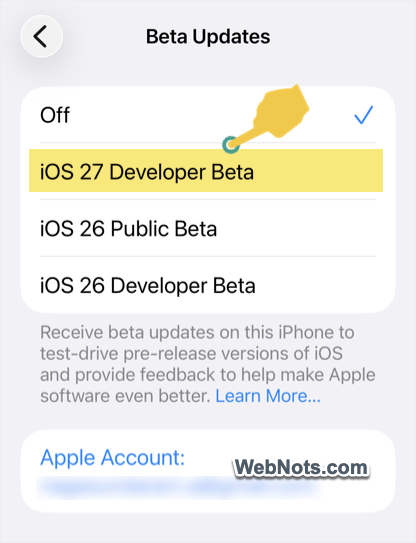
The first iOS 27 developer beta is available now as of June 8. If you have a spare device, head to “Settings > General > Software Update > Beta Updates” and install the “iOS 27 Developer Beta” version. A Public Beta version is expected in July, with the official release scheduled for September 2026 as usual.
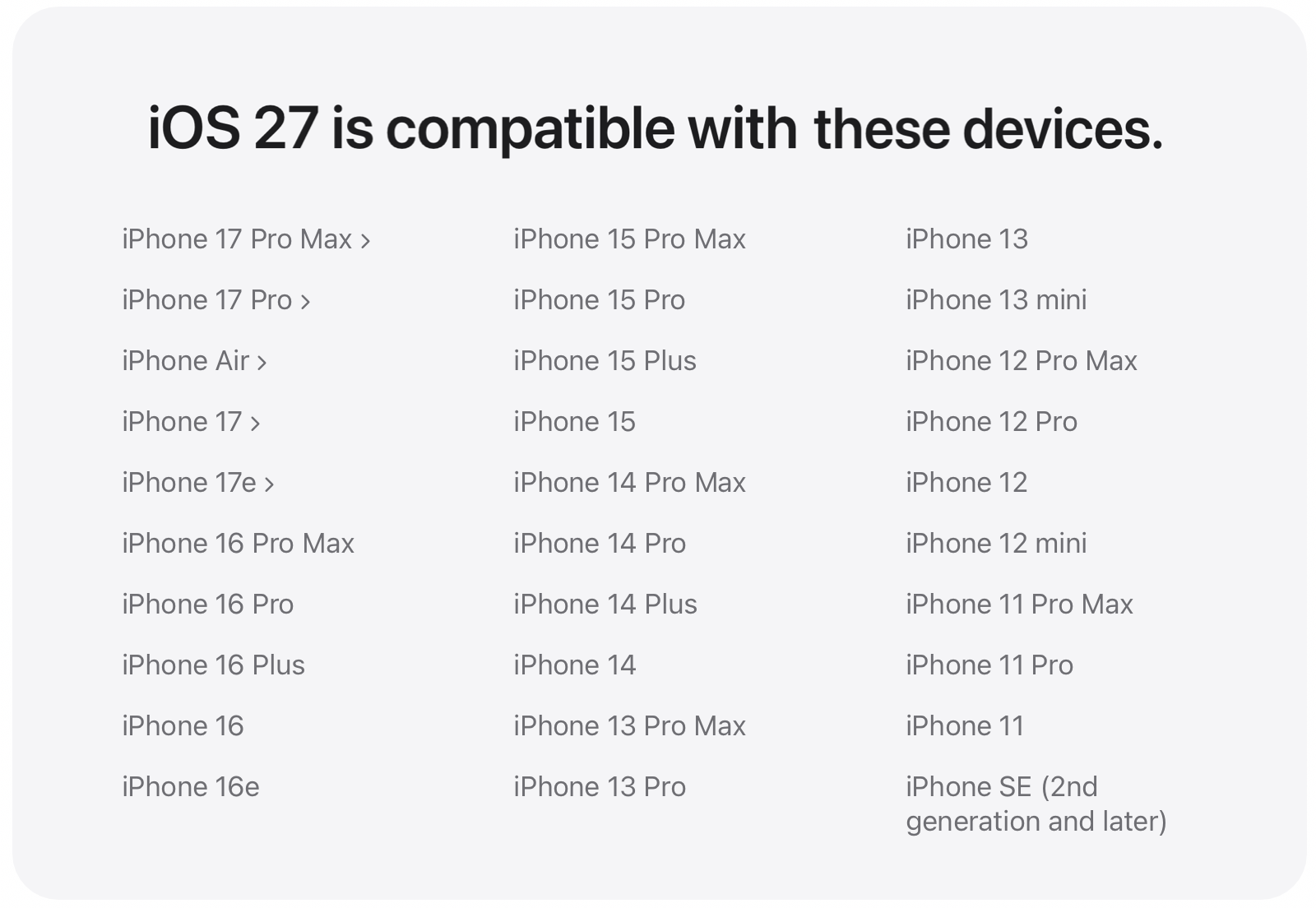
Because iOS 27 doesn’t demand radical new hardware, it will run on all iPhones currently compatible with iOS 26, including the iPhone 11 and second-generation iPhone SE. However, a few Siri features (like Siri voice customization) require an iPhone 17 Pro, iPhone 17 Pro Max, iPhone Air, or newer model.
1. Siri AI Finally Arrives
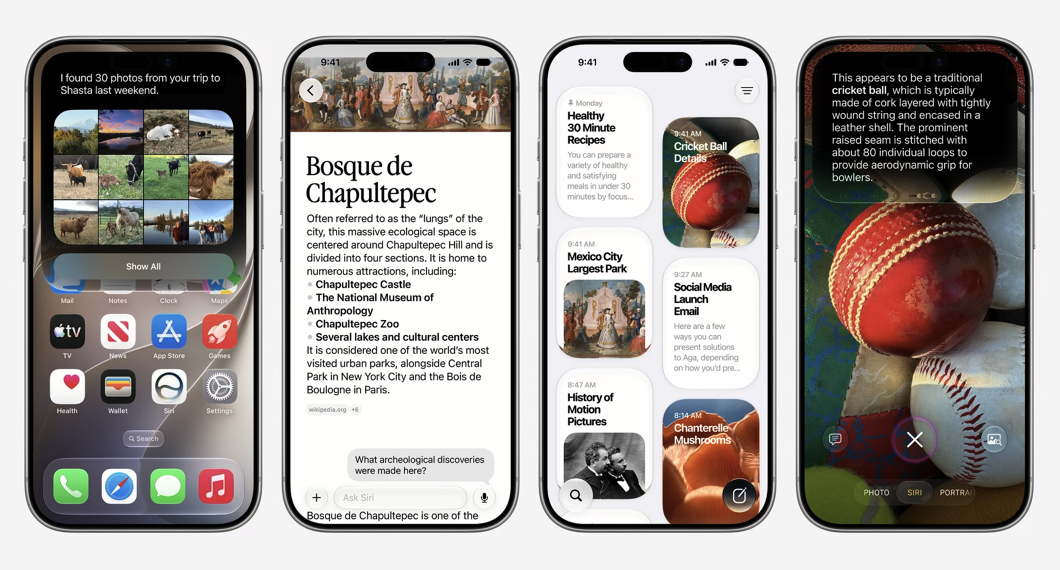
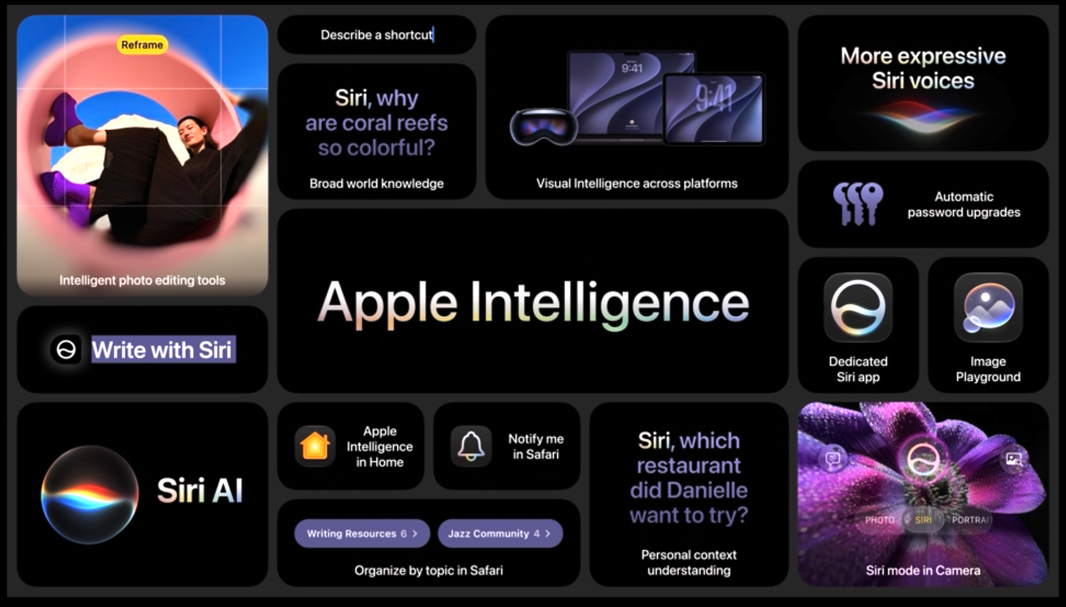
The standout feature of iOS 27 is the complete reinvention of Siri. Apple has rebuilt its assistant using a next-generation Apple Intelligence framework, making it smarter, more personal, and genuinely more useful. Apple’s own Foundation Models are now integrated with Google’s Gemini technology to power the upgraded experience.
- Siri now understands what’s on your screen and can access information from your emails, photos, and notes when needed. It responds more fluidly and handles multi-step tasks across apps.
- For the first time, Siri has its own app in iOS 27. It offers a chatbot-style interface where conversations continue via voice and text, with previous interactions always accessible.
- You can adjust Siri’s speaking pace and expression level (needs iPhone 17 Pro or later).
- Siri also now blends into the Dynamic Island for a cleaner, less intrusive interface.
2. Liquid Glass Improvements
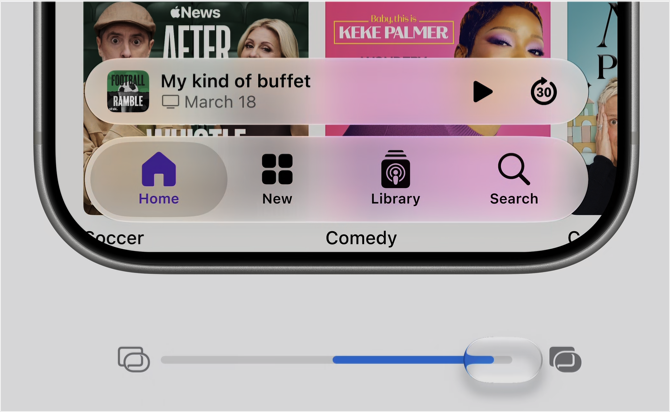
If you found iOS 26’s Liquid Glass design eye-straining, there’s good news. iOS 27 refines the same aesthetic with readability in mind.
- A new transparency slider lets you control the intensity of the glass effect.
- Choose a softer frosted appearance for better contrast or increase transparency for a more dramatic look.
- System icons also gain improved depth and sharper visual details.
3. Faster iOS Performance
Apple claims noticeable speed improvements with iOS 27:
- Apps launch up to 30% faster.
- AirDrop transfers complete up to 80% faster.
- Photos save up to 70% faster.
Best of all, these gains aren’t locked to new devices. Thanks to improved CPU scheduling, older iPhones also feel noticeably snappier and more responsive.
4. Photos and Camera Become AI-Powered
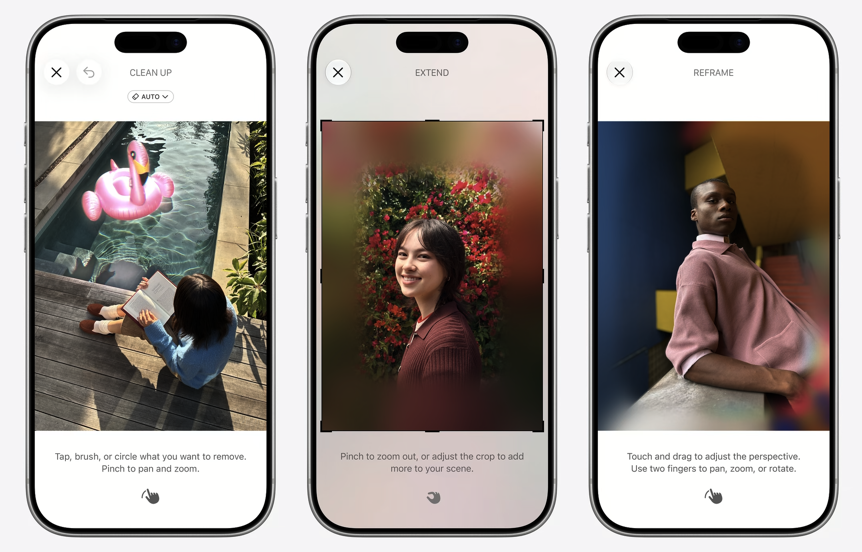
The Photos app now includes advanced Apple Intelligence editing tools:
- Reframe: Adjust photo perspective after you’ve taken the shot.
- Extend: Expand image boundaries using generative AI.
- Clean Up: Remove distractions or objects with greater precision.
The Camera app gains a dedicated Siri mode. Point your camera at a landmark, product, poster, or receipt and ask Siri for help. It can identify landmarks, add events from posters directly to your calendar, or split a restaurant bill by scanning the receipt.
5. Apple Intelligence Across Apps
AI enhancements are now woven throughout core iPhone apps:
- Safari: Automatically organizes tabs into smart topic groups. A new “Notify Me” feature alerts you when webpage content changes.
- Passwords: Detects weak or compromised passwords and updates them with minimal effort.
- Shortcuts: Describe what you want in natural language, and Shortcuts generates the automation automatically.
- Maps: Upgraded Flyover experience uses AI rendering for more detailed, realistic aerial visuals.
6. Child Safety Features
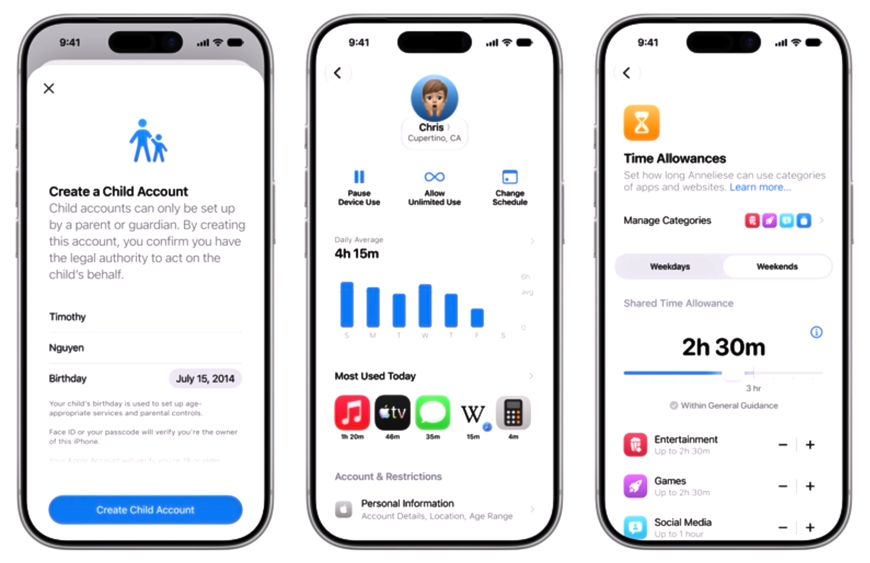
Not sure why Apple is placing a larger emphasis on digital safety in iOS 27. The redesigned Screen Time interface simplifies child account setup while introducing new controls:
- Ask to Browse: Requires parental approval before Safari web access.
- Time Allowances: Set daily limits for specific apps or categories.
- Expanded Communication Safety: Automatically blurs sensitive content (nudity, gore, violence) in Messages and FaceTime for users under 18.
These tools give parents more visibility and control, improving online safety for younger users.
7. Other Notable Features
iOS 27 also brings several smaller but meaningful improvements:
- iCloud Shared Albums now support full-resolution sharing with Android and Windows users via iCloud.com.
- Wallet gains a “Create a Pass” feature for scanning gym cards, library cards, and tickets into digital versions.
- Health app can notify users of symptoms potentially related to perimenopause and track them over time.
- AirPods users get a customizable EQ for better sound tuning.
- Home app uses Apple Intelligence to create smarter notifications and summarize HomeKit camera activity.
- Accessibility improvements include richer VoiceOver image descriptions and automatic subtitle generation for videos.
Final Thoughts
You could honestly call iOS 27 the “Siri AI update” as almost everything revolves around Apple’s rebuilt assistant. But there’s a catch. Apple Intelligence isn’t available in China and some EU countries, meaning the largest iPhone user base won’t benefit from these features at all. And for everyone else? Many are already using third-party AI apps for photo editing, video processing, and advanced automation. Given Siri’s long history of falling short, you’ll have to wait and see whether iOS 27’s AI features actually add value to your iPhone or just add another buzzword to Apple’s keynote slides.