Apple unveiled its groundbreaking Apple Intelligence features at WWDC 2024, positioning the company at the forefront of AI-powered advancements. This new feature suite promises to bring personalized, intelligent experiences across Apple devices – integrating AI directly into apps like Siri, Messages, Notes, Photos, Page, and more. However, there is a catch – Apple Intelligence isn’t available for all iPhones users. If you’re one of those users trying to find why Apple Intelligence is not available on your iPhone, this article explains why this is happening and what it means for you.
What Is Apple Intelligence?
Apple Intelligence is Apple’s new AI system that leverages on-device processing and cloud-based models to provide smarter and more context-aware features. This includes:
- Writing Tools – summarize, rewrite, or correct text within apps like Mail, Notes, and Pages.
- Image Playground – create images from your Photos or text using a dedicated app.
- Advanced Siri Features – Siri becomes more natural, capable, and contextually aware.
- ChatGPT Integration – use the most popular ChatGPT from OpenAI with Siri and Writing Tools.

There are many other features like create movie from Photos app, prioritize notifications, Genmoji, Image Wand, etc. You can check the complete feature in this official Apple’s webpage.
Why Isn’t Apple Intelligence Available on Your iPhone?
Missing out on those features can be frustrating. However, Apple Intelligence has several requirements, and your iPhone may not meet one or more of them. Here’s a breakdown of the key reasons:
1. Supported iPhone Models
Apple Intelligence requires devices with Apple’s A17 Pro chip or higher version (or M1 series or higher chips for Mac). These processors have the advanced Neural Engine and GPU capabilities necessary to handle the complex on-device AI workloads. This approach reduces reliance on external servers by performing AI tasks locally on the iPhone.
Here are the supported iPhone models at this point:
- iPhone 15 Pro and 15 Pro Max – A17 Pro chip.
- iPhone 16, 16 Plus – A18 chip.
- iPhone 16 Pro and Pro Max – A18 Pro chip.

So, if you have older iPhones with previous-generation chips, like the A16 Bionic or earlier, they do not support Apple Intelligence AI features.
2. Software and iOS Compatibility
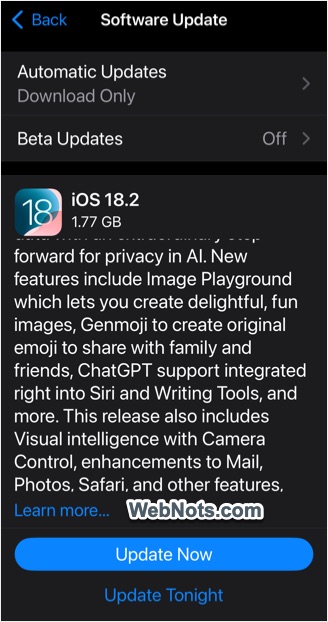
Many iPhone users avoid updating their operating system due to concerns about slowing down their devices. However, Apple Intelligence is included in iOS 18, with full integration starting from iOS 18.1 onwards. If you’re not seeing AI features, ensure your iPhone is updated to the latest iOS version.
- Tap on Settings app and go to “General” section.
- Navigate to “Software Update” section.
- Download and install the latest available iOS update.
3. Country Restrictions for EU and China
Currently Apple Intelligence is not available in EU and China, however, the restrictions are different for these two regions.
- For EU – Apple Intelligence will not work on iPhone if you are located in EU and your Apple account is based in EU. However, it will work if you travel outside the EU region for the supported languages (check point #4). Note that it works on Mac with macOS Sequoia inside EU region.
- For China Mainland – the feature is not available if you have purchased the device from China regardless of where you live. Unfortunately, it will also not work if you have travelled to China or your Apple account is based in China (even if you have purchased the device from another country).
Though Apple planned to roll out iPhone / iPad AI features from April 2025 for EU region, we do not see it will happen in China due to government regulations. When ChatGPT itself is blocked in China, you can’t expect it will be integrated in iPhone anytime soon. So, wait sometime if you are living in EU and don’t break your head with missing AI features if you have purchased iPhone from China or if you are living there now.
4. Language Restrictions
There are also language restrictions for using AI features in iPhone:
- Currently Apple Intelligence is supported only in English language for US, UK, Ireland, Canada, South Africa, Australia, and New Zealand.
- You should set the device and Siri to use the same language. Device language can be set under “Settings > General > Language & Region” section and Siri language can be set under “Settings > Apple Intelligence & Siri” section.
Additional languages are expected to be supported with the iOS update in April 2025. That includes English (India & Singapore), French, German, Italian, Japanese, Korean, Portuguese, Spanish, and Vietnamese. If you are using any other language, you will not be able to use Apple Intelligence at least till 2025.
5. Check Apple Intelligence is Installed
AI features are not installed and activated by default on your iPhone. You need to download and activate manually:
- Go to “Settings > Apple Intelligence & Siri” section.
- Tap on “Get Apple Intelligence” to download and install it.

Note that the feature needs more than 7 GB storage space to download. So, make sure to have sufficient space on your iPhone before trying to download it. In addition, Apple will verify the device serial number for eligibility like from where your iPhone is purchased.
Update: From iOS 18.3 onwards, Apple Intelligence is installed and enabled by default on supported iPhone models.
6. Disable Screen Time Restrictions
Finally, AI features can be disabled through Screen Time settings. So, make sure your settings are not blocking the usage, especially if you have setup content restrictions through Screen Time.
- Open Settings and go to “Screen Time” section.
- Scroll down and tap on “Content & Privacy Restrictions” option under “Restrictions” section.
- Go to “Intelligence & Siri” section.
- Under “Apple Intelligence” section, tap on “Image Creation” and “Writing Tools” options and select “Allow”. Image Creation allows to use Image Playground app, Genmoji and Image Wand feature for above 12 years age.
- Also, tap on “ChatGPT Extension” and set it as “Allow”. Note that, even if you allow ChatGPT extension, it will not be available for children under 13.

So, you will not be able to use ChatGPT and AI image features if you are using a child account (aged less than 12 or 13 years). It is also possible to selectively enable or disable these features by allowing or disallowing corresponding options in Screen Time settings.
What Does This Mean for You?
Apple Intelligence is a game-changer for iPhone users – but it’s only available to those who meet all the above listed requirements. It has hardware, software, country, and language, level restrictions, many of which may not be within your control. If Apple Intelligence isn’t available to you, don’t be discouraged. You can still explore other options, such as the ChatGPT iOS app, to enjoy a wide range of AI features.