In recent years, small-scale publishers have been consistently crushed by various factors. The emergence of Artificial Intelligence (AI) right after the COVID-19 pandemic reduced traffic by as much as 90% for most publishers. An additional problem is a similar drop in revenue from display advertising. Unlike large and medium scale publishers who rely on Google AdX, almost all small publishers completely rely on Google AdSense for their survival.
So, waking up to a sudden drop in AdSense earnings is frustrating. You haven’t changed anything on your site, yet revenue is suddenly down 30–50% and has been consistently dropping for years. The good news is that revenue drops usually happen for identifiable reasons. The bad news is that you can’t do much about some of those reasons.
1. Shifting from CPC to CPM Model
This is one of the biggest reasons many publishers are seeing revenue declines regardless of niche. Historically, high-value niches such as finance, legal, insurance, and software benefited from expensive CPC (cost-per-click) ads. In 2023, Google announced a shift toward an impression-based payment structure, which initially had little impact on publisher revenue. However, if you check the “Bid types” section in your AdSense account today, it may show 100% CPM and 0% CPC. This indicates that Google has largely transitioned away from click-based (CPC) ads to CPM (Cost Per Mille, or impression-based) inventory. As a result, publishers now earn primarily based on impressions rather than clicks, often lowering earnings even if traffic stays stable.
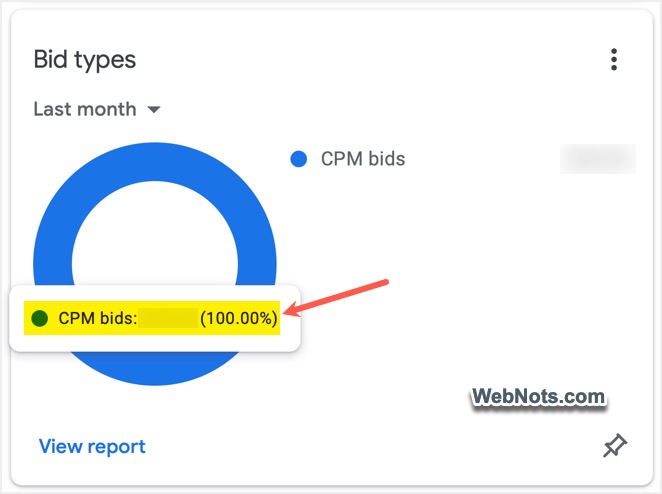
You may notice traffic unchanged, CTR unchanged, but the RPM suddenly lowered after this shift. This affects almost every niche because advertiser bidding behavior has changed, not necessarily your website quality. Now, all that you need is to focus on increasing page RPM rather than CTR. This can be done by choosing the appropriate actions suitable for your site’s content and layout:
- Add higher-engagement content to increase the number of ad impressions.
- Improve the internal linking structure to increase session duration and pages per visit.
- Test and change ad placements that improve viewability.
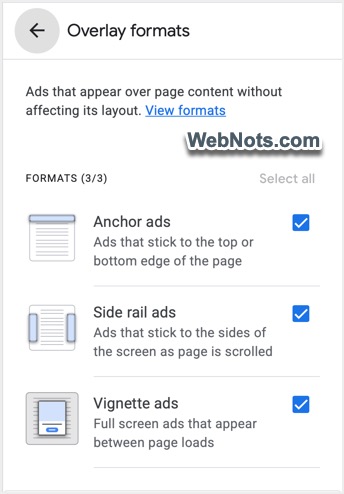
- Use sticky anchor, vignette, offerwall, and side rail ad formats, which increase viewability compared to display ads placed at the bottom or native ads placed in‑between content.
2. Showing Too Many Ads
This is a mistake most publishers make: trying to increase RPM by displaying more ads. However, it does not really work like that. Though Google does not limit the number of ads on a page (earlier it was just 3 ads per page), showing too many ads may result in a lower ad fill rate. If users bounce quickly, pages become cluttered, or engagement falls, Google may show fewer ads to improve user experience.
This means the ad requests will not get any response from Google servers, resulting in empty slots. Even if the ad slots are filled, you will get very low RPM, leading to less revenue. Here are some suggestions:
- Improve content depth to increase ad fill rate.
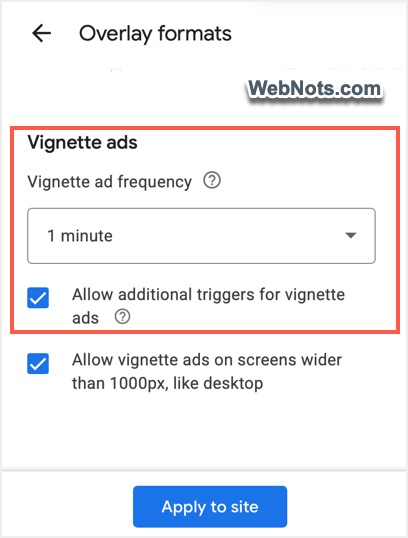
- Reduce the frequency and disable additional triggers for the vignette ads if you are using that format.
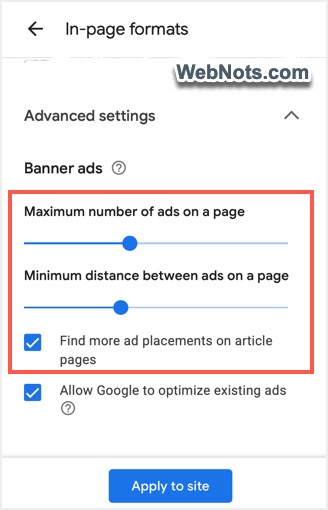
- Reduce ad frequency of in-page banner Auto Ads (number of ads relative to content length). You can adjust this in Auto Ads settings in your AdSense account. You do have a Google Site Kit plugin for WordPress sites to control the ad behavior.
3. Increased Revenue Loss with Ad Blockers
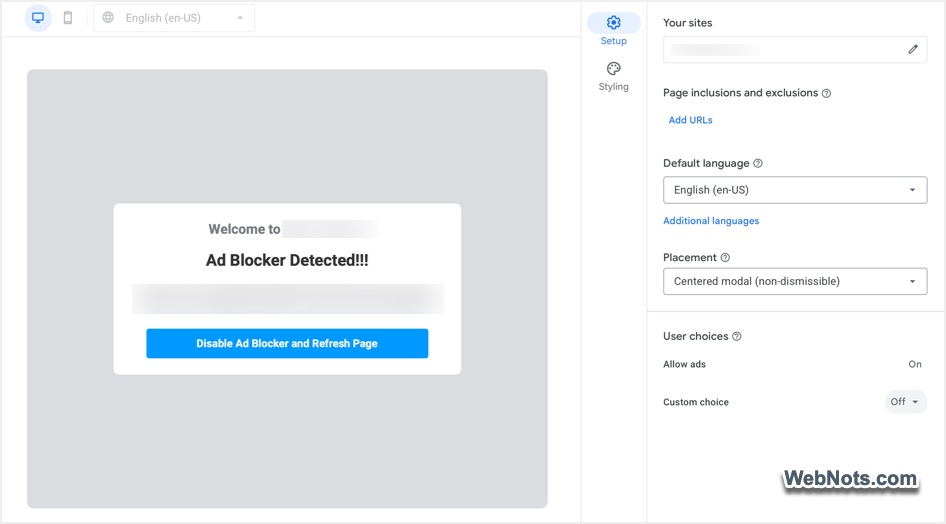
Nowadays, almost everyone uses ad blocker extensions to block advertisements and pop‑ups. Unfortunately, small-scale publishers cannot serve pages for free, considering the fact that they also need to pay for hosting, content creation, and other website management services. If you notice a big gap between your pageviews (or RPM) and earnings, it generally indicates loss due to ad blockers.
- Use AdSense ad block recovery with a dismissible pop‑up. If that doesn’t help, switch to a non‑dismissible one, preventing users with ad blockers from viewing your content.
- Try alternate revenue options like fixed image banners and affiliate banners in the same AdSense ad slots when an ad blocker is detected.
4. Technical Glitches Affecting Revenue
Hosting websites on popular platforms like WordPress requires a lot of technical maintenance. A new caching plugin, optimization plugin, CDN rule, JavaScript minifier, or security setting may accidentally delay or block ad loading. But many publishers overlook these technical conflicts due to lack of knowledge or time.
- Open your site in incognito mode or use a different browser to check that the layouts look good.
- Test on mobile, tablet, and desktop, and adjust ad placements accordingly.
- Check whether ads load for all users (logged in and logged out).
- Check the source code to confirm that your optimization does not remove the inline AdSense ad code.
Note: Technical optimizations are necessary for improving Core Web Vitals (page loading speed). However, AdSense JavaScript loads ads from Google servers and affects page loading speed drastically. Some publishers prefer delaying JavaScript to tackle this issue. However, this does not help users visiting your site and may result in a policy violation if ads load suddenly when users scroll. In summary, page speed scores will be lower when you use AdSense or any other third‑party scripts to dynamically load content. Since ads are dynamic in nature, you can’t optimize them like fixed scripts (such as Analytics tracking code). So, don’t spend too much time in the name of optimization to temporarily gain a few points in Google PageSpeed Insights.
5. Social and Referral Traffic
This is another difference between using a Google Certified Publishing Partner (like Raptive or Mediavine) and using Google AdSense. Social and referral traffic also get similar RPM (higher in some cases) to organic traffic when using Ad Exchange partners. However, AdSense rewards organic traffic and “hates” social and referral traffic. If you have noticed in your AdSense account, Google always deducts a small amount at the end of each month for “Invalid Traffic”. Sometimes this amount is much higher when you primarily rely on social platforms.
- The best solution in this case is to apply for another ad network (for example: Raptive, BuySellAds, Freestar, Ezoic) and replace AdSense with their code after approval.
- Avoid purchasing traffic from cheap exchange websites and block bot traffic using Cloudflare or other security setups. This not only protects your site’s reputation but also increases your RPM, as advertisers will trust your site’s traffic as reliable.
6. High-Value Pages Lost Rankings or Were Deindexed
Sometimes revenue collapses because one or two “money pages” stopped ranking due to a Google algorithm update or another issue. A single high-value page losing rankings can destroy RPM even if total traffic remains stable. Always monitor important pages using Google Analytics and Google Search Console for indexing, traffic, and keyword details, and keep track of actual ranking position changes in Google Search.
- Update important pages frequently to keep them relevant.
- Use the URL Inspection tool in Google Search Console to see if there are any technical crawling issues on those pages.
- Optimize and submit those pages to other search engines like Bing (which includes Yahoo and DuckDuckGo), Yandex, and Baidu.
- Consider promoting important pages in Tier 1 countries like the USA, UK, and Canada to increase RPM (this works better with other ad networks than with AdSense).

7. Change in Traffic Source Countries
Sometimes the overall traffic number remains the same while ad revenue plummets. Traffic from countries with lower advertiser competition often generates dramatically less revenue. So, getting 10K visitors from the USA generates considerably higher revenue than 10K visitors from India or Bangladesh.
- Review your Analytics traffic by source and geography to identify shifts in traffic source countries (shifts generally happen after Google algorithm updates).
- Consider affiliate promotions instead of using AdSense if you consistently receive high traffic from outside the USA.
8. Seasonality Affecting Revenue
This has two sides – niche and advertiser spending. Every niche has revenue cycles, and advertiser spending varies quarterly.
Here are some examples of how niche websites get affected by seasonality:
- Tax websites peak before filing deadlines.
- Recipe sites surge during holidays.
- Tech reviews spike during product launches.
- Travel sites fluctuate seasonally.
From an advertiser spending perspective, most advertisers and brands spend aggressively during Q4 (Black Friday, Christmas, holiday shopping) and reduce spending heavily in Q1. This usually improves as the year progresses toward the end.
So, always compare yearly revenue instead of month over month in your reports to understand the overall revenue trend and ignore fluctuations due to seasonality.
Final Words
Let’s be honest here: though you can investigate page speed, ad placement, and indexing issues on your site, some issues are outside your control as a publisher. You didn’t cause the January budget slump, you didn’t tell Google to switch from CPC to CPM, you can’t reverse a core algorithm update overnight, and you can’t magically turn low‑value traffic into premium visitors.
The important thing is to understand what’s happening and stop panicking over normal seasonal dips. Instead of wasting weeks tweaking your site for a problem that doesn’t exist, focus your energy on things you actually own, like creating better content and building a loyal audience.