Microsoft Windows has evolved dramatically over the decades, shedding features that once defined the user experience as it embraced new technologies. If you are a Windows user from the beginning, you might have easily noted that countless features have come and gone along the way, and many now forgotten. While Windows 11 dominates today’s PCs, let’s take a nostalgic dive into ten Windows features that have faded into obscurity but once shaped the user experience.
1. WordPad
Introduced with Windows 95, WordPad was a lightweight word processor that bridged the gap between Notepad’s simplicity and Microsoft Word’s complexity. Supporting rich text format (RTF), basic formatting (bold, italic, fonts), and even image insertion, it was a go-to for quick document editing without the bloat of full-fledged office suites. Microsoft removed WordPad in Windows 11 version 24H2 (2024), nudging users toward Microsoft Word or Notepad. WordPad’s simplicity and offline functionality made it a beloved tool for casual users.

2. MSN Messenger
Launched in 1999 and tightly integrated with Windows XP, MSN Messenger (later Windows Live Messenger) was Microsoft’s answer to instant messaging. With features like custom emoticons, “nudges,” and status messages, it was a social hub for millions. However, Microsoft phased it out by 2013 for promoting Skype, leaving behind a generation nostalgic for its iconic sign-in sound and “winks.” Its influence lingers in modern chat apps, but MSN Messenger is largely forgotten. The sad part is that Skype personal was also retired from May 2025 and Microsoft moved with the latest Teams app part of Microsoft 365 (Office) pack.
2. Windows Media Center
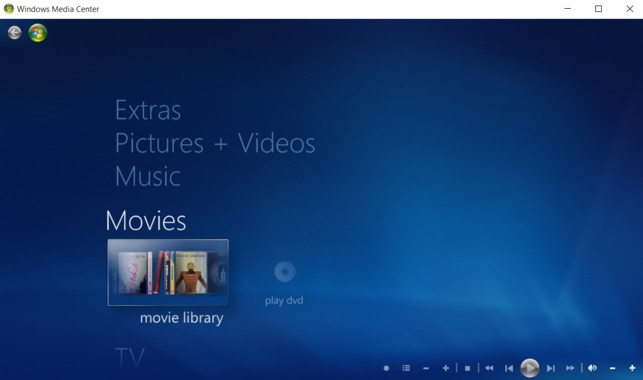
Debuting in Windows XP Media Center Edition (2002), Windows Media Center turned PCs into home entertainment hubs. Users could watch and record TV, play DVDs, and manage music libraries with a remote-friendly interface. Popular in the early 2000s, it was included in Windows Vista and 7 but was dropped in Windows 10 as streaming services like Netflix took over. Media Center’s demise reflects the shift from local media to cloud-based entertainment.
4. Active Desktop
Introduced in Windows 98, Active Desktop allowed users to display live web content like news feeds or stock tickers directly on their desktop. It was a bold vision of an internet-connected OS, but slow dial-up connections and high resource usage made it impractical. By Windows XP, Microsoft downplayed the feature, and it vanished in later versions. Active Desktop was a glimpse into the web-integrated future, but its execution was ahead of its time.
5. Aero Glass
Windows Vista introduced Aero Glass, a visually stunning interface with transparent window borders, smooth animations, and a 3D task-switching feature called Flip 3D (using “Win + Tab” keys). It showcased the power of DirectX and modern GPUs but was resource-heavy, leading to criticism on underpowered PCs. By Windows 8, Microsoft replaced Aero with a flatter, minimalist design. Aero Glass remains a nostalgic hallmark of Vista and Windows 7’s aesthetic charm.
6. Microsoft Bob
Released in 1995, Microsoft Bob was an ambitious but short-lived attempt to make Windows 3.1 more user-friendly. It replaced the desktop with a virtual “house” where apps were represented by objects (like a calendar on a desk). Aimed at novice users, Bob featured cartoonish guides like Rover the dog. Poor performance and a steep price led to its quick demise, but elements of Bob’s friendly design influenced later in features like Clippy (which was also discontinued).
7. Clippy (Microsoft Office Assistant)
Introduced in Windows 95 with Microsoft Office, Clippy (officially the Office Assistant) was an animated paperclip designed to offer contextual help. With its googly eyes and quirky animations, Clippy aimed to make Office tasks friendlier but often annoyed users with its intrusive pop-ups like, “It looks like you’re writing a letter!” By Windows XP and Office 2007, Clippy was retired, replaced by less intrusive help systems. Still, it remains a cultural icon, fondly remembered (or mocked) in tech nostalgia.

8. Gadgets (Windows Sidebar)
Introduced in Windows Vista, the Windows Sidebar hosted Gadgets like clocks, weather widgets, and CPU meters that sat on the desktop. Renamed Desktop Gadgets in Windows 7, they were discontinued in Windows 8 due to security concerns (gadgets could execute arbitrary code). While third-party apps have filled the gap, Gadgets were a customizable feature that many users miss.
9. Briefcase
The Briefcase, introduced in Windows 95, was a special folder for syncing files between two PCs, typically via floppy disks or early network connections. Users could drag files into the Briefcase, work on them elsewhere, and sync changes back. As cloud storage like OneDrive became prevalent, Briefcase lost relevance and was removed in Windows 10. It’s a relic of a time when file syncing was a manual, physical process.
10. Windows 3D Pinball Space Cadet
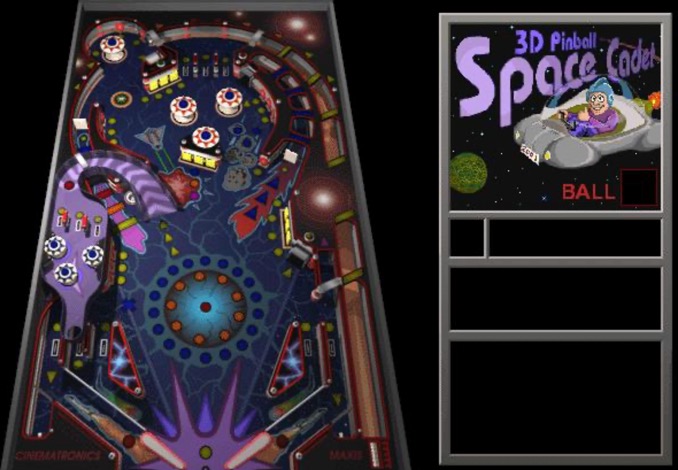
Bundled with Windows 95 Plus! and later included in Windows NT, ME, and XP, 3D Pinball Space Cadet was a simple yet addictive game that showcased Windows’ graphical capabilities. Developed by Maxis, it featured a space-themed pinball table with ramps, bumpers, and missions. Removed after Windows XP due to compatibility issues with Vista, it’s a relic of an era when Microsoft packed fun, lightweight games into its OS. Fans can still find emulated versions online.
Other Considerable Changes
There are so many other changes old Windows users could still remember and miss:
Control Panel in Its Full Glory
The traditional Control Panel has been a mainstay for system management, offering granular controls over hardware, software, and user accounts. Over the years, Microsoft has migrated many settings to the new Settings app, relegating the Control Panel to legacy status. This transition, while aiming for clarity and ease of use, has frustrated power users accustomed to the depth and flexibility of the original Control Panel.
Classic Start Menu
Introduced with Windows 95. Start Menu provided easy access to programs, settings, and files. Users could quickly find applications or shut down their PCs. Microsoft replaced the Start Menu with the controversial Start Screen in Windows 8, sparking widespread confusion and nostalgia. Although the Start Menu returned in Windows 10, its classic look, complete with rounded corners and simple icons, remains a cherished memory for many.
Windows Explorer Customizations
Earlier versions of Windows allowed for extensive customization of Windows Explorer (now File Explorer). Toolbars could be changed, folder backgrounds personalized, and shortcuts arranged to suit one’s workflow. Recent versions have streamlined and standardized these options, making the interface cleaner but less flexible for those who enjoyed tailoring their file management experience.

Sound Schemes and Startup Sounds
Who could forget the distinctive sounds of Windows startup, shutdown, error, and notifications? The ethereal chime that greeted users in Windows 95, the orchestral flourish of Windows XP, and the subtle cues of Vista and 7 are all but gone. Modern Windows has muted many of these sounds, opting for minimalism. The ability to customize sound schemes was once robust; now it’s limited, leaving nostalgia for the days when each PC had its own auditory fingerprint.
Classic Windows Games
Classic games like Minesweeper and Solitaire were bundled with Windows for years, providing casual entertainment during breaks. While some games persist, their original forms and the fun of discovering them on a new PC are largely forgotten.
Why These Features Faded?
Many of these features were victims of technological shifts. Dial-up gave way to broadband, rendering Active Desktop obsolete. Cloud storage replaced Briefcase, and streaming services outshined Media Center. Others, like Clippy and Bob, were bold experiments that didn’t resonate with users. Yet these forgotten features highlight Microsoft’s willingness to innovate, even if not every idea stuck.
Some of these features can still be experienced through emulators, virtual machines, or fan-made recreations. For instance, 3D Pinball Space Cadet lives on in open-source projects, and Clippy has inspired browser extensions. They remind us of a time when Windows was more experimental, blending utility with personality.