
Apple is releasing a new Creator Studio subscription plan bundling all of their creative apps. This is to directly compete with high-end services like Adobe Creative Cloud and aims to make the creative tools more accessible for lower price. Though there are no doubts about the quality of Apple’s apps, the problem comes with the subscription-based approach. Let’s explore the features included, compare the pricing with individual apps to check whether Apple can succeed with this approach.
Apps Included in Creator Studio
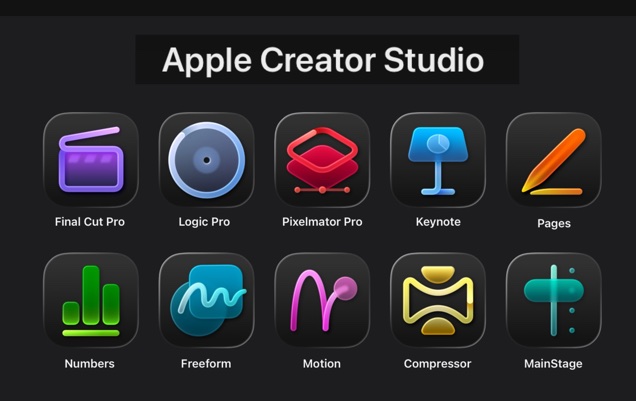
Apple Creator Studio includes the following apps – all existing and no new addition included.
- Final Cut Pro: For video editing on Mac and iPad, featuring tools like Transcript Search, Visual Search, Beat Detection, and Montage Maker to streamline complex projects.
- Pixelmator Pro: An image editor for Mac and now iPad, with intelligent tools such as Super Resolution, Warp, and touch-optimized features for Apple Pencil.
- Logic Pro: Music production software for Mac and iPad, enhanced with AI Session Players (including the new Synth Player), Chord ID, and a vast Sound Library.
- Motion, Compressor, and MainStage: Mac-exclusive tools for motion graphics, video encoding, and live performance setups.
- iWork Productivity Apps (Keynote, Pages, Numbers, and Freeform): These free apps gain premium content via the subscription, including a Content Hub with high-quality photos and graphics, plus AI features like Image Playground, Super Resolution, Auto Crop, and beta tools for generating presentation drafts or formulas.
Note: All AI features are based on Apple Intelligence, which is not available in some countries like China.
Subscription Pricing Plans
The subscription is available under various plans:
- Individuals: $12.99 per month or $129 per year, with a one-month free trial. You can get three months free subscription with a new purchase of Mac or iPad.
- Educational version: For students and educators, pricing drops to $2.99 monthly or $29.99 annually.
In addition, you can use the Family Sharing and share the subscription with another five members to access the suite.
Pricing Comparison: Subscription Vs. One-Time Purchases
One of the key selling points in Creator Studio is the shift from hefty one-time fees to a recurring subscription model. This may attract the potential creators hesitating to pay a big amount at the start – for example, $299.99 for Final Cut Pro on Mac. Also, the productivity apps (Keynote, Pages, Numbers, and Freeform) remain free for all users, but the subscription unlocks exclusive AI features and premium content in them.
Here’s a breakdown comparing the one-time purchase prices for the core Mac apps (where available) against the subscription cost. Note that iPad versions are subscription-only, and the total one-time cost doesn’t include ongoing updates or cross-device access, which the subscription provides seamlessly.
| App | One-Time Purchase Price (Mac only) | Subscription Inclusion (Mac & iPad where applicable) | Remarks |
|---|---|---|---|
| Final Cut Pro | $299.99 | Included | Subscription adds AI features like Transcript Search and Beat Detection. |
| Logic Pro | $199.99 | Included | Includes new Synth Player and Chord ID; iPad version subscription-only. |
| Pixelmator Pro | $49.99 | Included | First-time iPad availability; adds Warp tool for subscribers. |
| Motion | $49.99 | Included (Mac only) | Motion graphics tool with features like Magnetic Mask. |
| Compressor | $49.99 | Included (Mac only) | For customizing video output settings. |
| MainStage | $29.99 | Included (Mac only) | Live performance software. |
| Keynote, Pages, Numbers, Freeform | Free (base versions) | Premium content & AI features included | Content Hub, Image Playground, and beta tools like presentation drafts. |
| Total One-Time Cost (Core Apps) | $679.94 | $12.99/month or $129/year | Subscription covers all, with Family Sharing and trials; one-time buys lack iPad/cross-device and premium extras. |
The one-time total of nearly $680 represents a significant upfront investment, equivalent to over five years of the annual subscription ($129 x 5 = $645). For users who need ongoing updates, cross-platform compatibility, and AI enhancements, the subscription could offer better long-term value. However, for occasional users or those preferring ownership, the perpetual licenses remain an option for Mac versions. Also, users with a specific need will prefer individual apps instead of a bundled subscription. For example, Pixelmator Pro with $49.99 one-time payment is sufficient for image editing.

Pros for Success
- Value and Accessibility: At $12.99 monthly, it’s more affordable than buying apps individually, especially for students ($2.99/month) or families. The inclusion of iPad versions expands reach, as Pixelmator Pro and Final Cut Pro gain touch-optimized experiences.
- AI Innovation: Features like Montage Maker, Synth Player, and Image Playground “build on Apple Intelligence,” making workflows faster and more intuitive. This could attract emerging artists and entrepreneurs who want “studio-grade power” without steep learning curves.
- Privacy and Integration: Apple’s on-device AI ensures data protection, a differentiator in a market wary of cloud-based tools. Seamless integration across devices encourages adoption among existing Apple users.
- Market Timing: Launching amid a creator economy boom, with tools for video podcasts, social media content, and music production, aligns with trends. The free trial and device purchase incentives could drive initial sign-ups. Apple has millions of creators already using its devices, and bundling these apps could tap into that ecosystem.
Potential Hurdles
- Subscription Fatigue: Apple already offers lot of subscription-based services like iCloud+, Apple TV, Apple Music, etc. So, Creator Studio is another monthly fee for those preferring one-time buys.
- Competition: Rivals like Adobe Creative Cloud offer similar bundles but with broader app selections like Acrobat and Illustrator.
- Platform Dependent: This bundle may be good for Apple loyalists, but not for those want to use Windows or any other platform.
Conclusion
Apple Creator Studio is an attempt to bring pro creative tools to beginners through a subscription model. while enhancing them with AI. Whether it succeeds will depend on user uptake, but the bundle’s comprehensive features, competitive pricing, and ecosystem integration position it well. As with any new venture, time will tell, but the foundation looks solid.


