WordPress plugins make it easy to add new features to a website without writing code. From SEO optimization and security to website backups, page building, and performance improvements, plugins play an important role in managing a WordPress website. However, many premium WordPress plugins require an active license to receive updates, technical support, and other benefits. When the license expires, the plugin may continue to work, but that does not necessarily mean it is safe to keep using it.
An expired license does not automatically disable a plugin or make its existing features stop working. In many cases, the plugin continues to function normally. The problem is that you may lose access to important updates and services that help keep your website secure, compatible, and reliable. If you run a WordPress website, blog, online store, or business website, understanding these risks can help you decide whether to renew a license, replace a plugin, or stop using it altogether.
WordPress Premium Plugins
It’s necessary to understand the types of premium plugins you can get:
- Bundled premium plugins supplied with the theme. Best examples include the page builder plugins like WPBakery and Elementor.
- Premium add-on plugins required for the theme to work. Astra Pro and GeneratePress Pro are the best examples in this case.
- Plugins directly bought from the developer’s site and installed on your site. These items, generally don’t offer a free version through the WordPress repository. Perfmatters and WP Rocket are the examples for this category.
- Free plugin available in WordPress repository and you can purchase a premium version from the developer. It could be a license activation for getting additional features, a new premium plugin, or a separate plugin on top of the free version. TablePress and Pretty Links are some of the examples in this category.
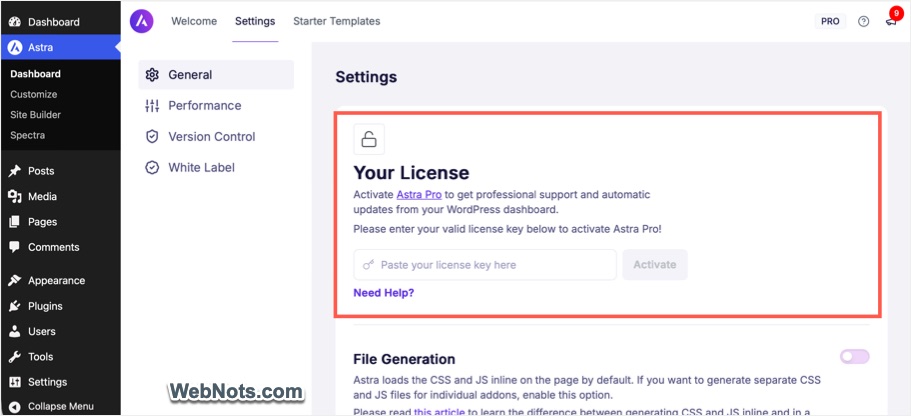
So, in most cases, the licensed plugin is linked to a theme or another free version affecting the entire site. Now, let’s examine the main reasons why using WordPress plugins after license expiry can be annoying and risky.
1. WordPress Admin Distractions
You will see lot of distractive notifications in your admin panel depending on the situation:
- Plugin or theme settings panel will show a warning that license is expired.
- The plugins page (Plugins > Installed Plugins) will show an update pending notification for the license expired plugins.
- You will also get a warning under “Tools > Site Health section” when the expired plugin is pending for an update.
- You may also see a notification on the Dashboard, especially for the bundled plugins.
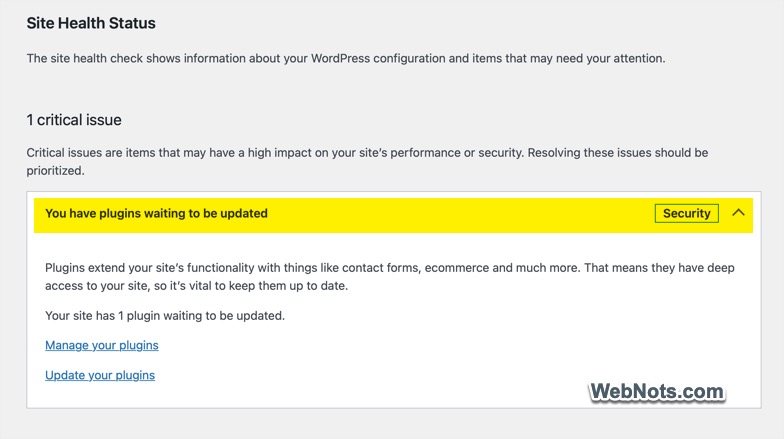
These constant notifications may annoy and distract when navigating through admin panel.
2. Security Problems
Security is one of the most important reasons to keep WordPress plugins updated. Imagine that you are using a premium contact form plugin. A security vulnerability is discovered that allows attackers to submit malicious requests through a vulnerable component. The developer releases a patched version, but your expired license prevents you from downloading the update through the normal update system.
Your website may continue to operate as usual, but it could remain vulnerable.
3. Compatibility Issues
WordPress is continuously developed and improved. New releases introduce changes to the software’s functionality, APIs, database handling, editor, and other components. Plugin developers need to maintain their products to ensure they work correctly with newer WordPress versions. When a plugin license expires, you may no longer receive the updates required to maintain compatibility.
For example, suppose you installed a premium plugin several years ago. At that time, it worked perfectly with your WordPress installation. You then updated WordPress several times, but the plugin remained unchanged because you could not access its newer versions. Eventually, you might experience problems such as:
- Plugin settings no longer working correctly.
- Features disappearing or producing unexpected results.
- Conflicts with the WordPress block editor.
- Errors in the WordPress administration dashboard.
- Compatibility problems with newer PHP versions.
- Website functionality breaking after a major update.

There is another complication: updating WordPress, your theme, and your other plugins while leaving one outdated premium plugin in place can create an increasingly inconsistent software environment. Not every plugin becomes incompatible immediately after an update to WordPress. Well-written plugins may continue working for years without requiring significant changes. However, the longer a plugin remains unmaintained, the greater the possibility that compatibility problems will emerge.
4. Lose Access to Premium Support
Premium WordPress plugins often include technical support as part of their license. When the license expires, access to this support may end as well. This can become a problem when a plugin starts behaving unexpectedly or conflicts with another component of your website.
Consider a situation in which your website suddenly displays a PHP error after a server upgrade. You suspect that a premium plugin is responsible, but you cannot determine the cause. With an active license, you may be able to contact the developer, provide diagnostic information, and receive guidance on resolving the issue.
With an expired license, the developer may refuse support until you renew. You will then need to troubleshoot the issue yourself or hire a WordPress developer. This can be particularly expensive if the plugin is responsible for a critical function, such as payment processing, membership management, bookings, or customer registration.
5. Features Will Be Unavailable
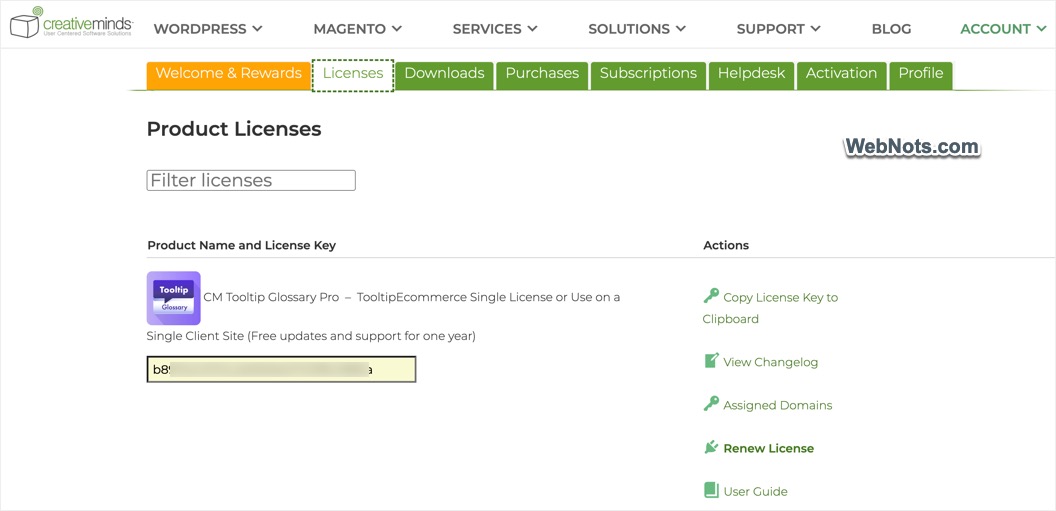
In many cases, the installed version continues to work after the expiry date, especially if the plugin’s core functionality runs locally on your server. However, there are plugins like CM Tooltips Glossary, which will stop working without active license. You will not be able to edit the plugin’s settings on your admin panel although the frontend works without premium features. So, be aware of this fact before purchasing a premium plugin.
On other hand, plugin developers also introduce new features, improve existing functionality, and refine the user experience. When your license expires, you may lose access to these improvements. Your existing plugin may continue to perform its original functions, but it can gradually fall behind competing products.
6. Your Website May Break After a PHP Upgrade
PHP is the programming language used by WordPress and many of its plugins. Web hosting providers periodically update PHP to provide security fixes, improve performance, and maintain supported software versions. Plugin developers must ensure their products work with the PHP versions they claim to support. An older plugin may use functions or coding practices that are deprecated or no longer supported in a newer PHP release. When this happens, you might see PHP warnings, unexpected behavior, or fatal errors that prevent parts of your website from working.

In severe cases, a plugin can cause a critical error that makes your website or WordPress administration area inaccessible. An expired license can make this problem harder to solve if the developer has already released a compatible version that you cannot download.
7. Your Plugin May Stop Working With External Services
Many WordPress plugins depend on external services to provide their functionality. Examples include:
- Payment gateways.
- Email delivery services.
- Cloud storage providers.
- Social media platforms.
- Mapping services.
- Shipping and tracking systems.
- Analytics platforms.
- Customer relationship management software.
These services can change their APIs, authentication requirements, security standards, and supported integrations. Plugin developers must update their products to accommodate these changes. If you cannot access plugin updates after your license expires, an integration may eventually stop working.
Consider a WooCommerce store that uses a premium payment gateway plugin. The payment provider changes its API, and the plugin developer releases an update to support the new version. If you continue using the old plugin, customers might encounter payment errors or be unable to complete purchases.
A similar problem could affect a plugin that connects your website to an email marketing platform. Changes to authentication or API requirements may prevent new subscribers from being synchronized. These failures can directly affect revenue, customer communication, and business operations. For plugins that handle payments, subscriptions, bookings, or other business-critical processes, maintaining access to compatible updates is especially important.
8. Missing Performance Improvements
Plugin updates can improve website performance by optimizing database queries, reducing unnecessary processing, fixing memory issues, and improving how scripts and stylesheets are loaded. An outdated plugin may use more server resources than a newer version and can contribute to:
- Slower page loading.
- Increased server CPU usage.
- Excessive database queries.
- Higher memory consumption.
- Slow WordPress administration pages.
- Poor performance during periods of high traffic.

These problems are not inevitable and maintaining an outdated plugin means you may miss optimizations that the developer has introduced.
9. Privacy and Compliance Issues
Websites often process personal information through contact forms, analytics, membership systems, payment integrations, and other plugins. Privacy laws and industry requirements can change, while external platforms may introduce new rules for collecting, storing, or processing information. Plugin developers may release updates to support new consent mechanisms, improve data handling, add export or deletion options, or address changes to third-party integrations.
If your license expires, you may not receive these improvements. The practical concern is that an unmaintained plugin may lack capabilities you need to meet your current obligations.
10. Problems With Website Migrations
Websites are not static. You may eventually move to a new hosting provider, change your theme, redesign your website, or migrate to a different server environment. During these changes, outdated plugins can create unexpected complications.
A plugin that works on your current server may not work correctly on the destination server because of differences in PHP versions, database configuration, or other software dependencies. If the plugin has not been maintained for several years, it may be difficult to find a compatible version. The problem can become more serious when a plugin stores important information in custom database tables or uses proprietary data structures.
11. Your Website Become Expensive to Maintain
Allowing a plugin license to expire may seem like an easy way to reduce website expenses. However, the initial savings can be outweighed by the cost of dealing with problems later. Consider the following scenario.
You use a premium plugin for website backups. Your license expires, and you stop receiving updates. Several months later, a compatibility issue prevents the plugin from completing backups correctly. You discover the problem only after a website failure, when you need a recent backup to restore your site. You may then need to hire a developer to diagnose the issue, purchase a replacement backup solution, or recover missing data.
The total cost could be considerably higher than the original license renewal. Similar situations can occur with security plugins, form builders, membership systems, and ecommerce extensions. The goal should be to manage plugin costs without compromising the security and reliability of your website.

Should You Renew Every Expired WordPress Plugin License?
Not necessarily. Renewing every license without evaluating the plugin’s importance can waste money. On the other hand, allowing critical plugins to become outdated can create serious operational risks. A better approach is to evaluate each plugin individually.
Renew the license when:
- The plugin handles payments, subscriptions, or other critical business functions.
- The developer regularly releases useful security and compatibility updates.
- You need ongoing technical support.
- The plugin depends on a subscription-based cloud service.
- The plugin is deeply integrated into your website and replacing it would be difficult.
- No suitable alternative provides the functionality you need.
Consider replacing the plugin when:
- Its license cost is too high for the value it provides.
- A well-maintained free or lower-cost alternative is available.
- The developer has stopped maintaining the product.
- The plugin has unresolved security vulnerabilities.
- It no longer supports your WordPress or PHP environment.
- You no longer need its functionality.
Consider leaving the license expired temporarily when:
- The plugin is still maintained and the installed version remains compatible.
- You have verified that no relevant security fixes are being missed.
- Its current functionality does not depend on an active cloud service.
- The plugin is not essential to your website’s operation.
- You have a clear plan to monitor its status and replace it if necessary.
Even in this situation, verify the developer’s licensing terms and do not treat the absence of visible problems as proof that the plugin is safe.