Though WordPress is the most popular content management system (powers +40% website on the internet), it needs a solid infrastructure to run. You can’t simply use a cheap hosting to run an online store with WordPress plugins like WooCommerce. The site will crash or you will consistently get a downtime notifications and the hosting company might close your account in the worst case for abusing the resources (CPU & RAM). So, it is important to choose a solid hosting platform for running your WordPress site to have a peace of mind.
Managed Vs Shared Hosting
There are different types of hosting available and shared hosting is the most popular for beginners. However, the popularity is fading and shifting towards the managed WordPress hosting plans. Though both shared and managed services are using a shared server to host your website, there are many differences (or advantages of using managed platforms).
- WordPress is preinstalled on your site on Managed hosting services taking care technical setup like DNS nameservers assignment. Some plans also offer WordPress + WooCommerce as a package.
- You will get automatic software update to keep your site up to date free from security vulnerabilities.
- Dedicated performance optimization (through plugins as well as on server side) will boost your site’s speed.
- High quality support, generally over chat or phone to resolve site specific problems.
- Automatic scaling of server resources whenever needed.
These stuffs will allow you to focus on content creation and other growth opportunities instead of dealing with the technical aspects of WordPress. If you are convinced, here are the top 5 managed WordPress hosting services offering best features.
Note: Managed hosting costs much higher than shared hosting. So, go for it only if your site needs it, otherwise, cheap shared hosting service is sufficient for running a content based on blog(s).
1. SiteGround Managed Cloud Hosting
We are using SiteGround Cloud for this website around 10 years. Initial days, we were using their GoGeek plan and used to get downtime emails due to PHP / CPU limitations. But with managed Cloud, there were no downtimes at all. Though the pricing is higher, you will get a flexible managed premium package making it as a first choice in our list.
- Google Cloud Platform, multilevel caching with SuperCacher technology, custom PHP, dedicated IP, and free CDN to speed up your site loading worldwide.
- Custom Site Tools to manage websites (yours as well as your clients).
- Daily backups (for one week retention), free migration using their plugin, and a custom firewall protection.
- Free email setup (on your domain) for each site.
- Autoscaling and custom pricing plans (by choosing your own CPU cores / RAM / storage).
- 24/7 extraordinary customer support through chat or call.
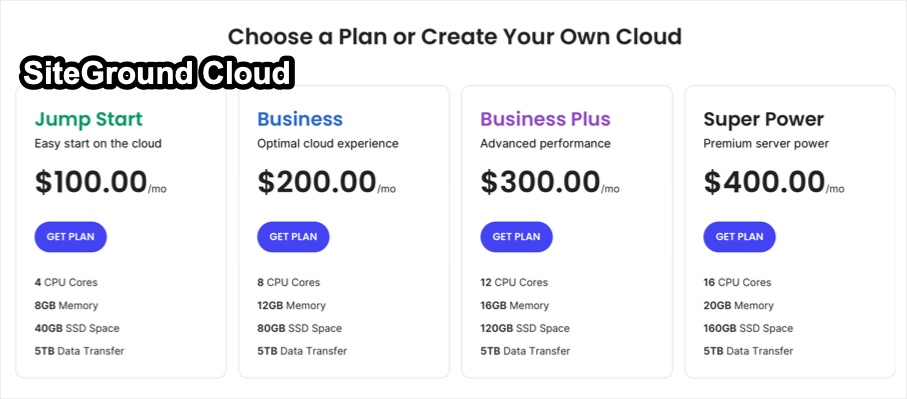
The lowest Cloud plans starts with $100 for getting 4 CPU cores, 8GB memory, 40GB storage, and 5TB data transfer. You can host unlimited number of sites and add create emails for each site. So, this will be the best managed hosting plan if you have multiple sites and you can host PHP scripts or static HTML pages along with WordPress. There are also no limit on the number of visitors. All other platforms listed below restrict the service for number of WordPress websites or traffic (number of visitors) and you can’t host custom PHP scripts. Read the complete review of SiteGround Cloud hosting.
2. WP Engine
WP Engine is a focused managed WordPress hosting company known for their enterprise-grade stability and performance. Though their customized setup will restrict the use of certain plugins, the platform is robust offering high speed, security, and scalability.
- Cloudflare CDN and custom EverCache system will load site with lightning speed.
- Daily backups to keep your site safe and staging environment to test before deploying changes to live site.
- 10 premium themes from StudioPress and Genesis blocks (Gutenberg blocks).
- Free SSL, real-time threat detection, and multi-layer DDoS protection.
- 24/7 support through chats and higher plans offer phone support.
- Best local development tool (called Local) to build and deploy sites right from your computer.
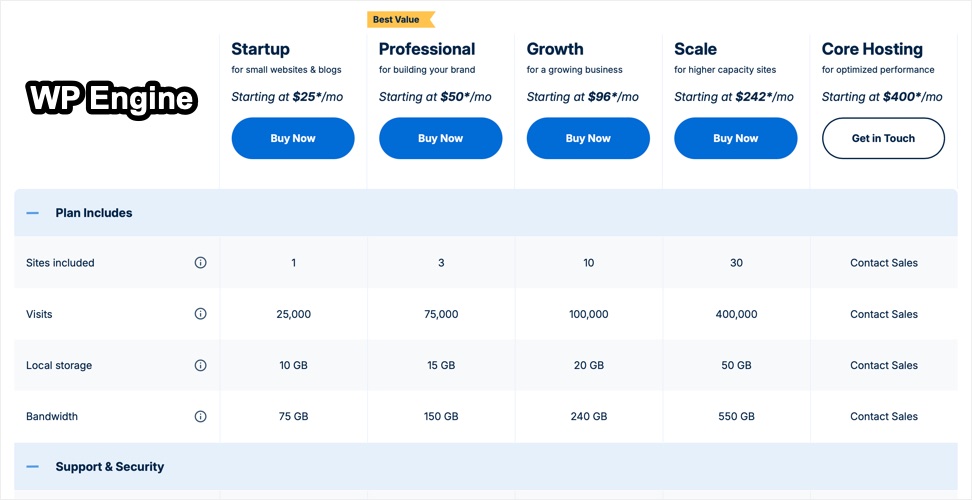
The lowest Startup plan (as part of Essential plans) starts with $25 per month. You can host a single site with 25K visits per month, 75GB bandwidth per month, and 10GB storage space. Read the complete review of WP Engine hosting.
3. Kinsta
Kinsta is another leader in the managed hosting space focusing only on WordPress setup. You can manage the site using custom MyKinsta dashboard, build a site on temporary domain, and connect to your domain when everything is ready.
- Powered by Google Cloud Platform and custom CDN, your site will load with impressive speed.
- Staging environment and DevKinsta local development tool to test features before deploying on live site.
- Automatic backups with 14-days retention, free malware removal, uptime monitoring, and DDoS protection.
- Clean dashboard for monitoring and managing resources.
- 24/7 support on chat from WordPress experts.
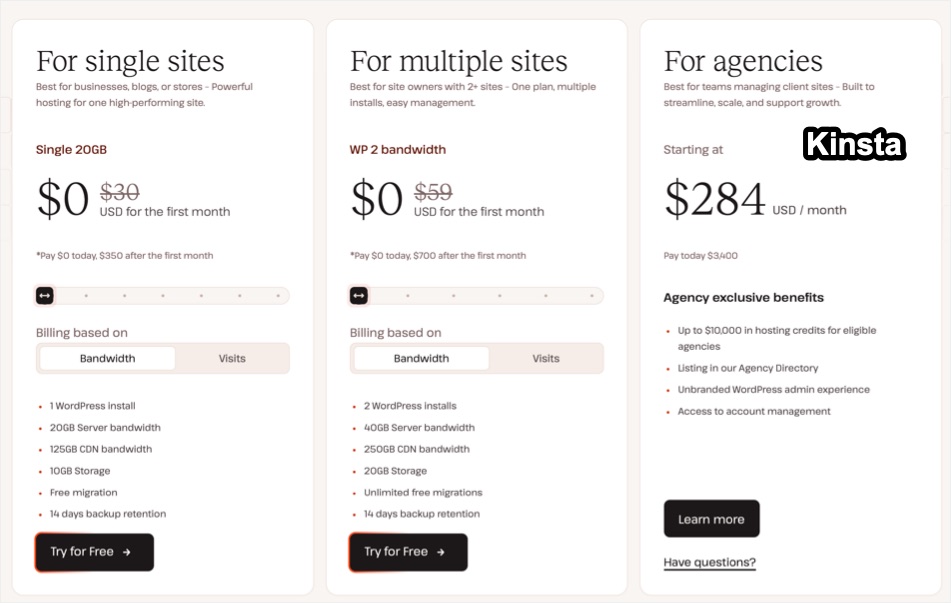
Kinsta offers confusing pricing plans either based on bandwidth or traffic. The lowest plan starts with $30 for hosting a single website. You will get 20GB bandwidth or 35K visits per month, 125GB CDN bandwidth per month, and 10GB storage. Read the complete review of Kinsta hosting.
4. Flywheel
Flywheel is owned by WP Engine and share some of the tools like StudioPress themes and Local app. Their managed WordPress hosting offers collaborative tools and workflow management make it appealing for agencies and developers managing multiple projects.
- Built on Google Cloud Platform, powered by Fastly CDN, and custom FlyCache technology will boost your site’s speed.
- Genesis Framework and 10 free StudioPress theme.
- Features like Blueprints (create a custom configuration setup), Organizations (for collaborating with teams), billing transfer to another account, and easy site cloning will help to simply your workflow, especially for a larger agencies managing multiple client sites.
- Nightly backups with 30-days retention, staging site, security alerts keep your site safe.
- 24/7 chat support with phone support available on higher level plans.
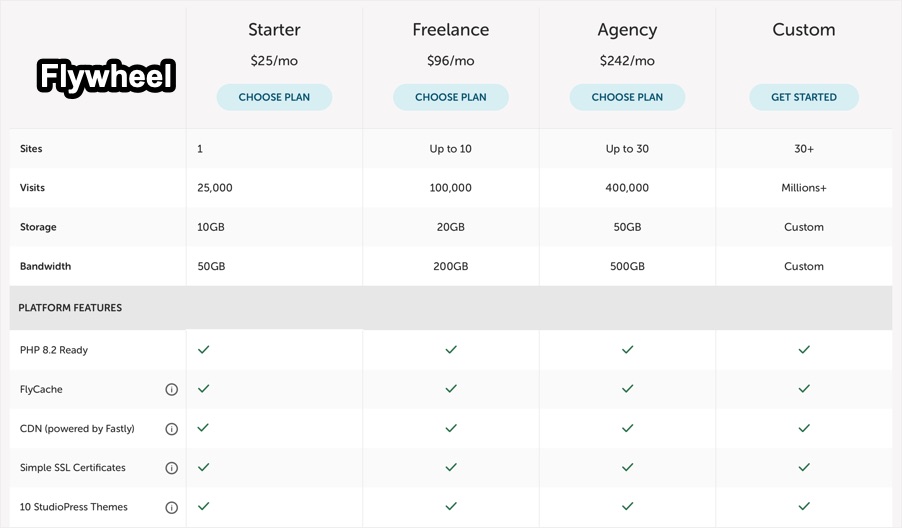
Flywheel offers similar plan like WP Engine starting from $25 per month. You will get 1 WordPress site, 25K visits per month, 50GB bandwidth per month, and 10GB storage space.
5. Pressable
Pressable is owned by Automattic, which is the company behind WordPress.com, Jetpack, and WooCommerce. It is also one of the recommended hosting companies by WordPress.org. With a deep understanding of WordPress’s inner workings, they deliver a managed hosting experience focused on reliability.
- Built on custom WP Cloud Platform and global CDN to boost the loading time.
- 100% uptime guarantee, staging site, hourly and daily backup options.
- Free migrations, auto scaling, and premium Jetpack Security.
- 24/7 chat support for all plans.
Pressable’s pricing plan starts with $20.83 per month and you will get 1 WordPress install, 30K visits per month, and 20GB storage. They also offer a special 50% discount for those coming from WordPress.org site. So, you can get the same hosting plan for $12.50 per month. You can even get a plan for $5 for a single site, 5GB storage with 5K visits per month.

Conclusion
Unlike shared hosting service, choosing managed WordPress hosting service helps to keep out the stress of running a website, allowing you to focus on content, customers, and growth.
- As mentioned, SiteGround’s price is much higher though you can host unlimited sites with no traffic limit.
- However, if you want to strict to high-speed WordPress only hosting, then WP Engine, Kinsta, Flywheel, and Pressable each offer their unique strengths. WP Engine, Flywheel, and Kinsta offers their own local development app, which can be used for building site locally on your computer and push to live server.
- On other hand, Pressable offers the cheap starting price $5 for a single site with 5K visits.