Self-hosted WordPress sites need paid hosting services to store your content (image, database and all other website files). WordPress officially recommends a few hosting companies like Bluehost, Pressable and Hostinger. These companies are recommended based on the sponsorships for various events and development of the core WordPress software and NOT based on their performance. So, the recommendations changes frequently and the earlier recommended companies like Dreamhost and SiteGround are no more in the list. Besides that list there are hundreds of premium hosting companies offer dedicated services only for WordPress sites. WP Engine is one such a web hosting solution which we will review in this article.
WP Engine Managed WordPress Hosting
WP Engine provides optimized and fully managed WordPress hosting. They have a special architecture designed for speed that will result in more expensive hosting solution. Unlike many other hosting companies, WP Engine offers hosting services only for WordPress platform. Due to this reason, WP Engine is popular among WordPress community for their dedicated approach.
Important Note: There was a conflict between WP Engine and Matt Mullenweg (WordPress co-founder and Automattic CEO), erupted in September 2024. Mullenweg complained about WP Engine for profiting off the open-source platform without sufficient contributions and for alleged trademark infringement. Escalations included mutual cease-and-desist letters, a brief ban on WP Engine’s WordPress.org access (later reversed due to security concerns), and WP Engine’s October 2024 lawsuit against Mullenweg and Automattic for extortion, libel, and power abuse. By 2025, Automattic filed counterclaims for trademark violations, WP Engine amended its complaints, and courts ordered access restoration, plugin control return (Advanced Custom Fields), and action reversals amid antitrust claims. As we understand, these conflicts do not affect the hosting capabilities of WP Engine, at least at this point.
Pricing Plans
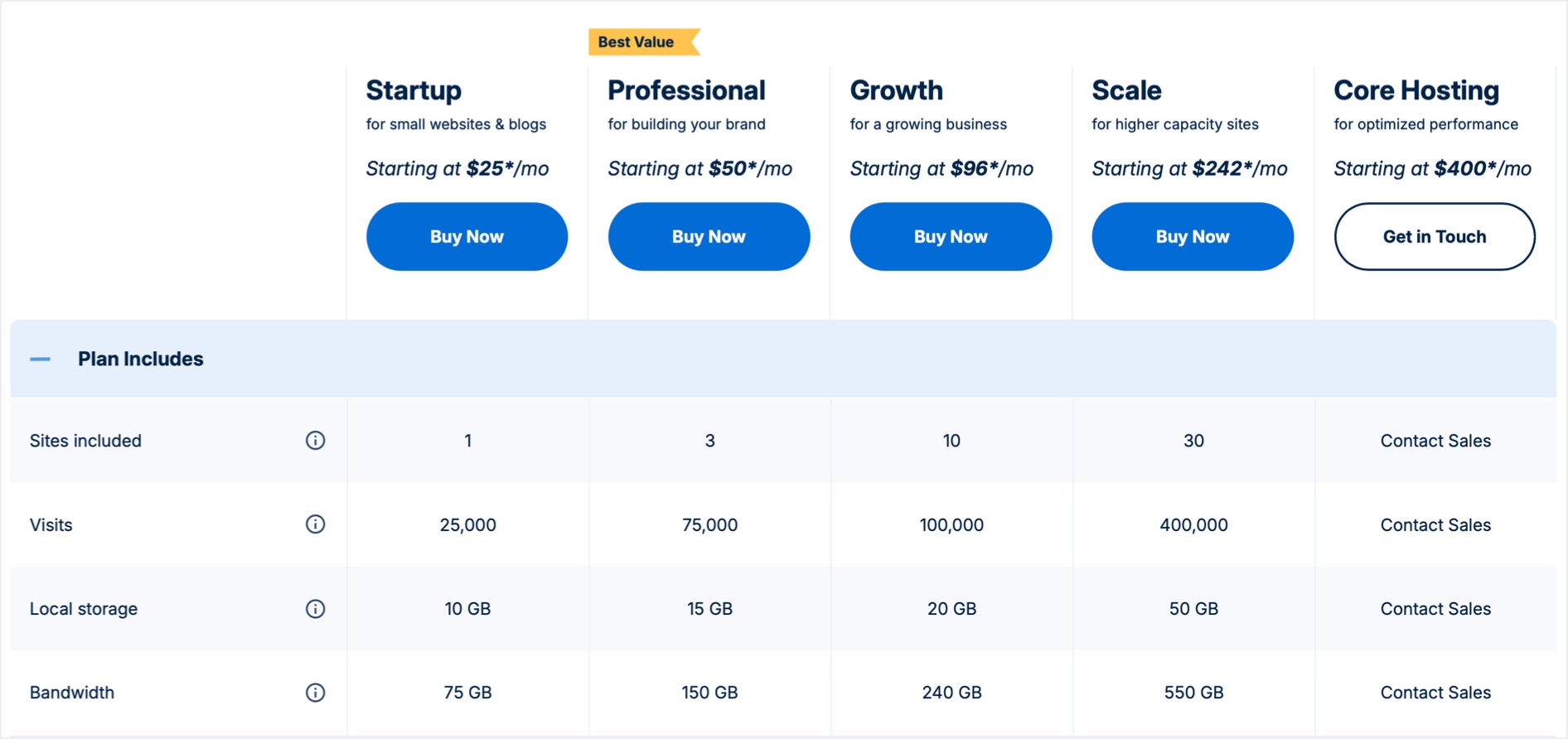
WP Engine offers multiple pricing plans – Startup, Professional Growth and Scale. The price starts from $25 per month for the Startup plan to $242 per month to the Scale plan and plans use shared hosting setup. If you have custom requirements then get in touch with them to get quote for a premium or enterprise level plan for your needs. If you are launching a new WordPress site, then the Startup plan will be sufficient for you with a single site, 25K visits, 10 GB storage and 75 GB bandwidth.
Most of the time, you can get three months free hosting with al these plans. Make sure the discount is applied in the cart and do not add any unnecessary add-ons on the cart page.
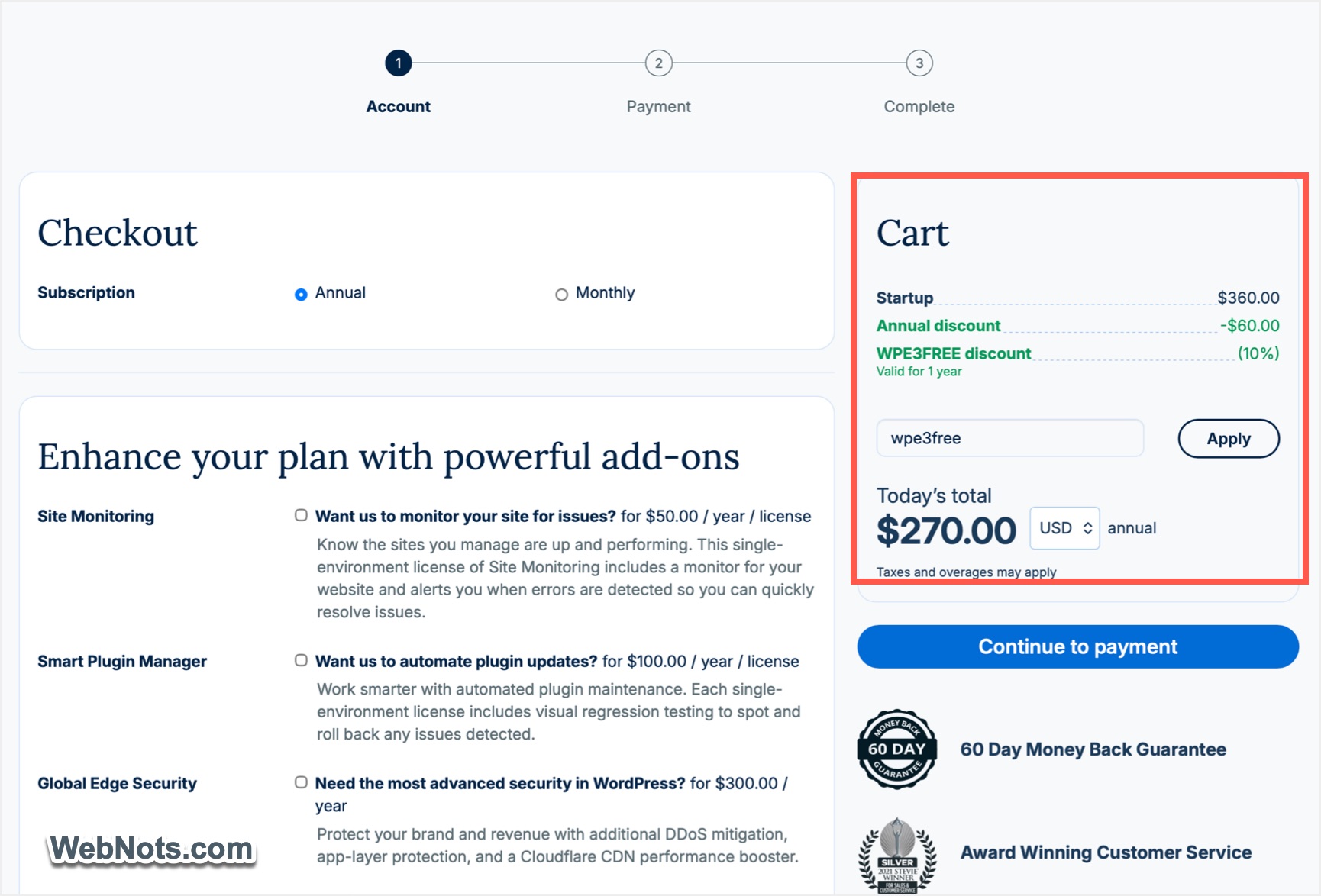
All plans offer 60 days money back guarantee which you can make use to get the full refund of you are not satisfied.
Overall Features
As you can see, all pricing plans are based on number of sites, unique visits, storage and bandwidth. So, it will look stringent when compared with plans from other hosting companies. However, the plans include the following features to justify the cost:
- Free site migration plugin to move your existing site to WP Engine platform.
- Local development app (previously called Flywheel and now known as Local).
- Staging environment for setting up your workflow.
- Automated PHP / WordPress updates with daily backup.
- Global Cloudflare CDN and free SSL.
- 24/7 support on chat and phone (except Startup plan which offers only chat support).
- 10 premium StudioPress themes with Genesis blocks.
- Plenty of additional add-ons for security, uptime monitoring, etc. (add-on to be purchased separately).
Reliability
Reliability is essential because the process of running or migrating a website can be risky. You can reduce the risk of data loss with the automatic backup feature (daily). It is also easy to create backups on demand and restore the backup when needed. You can also download the backups for local archiving. This feature is easy to use and very valuable for people who prioritize on reliability.
You can also develop the sites on your computer using Local app and the push the changes to live environment.

Performance
Generally, people measure the performance by creating a testing site with default theme. In our opinion, this is meaningless as the reality will be completely different and depends on the individual site (theme and plugins you use). WP Engine platform is optimized for speed and helps you to get good search engine results.
- WP Engine comes with built-in tests to check performance. These tests give specific score and you can get various recommendations. It will be easy to assess how each tweak will affect performance.
- The pricing plans include global Cloudflare CDN with edge delivery to boost the speed. You can also configure the CDN to optimize performance.
- You can get built-in caching technology (called EverCache), with easy to purge option.
Additional add-ons are available for performance monitoring and automatic optimization of images / code.
Restrictions
WP Engine have their own rules and don’t allow certain plugins that cause performance issues with their platform. So, it is important to check the banned plugin list. Especially, if you are planning to migrate to WP Engine from another hosting company, then we strongly recommend checking with the WP Engine support team to know all compatible plugins. In general, caching, backup and heavy performance impacting plugins are not allowed and you can check the complete list on their official disallowed plugins list.
Though this looks as a restriction, in our opinion, this is one of the major advantages of WP Engine as you can be sure that the platform will work properly.
Support
As mentioned, you have 24/7 professional chat and phone support available except for Startup plan. The support is overall quite reliable and you can connect to a service staff in less than a minute. Though AI assistants are used for summarizing the articles, you can chat / talk with a real human to resolve your issues. You can also escalate to next level if the issue is not fully addressed or you are not satisfied.

Besides that, you can make use of the Resource Center (offers free tutorial articles) and Help Center (offers support articles). Also, you can clarify all pre-sales questions through live chat (AI agent) before purchasing a hosting plan.
Additional Products
WP Engine offers many other services and products which you can make use of with the primary hosting account.
- Torque Magazine – free WordPress resource and news site.
- Local – free WordPress localhost development app for Windows, Mac and Linux.
- Flywheel – another premium managed WordPress hosting company.
- Advanced Custom Fields – premium WordPress plugin for managing custom fields.
- StudioPress – offers Genesis Framework, themes and blocks.
- NitroPack – freemium speed optimization plugin.
Summary
WP Engine is definitely more than a regular web hosting company with a dedicated focus on WordPress sites. Though the overall price is bit higher, they strive to maintain proper level of security, reliability and performance. You can get regular updates, automatic backups, custom caching, staging, malware scanning and integrated CDN all in one single platform.
Pros
- Professional WordPress managed hosting.
- High speed with in-built caching.
- Studiopress themes and other integrations.
Cons
- Pricing based on page views.
- Some of your favorite plugins may be blocked.