Ease of use is one of the most critical factors to consider when creating a website. This is especially true for beginners and small business owners who don’t have time to navigate complex tools. Squarespace and Weebly are two of the most popular website builders known for their simplicity and user-friendly features. However, each platform offers a different experience when it comes to design flexibility, customization, ecommerce functionality, SEO tools, and blogging.
In this in-depth comparison, we’ll analyze Squarespace and Weebly feature by feature to determine which platform offers the better experience. We’ll also provide a rating for each feature, making it easier to choose the right platform based on your specific needs. For example, if your priority is an online store, website editor, templates, or SEO, you can see which platform performs better in that particular area.
1. Ease of Use
Squarespace
Squarespace has a smooth and streamlined onboarding process. After creating an account, users are immediately prompted to select a template from its beautifully designed template library. Once you choose a template, Squarespace offers a guided tour of the platform’s tools, giving you a clear overview of how to start editing your website. The setup is intuitive, and no coding knowledge is required. However, Squarespace’s focus on creative designs and customization may feel overwhelming for someone new to website building. Check out complete Squarespace review to learn more.
Weebly
Weebly is well-known for its simple and beginner-friendly setup. After signing up with your Square account, you can quickly choose a theme and begin editing without much friction. Weebly’s drag-and-drop editor is highly intuitive, which makes adding content and customizing the layout incredibly easy. Weebly also offers a quick online store setup, allowing users to start selling products in just a few clicks (with Square integration as Square is the owner of Weebly). Check our complete Weebly review to learn more.
Ease of Use Winner – Squarespace: Squarespace’s onboarding process is professional and simpler, especially for those new to web design. Its user interface feels a bit more comfortable with straightforward login compared to Weebly, which needs a Square account.
2. Templates Design
Squarespace
Squarespace is well-known for its stunning, professional-grade templates. There are 200+ mobile-responsive templates optimized for various industries, from portfolios to ecommerce stores. Squarespace gives users the freedom to create beautiful, custom designs with its grid-based drag-and-drop editor, which allows you to fine-tune fonts, colors, and layouts with precision. However, the grid-based editor can sometimes feel less intuitive when trying to place elements in custom positions as you can only align the elements within the grid layout. Other important thing is that you can’t switch the template once selected. Earlier, Squarespace allowed this, however, the feature was removed from version 7.1.

Weebly
Weebly offers a limited 50+ mobile responsive and a large number of non-responsive themes (we don’t recommend using non-responsive themes). So, usable responsive themes are just one-fourth compared to the number of templates offered by Squarespace, and the overall design quality is also much simpler. Although Weebly’s design options lack the level of polish that Squarespace offers and customization is more restricted, there are few advantages. You can switch the theme anytime after creating a site, import or export the theme, and reuse the customized themes across your account (you can have 10 sites per account). It is also possible to download the entire site as a ZIP archive excluding your blog posts and products.

Design Flexibility Winner – Squarespace: For those who want a stunning and professional design, Squarespace is the winner. Its templates are far superior in terms of aesthetics and design customization. Although you can’t switch the template, there are sufficient customization options to change the appearance of your site.
3. Drag-and-Drop Editor Usability
Squarespace
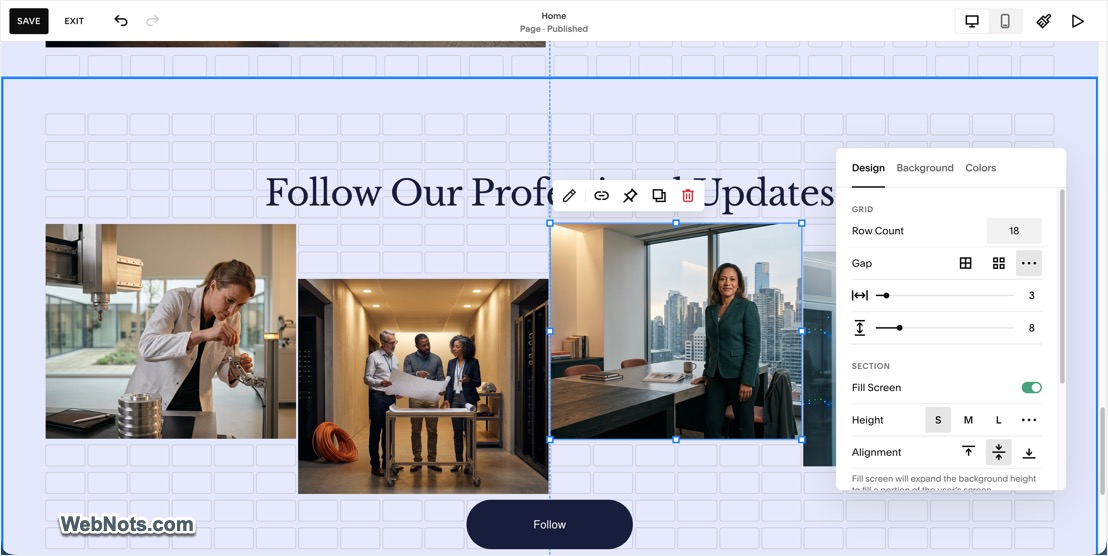
Squarespace’s drag-and-drop editor offers a polished experience but comes with a slight learning curve. It’s not a true drag-and-drop system where you can place items freely anywhere on the page. Instead, Squarespace uses a grid-based system, meaning elements snap into predefined grid of the page. This ensures designs remain consistent but can be limiting for those who prefer full control over their layouts. While advanced users will appreciate this structured layout, beginners might find it challenging to place items exactly where they want them.
Weebly
Weebly’s drag-and-drop editor is one of the easiest and most simplest on the market. Users can drag text boxes, images, videos, buttons, and other elements directly on the page and place them anywhere they want. The freedom it provides, combined with its simplicity, makes Weebly a favorite for non-tech-savvy users. Weebly’s editor is straightforward to use, but it can sometimes feel too simplistic for users seeking more advanced design options.

Edition Interface Winner – Weebly: Weebly’s drag-and-drop editor is more intuitive, giving users greater control over where elements are placed. Squarespace’s editor, while powerful, requires more learning and has limitations on element placement.
4. Customization Options
Squarespace
Squarespace offers a high degree of customization for users who want to tailor every detail of their website. You can modify fonts, colors, spacing, and even use custom CSS for more granular control. There are built-in tools for creating image galleries, sliders, and embedding multimedia elements with ease. Advanced users will appreciate Squarespace’s developer mode, which opens the door to even deeper customizations by editing the site’s code. However, most users will stick to the basic editor, which offers plenty of flexibility for design, even though it can sometimes feel restrictive due to the block-based layout.

Weebly
Weebly provides fewer customization options compared to Squarespace. While you can change colors, fonts, and basic layouts, it doesn’t offer the same level of creative freedom. Weebly’s customization tools are geared towards simplicity rather than advanced design, which can be limiting for users who want a more tailored website. Weebly does allow for custom HTML and CSS editing, but this feature is less prominent than it is in Squarespace.

Customization Features Winner – Squarespace: If customization is a priority, Squarespace takes the lead with its wide range of tools and deeper design control.
5. AI Tools
Squarespace
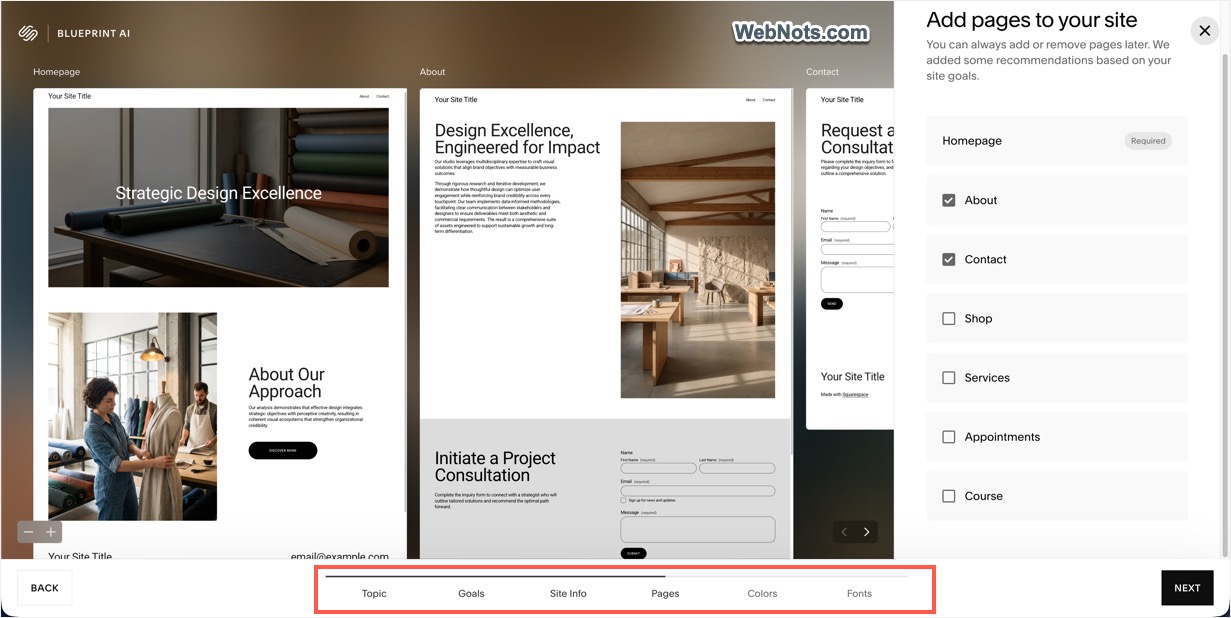
Squarespace offers a Blueprint AI site builder that can generate an entire website based on a few simple questions about your business. All you need is to provide details like your industry, website description, required page layouts, and the AI will do the rest of work for you. This allows you to bypass much of the manual setup process and create a professionally designed website in just a few minutes. Blueprint AI is not the only AI feature available. Squarespace also provides AI-assisted tools for generating and refining text and creating images, making it easier to build and manage your website.
Weebly
Surprisingly, Weebly is one of the few popular website builders that does not offer an AI site builder or other AI-powered tools. This stands in sharp contrast to Squarespace, Wix, SITE123, WordPress, and many other major website-building platforms. We assume that Square (parent company of Weebly) is prioritizing its Square Online platform, which uses technology from Weebly in the background, rather than continuing to invest heavily in Weebly.com as an independent website builder. We have been using Weebly for more than 15 years, and the last major platform update we experienced was the Carbon update in October 2015. In more than a decade since then, Weebly has not received a comparable major platform update. This limited development is an important concern to consider if you are looking for a website builder for the long term.
AI Tools Winner – Squarespace: There is no comparison in this category as Weebly does not even offer any AI features.
5. Ecommerce Features
Squarespace
Squarespace’s ecommerce features are built directly into the platform, offering seamless functionality for selling products and services. You can easily set up a store, manage inventory, track orders, and integrate payment gateways like PayPal, Stripe, and Squarespace Payments. Squarespace also provides options for handling taxes, shipping, and coupons. Advanced features like product variants, subscription products, and abandoned cart recovery make Squarespace an ideal choice for small to medium-sized ecommerce businesses. The best part is that all ecommerce features are available for all premium plans with transaction fee is the only difference (lower fees for higher plans).

Weebly
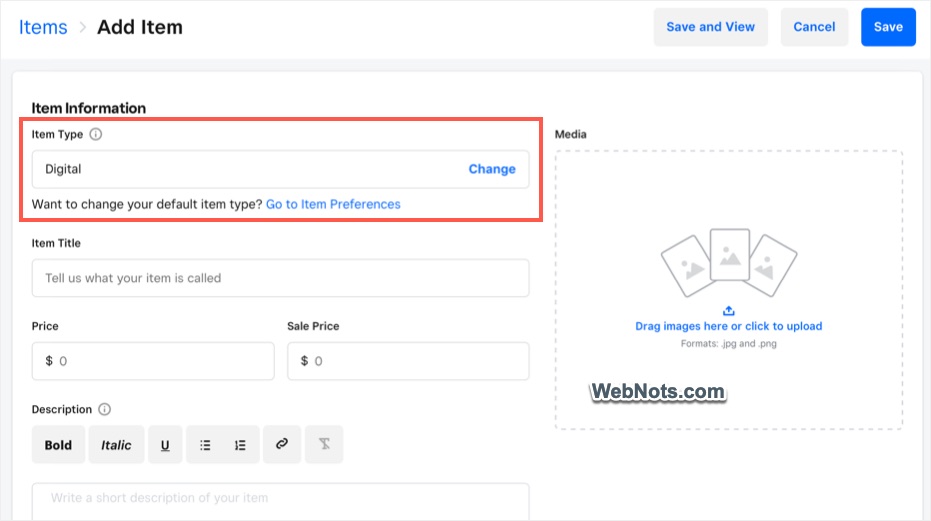
Weebly also offers a solid set of ecommerce tools, especially for the higher plans. Like Squarespace, you can set up an online store, manage inventory, and accept payments through platforms like PayPal and Stripe. However, Weebly’s ecommerce features are somewhat basic compared to Squarespace. Weebly lacks advanced ecommerce options like subscription products, though it’s still suitable for small businesses looking for an easy way to sell online. Note that you need the Square integration for managing your products.
Ecommerce Winner – Squarespace: Squarespace offers a more feature-rich ecommerce experience, with advanced tools for larger online stores and businesses with more complex needs.
6. SEO Tools
Squarespace
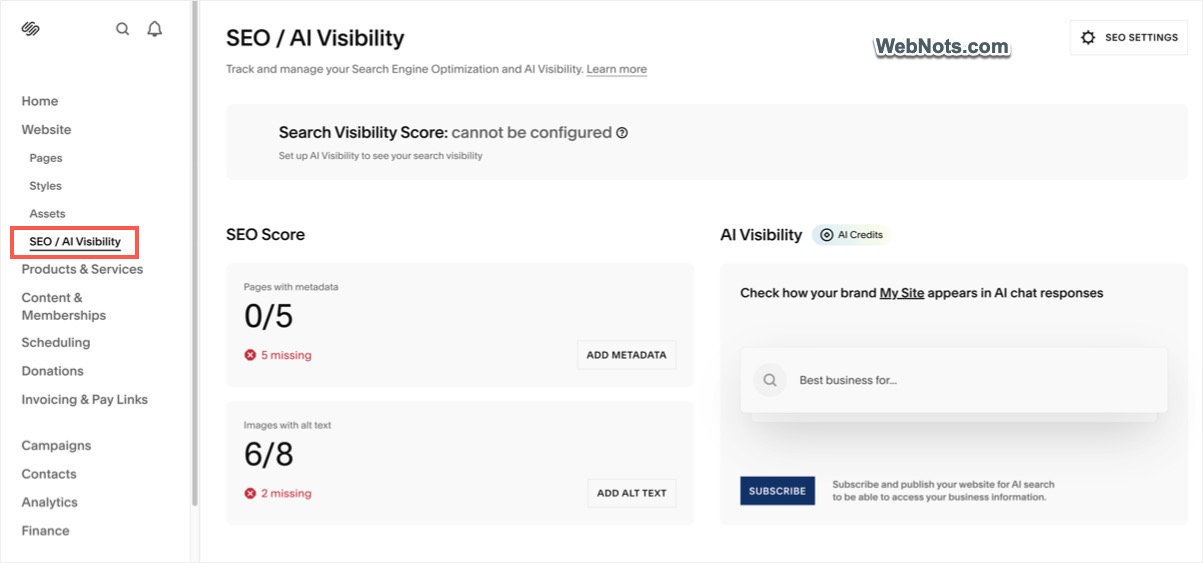
Squarespace offers a range of SEO tools to help improve your site’s visibility on search engines and AI chatbots. Users can edit page titles, meta descriptions, alt text for images, and create custom URLs. The platform also automatically generates sitemaps and supports SSL, which improves site security and boosts SEO rankings. However, some users may find Squarespace’s SEO settings somewhat limited compared to more SEO-focused platforms like Wix or WordPress.
Weebly
Weebly offers easy-to-use SEO settings, allowing users to optimize titles, meta descriptions, and image alt tags. Weebly also supports custom URLs and automatically generates sitemaps. For beginners, Weebly’s SEO tools are simple and easy to navigate, making it a good choice for users who want basic SEO functionality without complex setups. That said, Weebly’s SEO features are fairly basic and may not meet the needs of users looking for more detailed control over their SEO strategy.

SEO Tools Winner – Squarespace: Squarespace offers more robust SEO features than Weebly, though both platforms cover the basics for improving search engine rankings.
7. Blogging Features
Squarespace
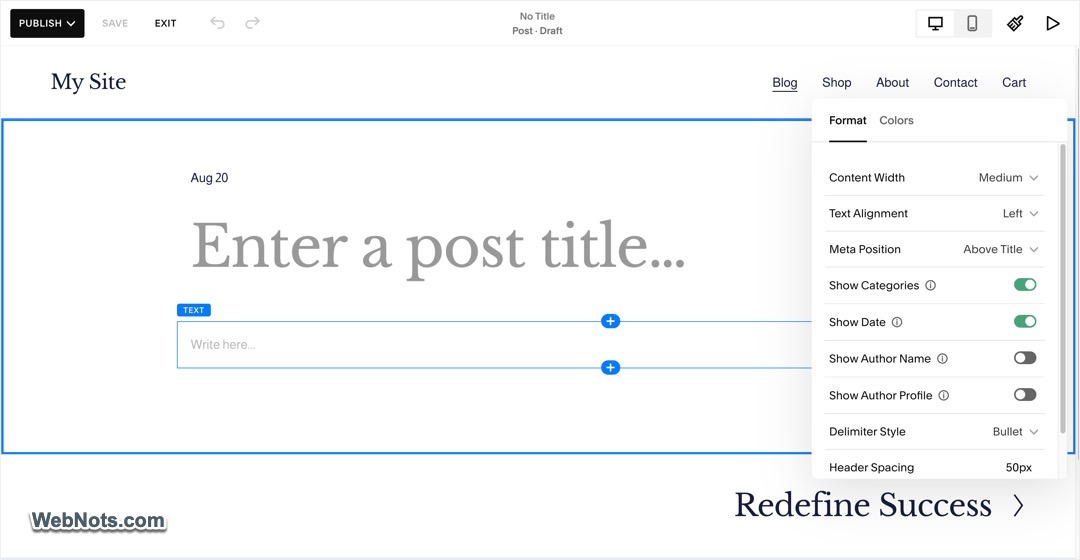
Squarespace is a great choice for bloggers who value design and aesthetics. Its blogging platform is sleek, allowing users to create visually appealing blogs with ease. Squarespace supports features like scheduling posts, adding tags and categories, embedding media, and integrating comments. You can also manage your blog from a mobile app, making it easy to post on the go. While Squarespace’s blogging features are solid, the platform does not offer the drag-and-drop platform for creating blog posts. You have a plain Classic editor as shown below and create content either manually or with AI.
Weebly
Weebly offers a simpler blogging platform with easy-to-use tools for writing and publishing posts. Like Squarespace, you can schedule posts, categorize content, and enable comments. However, blog posts use the same drag-and-drop editor with additional elements such as RSS, Blog Archives, LinkedIn Button, etc. Weebly’s blogging functionality is great for casual bloggers or beginners but may not suffice for users who need more advanced features.

Blogging Features Winner – Both: Both Squarespace and Weebly are not the platform for creating a full-fledged blog. They are meant for adding a blog section to a business website. From this perspective, both platforms offer sufficient tools for basic blogging setup.
8. Customer Support
Squarespace
Squarespace offers 24/7 customer support via email and limited live chat, as well as an extensive knowledge base with guides and tutorials. Their support team is responsive and knowledgeable, and the platform also provides webinars and community forums for additional help. While the support is solid, Squarespace does not offer phone support, which may be a drawback for users who prefer to speak with a support representative directly.

Weebly
Weebly offers a wider range of customer support options, including email, chat, and phone support for premium users. Like Squarespace, Weebly has a helpful knowledge base and documentation, but it also provides phone support, which can be a significant advantage for users who need immediate assistance. Once there was a community forum, which was closed after Square acquired Weebly. Now, you can get help from the Square’s sellers community primarily for ecommerce related queries.

Customer Support Winner – Squarespace: Although Weebly provides phone support, Squarespace’s support and documentations are highly professional. Weebly does not maintain the documents with plenty of missing links. Even the community forum and developer docs links on the official Weebly.com website’s footer section point to 404 page, and they don’t have time to fix.
9. Pricing
The plans explained here are applicable for USA and the pricing / features may vary based on your geographic location.
Squarespace
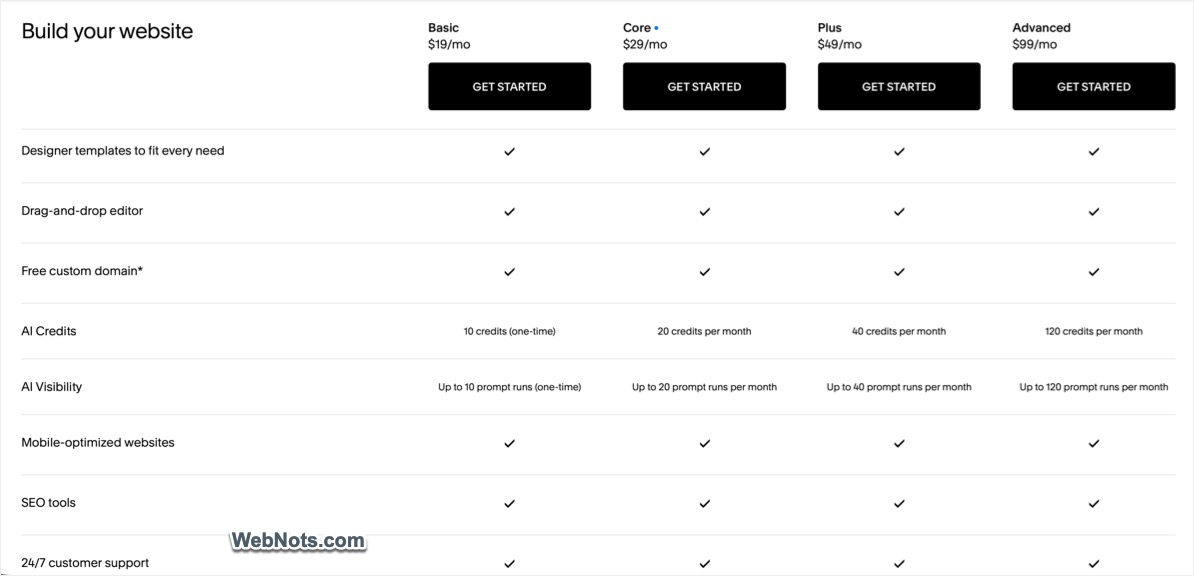
Squarespace offers four pricing plans:
- Basic ($19/month annually and $25 monthly): Best for personal sites, portfolios, blogs, and small websites with 2 contributors, 30 minutes of video storage, 2% online store transaction fee, and 7% digital content/membership fee.
- Core ($29/month annually and $39 monthly): Best for small businesses with unlimited contributors, 5 hours of video storage, CSS/JS customization, 0% online store transaction fee and 5% digital content/membership fee.
- Plus ($49/month annually and $65 monthly): Best for growing online stores and businesses with 50 hours of video storage, lower payment processing rates, 0% online store transaction fee, and just 1% digital content/membership fee.
- Advanced ($99/month annually and $139 monthly): Best for high-volume ecommerce and established businesses with unlimited video storage, lowest payment processing rates, and 0% online store and digital content/membership transaction fees
Squarespace offers a 14-day free trial, but there is no free plan.
Weebly
Weebly has a more affordable pricing structure and offers a free plan with basic features.
- Free Plan: Basic website with Square ads on Weebly subdomain. Includes SSL, third-party embed code, SEO, lead capture, Instagram feed, shopping cart, and unlimited items.
- Personal ($13/month annually and $16 month-to-month): Suitable for personal websites and basic online presence with Square ads, support for a custom domain, includes ecommerce basics, SEO, lead capture, Instagram feed, and chat/email support.
- Professional ($15/month annually and $20 month-to-month): Adds more customization features, advanced site statistics, a free domain, removal of Square ads, and password protection, ecommerce features such as digital goods, inventory management, coupons, and phone support.
- Performance ($32/month annually and $36 month-to-month): Designed for businesses focused on growth and operations with advanced ecommerce features including PayPal payments, item reviews, shipping labels, abandoned cart emails, and advanced ecommerce insights. It also includes priority support.
- Premium ($90/month annually and $99 month-to-month): The complete package including real-time shipping rate calculator.
Weebly’s free plan makes it an attractive option to test the features before making a purchase decision.

Pricing Winner – Squarespace: Although Weebly is bit cheaper compared to Squarespace, the platform was not updated for a decade and lower plans do not include free domain, ad removal, and custom domain features. On other hand, Squarespace updates and maintains the documentations properly justifying the higher price.
Final Verdict
If you see the category-wise winners, Squarespace stands out in 7 out of 9 categories. Weebly only wins with the drag-and-drop builder and no winner in blogging category. So, we strongly recommend going with Squarespace to have a strong foundation for your new websites. If you are already using Squarespace and looking for alternate options, ignore Weebly and consider Wix, WordPress.com, or WordPress.org platforms for moving your website,
Important Update: Weebly was a cool and super easy website building platform before Square acquired it in 2018. After so many years passed, still there are lot of confusions between Weebly and Square Online platforms. You need a Square account for logging in and to use any ecommerce features in Weebly. Now, the official Weebly support page recommends using Square Online for new websites to get proper support (earlier the same page claimed Weebly.com support would end on July 2025). With this kind of future, we strongly recommend being away from Weebly.com and go with Squarespace, unless you have a specific reason (like you love Weebly’s editor). Remember that Squarespace and Square Online are completely different website building platforms. So, don’t get confused because of their names.