Choosing the right platform is important when it comes to building a website. Wix, Squarespace, and Weebly are three of the most popular website builders available today, each offering different features, pricing, and design capabilities. Whether you’re building a personal blog, an online store, or a business website, knowing how these platforms compare will help you make the right decision for your project. We use all three platforms and have created websites, online stores, and blogs on each of them (as you can see in the screenshots below). This comparison is therefore based on our hands-on experience with all three platforms. In fact, we originally started this website on Weebly before moving to WordPress.org in 2015. Based on this firsthand experience, we’ll compare Wix, Squarespace, and Weebly across their key features, pricing, ease of use, ecommerce capabilities, and other important factors.
Comparison Summary: Wix vs. Squarespace vs. Weebly
Below is the summary of major features offered by these platforms:
| Feature | Wix | Squarespace | Weebly |
|---|---|---|---|
| Ease of Use | Flexible drag-and-drop editor | Structured drag-and-drop, minimal UI | Simple, beginner-friendly editor |
| Templates | 2K+ templates, highly customizable | 200+ sleek, polished, and responsive templates | 50+ mobile-responsive themes |
| AI Integrations | AI site builder and content generation tool | AI builder and content assistance | No AI integration |
| Ecommerce | Solid for small and medium businesses | Ecommerce for design-focused stores | Basic ecommerce, ideal for small stores |
| SEO Tools | Advanced SEO & GEO options with guides | Basic built-in SEO and AI Visibilities tools, mobile-first | Basic SEO, with apps for enhancement |
| Customer Support | 24/7 support, VIP for premium users | 24/7 email, limited live chat, strong documentation | Email, phone support, priority for premium users |
| Pricing | Free plan, paid plans from $17/month | Free trial, paid plans from $19/month | Free plan, paid plans from $10/month |
Note: When Square acquired Weebly in 2018, the initial plan was to integrate Weebly more closely with Square’s products. However, that integration did not fully materialize. Today, Weebly’s technology continues to support Square Online, which is a separate website-building platform. This is the reason you see the name and logo mention “Weebly eCommerce by Square”.
Let’s dive into each feature in detail.
1. Editor Use
Wix
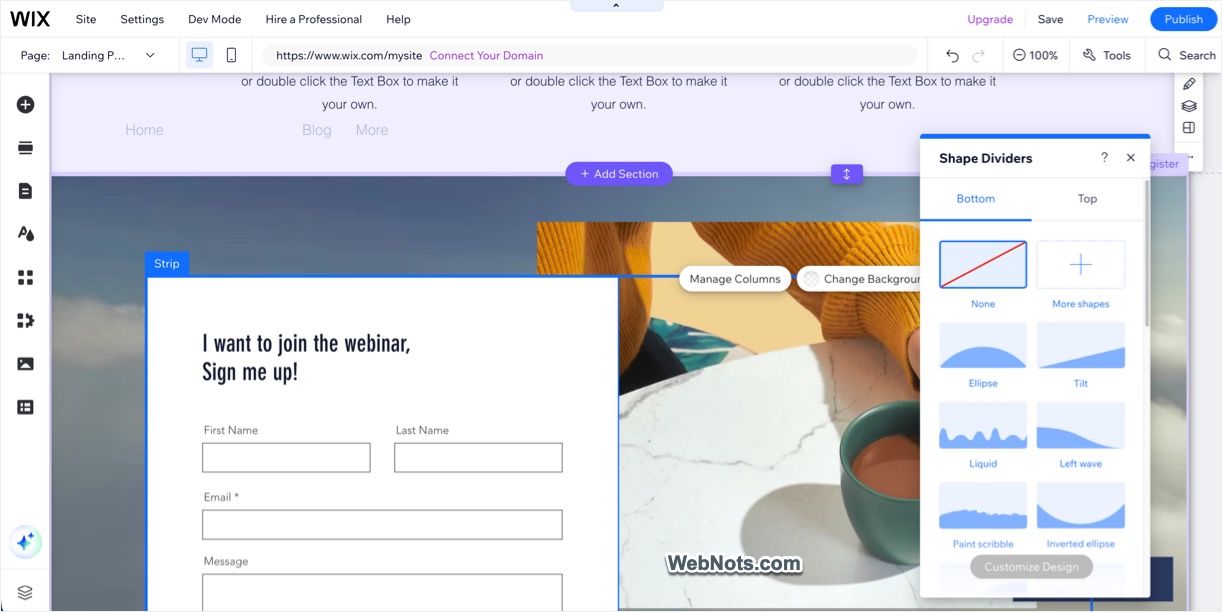
Wix provides an intuitive drag-and-drop editor that allows you to place elements anywhere on the page. It’s highly flexible, offering both structured and free-form design options. For beginners, Wix also offers an AI site builder, which builds a website for you after answering a few questions. You also can make use of the AI text generator tools for creating compelling content for your site.
Squarespace
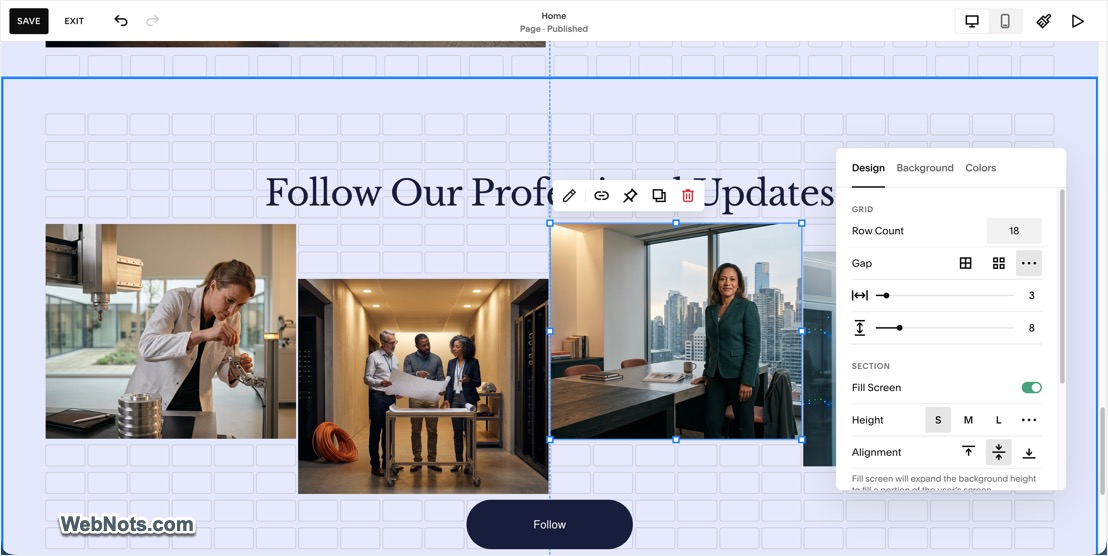
Squarespace’s editor is also drag-and-drop but more structured, with grid-based layouts. This ensures professional and balanced designs, though it’s less flexible than Wix’s free-form approach. The editor is sleek and minimal, making it easy to focus on your design without distractions. There are also Blueprint AI site builder for creating website and AI tools to assist you in content generation.
Weebly
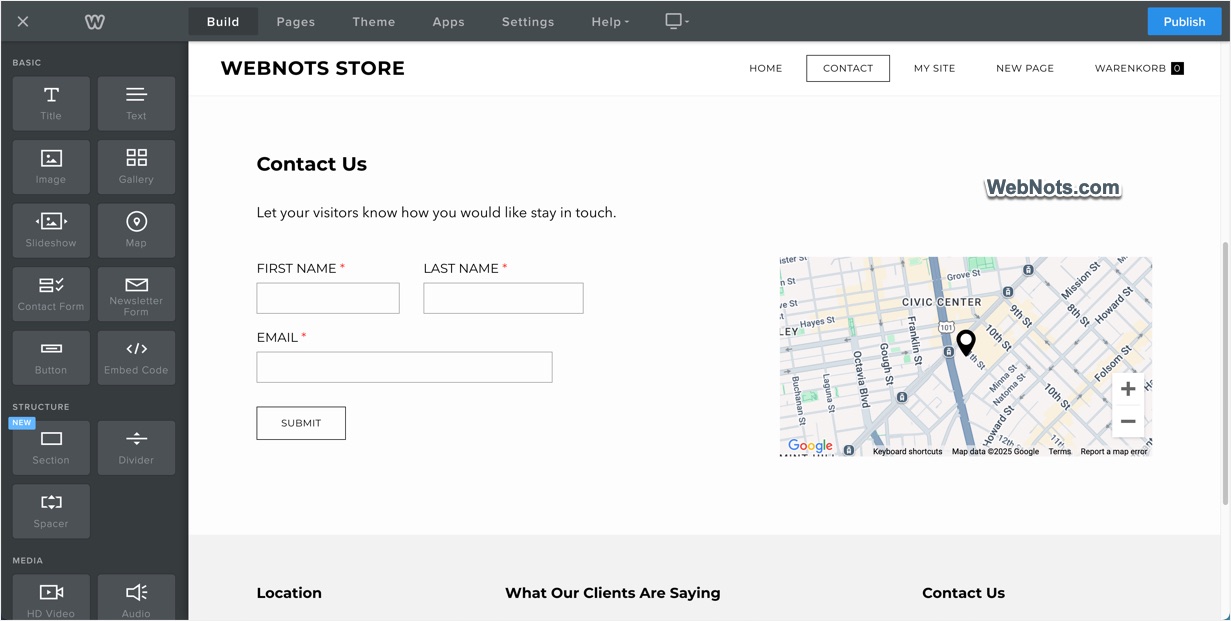
Weebly offers a simple, beginner-friendly drag-and-drop editor with a structured layout. It’s easy to use, but the design freedom is somewhat limited compared to Wix. Like Squarespace, Weebly’s interface is clean and straightforward, making it a good option for first-time users. However, Weebly does not offer an AI site builder or AI-powered tools. Based on our 16 years of using Weebly, we have not seen any major platform update in more than a decade following the messy Carbon 4 update in October 2015 and also the separate Designer and Education platforms have been discontinued. These factors suggest that Weebly may no longer be a major focus as an independent website-building platform for Square. If you are starting a new website, consider this limited development and uncertain long-term direction before committing to Weebly.
2. Design Flexibility and Templates
Wix
Wix offers an extensive range of 2K+ templates for various industries and use cases. The designs are modern, though switching templates after your website is live is not possible. You have full control over design elements, including animations, backgrounds, and font choices.

Squarespace
Squarespace is known for its 200+ high-quality, polished templates, which are perfect for creative professionals and businesses. The older version allowed you to switch templates at any time. However, they removed this feature with version 7.1 and you can no longer change the template once selected. All templates are mobile-friendly without needing manual adjustments.

Weebly
Weebly’s selection of templates is smaller (50+) and simpler than Wix and Squarespace, but all designs are mobile-responsive. There are also old non-responsive themes you can choose but bot recommended as you need to manually adjust the mobile elements in a separate mobile editor. Weebly allows for some customization of colors and fonts, but options are more limited compared to its competitors. Though you can edit the HTML templates and upload CSS / JS files (which is not possible with Wix or Squarespace), this is not required for common users focusing on business.

3. Ecommerce Capabilities
Wix
Wix provides solid ecommerce tools for small and medium-sized businesses, including product galleries, inventory management, and integrated payment options. Ecommerce features suitable for online stores are only available for higher-level premium plans (from Core plan). So, you should allocate sufficient long-term budget accordingly. For payment processing, you can use Wix Payments or connect with other options like PayPal, Square, Stripe, etc.

Squarespace
Squarespace’s ecommerce tools are highly polished, with features like subscription services, product variations, and shipping and tax management. Unlike Wix and Weebly, all premium users get the ecommerce features with Squarespace. Payment fee for transaction, membership, and credit card processing is the major difference and reduces with higher-level plans. You can use Squarespace Payments or connect with any other popular payment processors like PayPal, Square, Stripe, etc.

Weebly
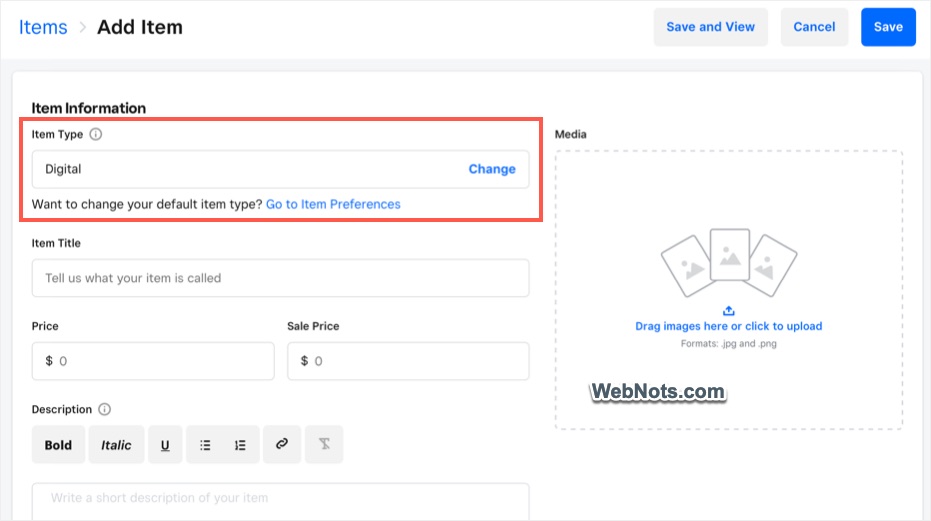
Weebly’s ecommerce features are solid for small businesses, offering product listings, payment integration, and basic inventory management (handled by Square). You will get these features only on higher-level pricing plans. Weebly lacks some of the advanced ecommerce options found in Wix and Squarespace, making it less suitable for larger online stores. Since Square is the owner of Weebly, you can easily integrate Square payments. Otherwise, PayPal (you need highest pricing plan for this) or Stripe can be used.
4. SEO Tools
Wix
Wix offers an SEO & GEO Dashboard that helps beginners optimize their website with step-by-step guidance. Advanced SEO tools allow users to edit meta tags, titles, and alt texts. Advanced users can use options like adjusting robots meta tags to control the search engine access to individual pages on the site. There are also apps from App Marketplace, which you can purchase to optimize the site if required (additional purchase required).

Squarespace
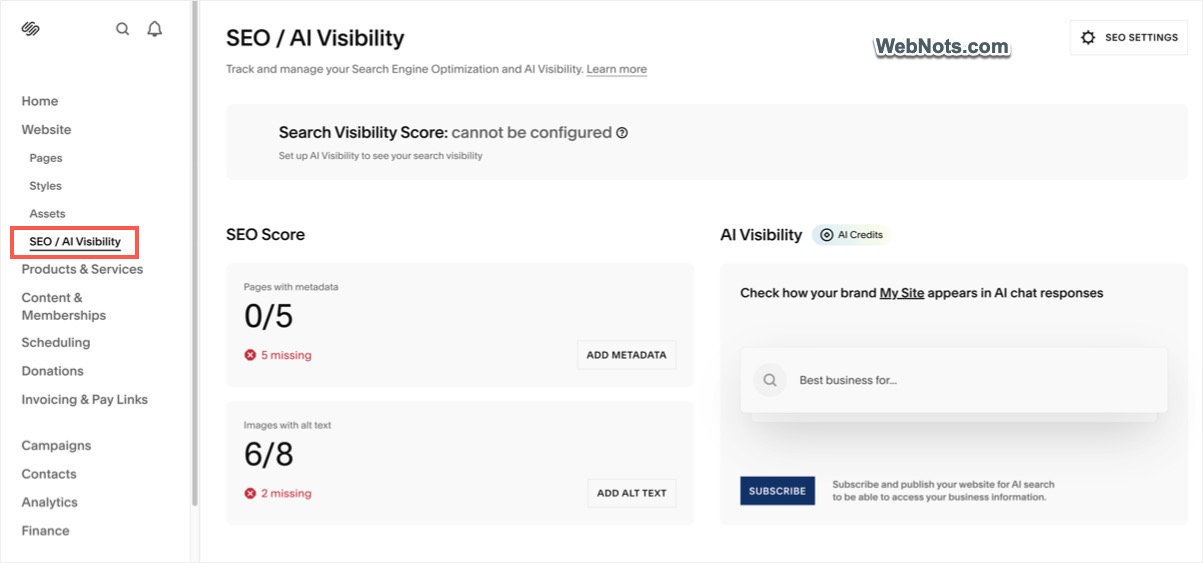
Squarespace offers built-in SEO and AI Visibility features, including the ability to edit meta descriptions, clean URLs, and automatic XML Sitemaps. You can integrate Analytics by connecting Google account from Dashboard. However, the overall SEO controls are limited compared to Wix.
Weebly
Weebly provides the essential SEO settings like custom URLs, meta tags, and descriptions similar to Squarespace and Wix platform’s settings. However, Weebly lacks more advanced features like SEO dashboard and GEO optimizations. You can easily add Google Search Console and Analytics verification codes in site level header or footer. One good thing is that Weebly allows you to add SEO apps to enhance your site’s search engine optimization from their App Center (like Wix App Marketplace, though with limited apps).

5. Customer Support
- Wix: Wix offers 24/7 customer support via email and phone, with VIP support for premium users. You have access to large help center with guides, tutorials, and community forums.
- Squarespace: Squarespace provides email support around the clock and limited live chat support during business hours. They also have a comprehensive help center and community forums. Squarespace’s guides and tutorials are well-written and easy to follow.
- Weebly: Weebly offers email and phone support for premium users and chat assistance available for all users. A detailed knowledge base and active community forums are available to assist users with common issues.
6. Pricing
Wix
Wix offers a free plan with Wix-branded ads and limited storage. Premium plans starts at $17/month for personal use (Light Plan) and goes up to $159/month for advanced ecommerce features (Business Elite Plan).

Squarespace
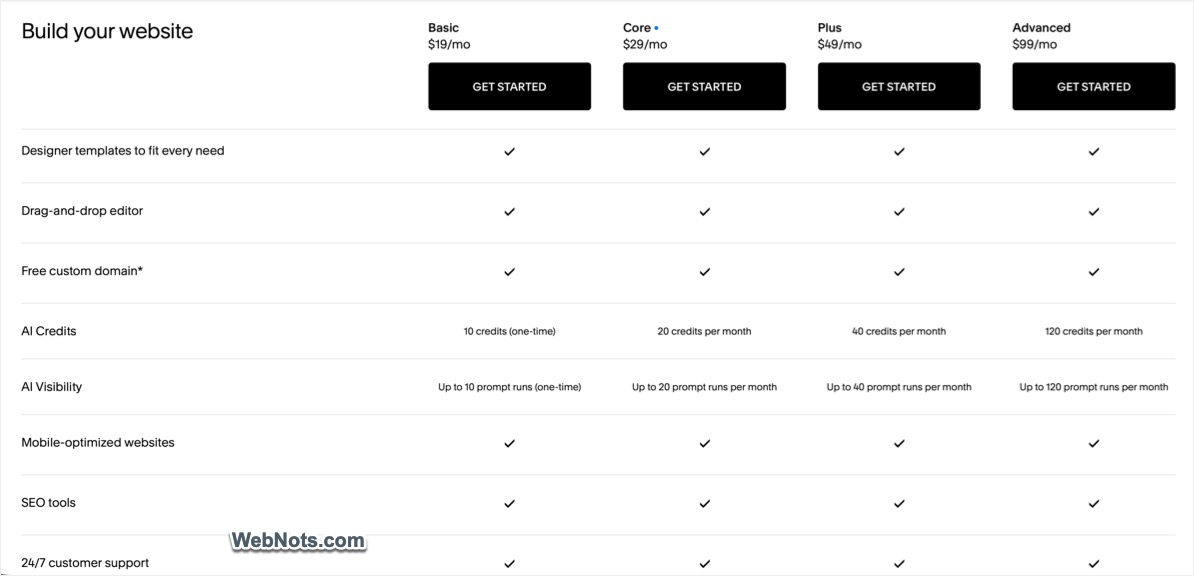
Squarespace does not offer a free plan but provides a 14-day free trial. Pricing plans start at $19/month (Basic) and go up to $99/month (Advanced Commerce) for larger businesses with ecommerce needs.
Weebly
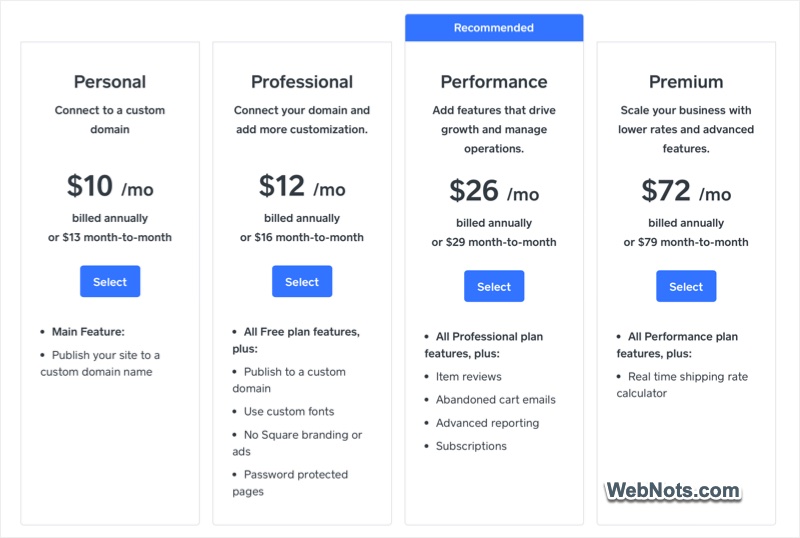
Weebly offers a free plan with limited features and Square branding. Premium plans start at $10/month for the Personal plan (still shows Square ads), with Professional plan starting at $12/month for more advanced features.
Note: As we have checked, the pricing of these platforms changes based on geographical location. All pricing plans mentioned above are applicable for USA.
Conclusion: Which Website Builder is Right for You?
All three Wix, Squarespace, and Weebly website builders offer excellent options depending on your specific needs and preferences.
Choose Wix If:
- You want maximum design flexibility with a robust drag-and-drop editor.
- You need a platform that grows with your business, offering solid ecommerce and app integrations.
- You’re comfortable paying a premium for advanced features and top-notch design tools.
Our rating for Wix is: 9 out of 10.
Choose Squarespace If:
- You’re looking for the best design quality and aesthetics, with polished templates.
- You need a robust ecommerce platform that integrates beautifully with your website’s design.
- You prefer a beginner-friendly platform with additional AI tools for instant website creation.
Our rating for Squarespace is: 8 out of 10.
Choose Weebly If:
- You’re a beginner or a small business owner looking for an affordable, easy-to-use website builder.
- You need a basic but functional platform that handles ecommerce and SEO without too many bells and whistles.
- You want to take advantage of the free plan or start with a budget-friendly solution for your website.
Our rating for Weebly is: 7 out of 10.