PayPal is an online payment processing system that allows you to send and receive money over the internet. Your account number is nothing but your login email id and you can add up to 8 email ids in one single account. This helps you to hide your real identity to others when sending and receiving money. However, you still need to verify your details with PayPal by linking a credit card or bank account. This verification helps confirm your identity and enables full access to payment and withdrawal features.

Why Do I Need Online Payment Account with PayPal?
Most international online advertising and affiliate programs use online payment accounts as a primary payout method, along with options like bank transfers or checks. For example, Infolinks pays publishers through PayPal with a minimum payout of USD 50, while the minimum amount for a bank transfer is USD 100. This makes online payment systems more convenient, especially for smaller publishers who want faster access to their earnings.
In addition, many advertising platforms and affiliate networks rely on online wallets to simplify global transactions. Some services, such as Microsoft Advertising program (Bing Ads), allow advertisers in the United States to receive refunds or payments through PayPal. Because of this, having a verified online payment account is often essential for bloggers, freelancers, and affiliate marketers who work with international programs and need a fast, low-cost way to receive commissions.
PayPal Personal Vs Business Accounts
PayPal Personal account is designed for individuals who want to send or receive money for personal use such as for online shopping, paying friends, or receiving small payments. On other hand, Business account allows you to accept payments under a business or company name. You can easily convert a Personal account to a Business account by adding and verifying the business details.
Here are the key differences:
| Feature | PayPal Personal Account | PayPal Business Account |
|---|---|---|
| Purpose | Personal use | Commercial or business use |
| Account Name | Individual name | Business or brand name |
| Payment Options | Basic sending and receiving | Advanced checkout and card acceptance |
| Tools | Limited features | Invoicing, reports, and integrations |
| Access | Single user | Multi-user access for teams |
Why PayPal Not others?
PayPal is a simple and reliable way to send and receive money online. You can easily use the email address when registering for affiliate programs, advertising platforms, or online services. All transactions are encrypted, and your financial details are not shared with merchants, which helps protect your privacy when making payments or receiving funds. The linked credit card can be used to make payments even if you do not have a balance in your PayPal account.
When you receive payments, you can transfer the money to your bank account. The rules for receiving and holding funds depend on the regulations of your country. In some countries, you can keep the balance in your PayPal account, while in others, the amount is automatically transferred to your linked bank account. Another important benefit is buyer protection. If you do not receive the promised product or service, you can file a dispute and request a refund. This encourages sellers to maintain quality and gives buyers added confidence when shopping online.

Benefits of PayPal Account
Here are some of the benefits you will get with the PayPal account.
- Pay and receive money without revealing your credit card or bank account details.
- Send money to more than 110 countries.
- Secured online payments using just an email address with encrypted transactions.
- Widely accepted by affiliate programs and advertising platforms.
- Option to pay using PayPal balance, linked bank account, or credit card.
- Quick withdrawal of funds to your bank account.
- Detailed transaction history for tracking income and expenses.
- Supports multiple currencies for global payments.
- Useful for receiving small or frequent international payments.
- Buyer protection on eligible purchases.
- Create invoices and collect payments from customers.
Note: PayPal features and usage may vary depending on the country you live in. For example, for Indian accounts, payments received are automatically transferred to the linked bank account on a daily basis, and users cannot keep a balance in their PayPal account.
Transaction Fee
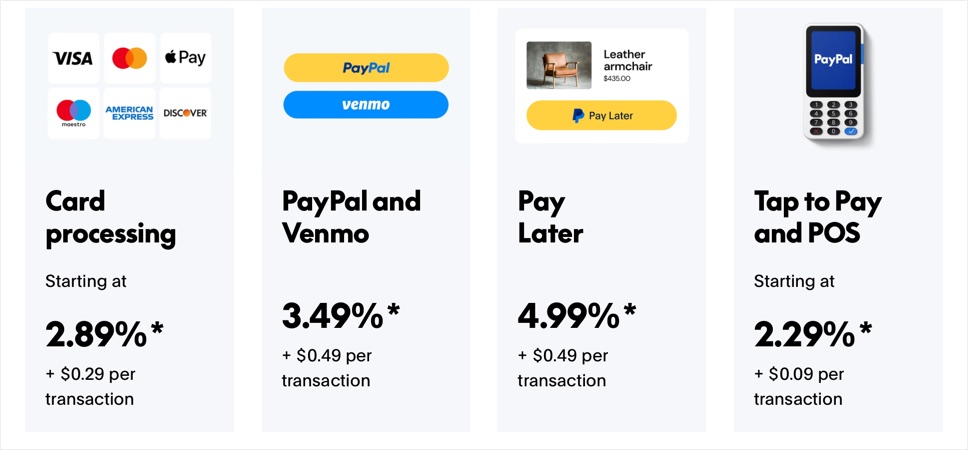
There is no fee to join PayPal and using their services. However, you need to pay three fees depending on the payment: Transaction fee, Fixed fee, and Currency Conversion fee. It also varies for Personal and Business transactions. Here is a fees involved in a business transaction (without currency conversion):
| Processing Type | Transaction Fee | Fixed Fee /Transaction |
|---|---|---|
| Card | 2.89% | $0.29 |
| PayPal and Venmo | 3.49% | $0.49 |
| Pay Later | 4.99% | $0.49 |
| Tap to Pay and POS | 2.29% | $0.09 |
Pre-approved Payments
One of the important features of PayPal is that users can setup pre-approved payments to merchants. This will enable you to pay monthly subscriptions and recurring payments automatically. At the same time, pre-approved payments can also cause you problem that you may end up in paying unnecessarily. Below is the video showing how to cancel the pre-approved payment in PayPal.

Restrictions on PayPal Indian Account
As per Reserve Bank of India’s regulation, PayPal Indian account has the following additional restrictions:
- The balance amount is squared off to zero on every day basis. This means you should not be able to carry the balance to the next day.
- You can’t transfer money from one Indian PayPal account to another PayPal account.
Similar to PayPal India, PayPal China has different set of rules, which you can checkout in our article about PayPal beginners guide for China.