Microsoft 365 (earlier called Office 365) comes as a package containing all popular Office apps like Word, Excel, PowerPoint, Outlook and OneNote. It also includes 1 TB free storage, Team, 60 minutes Skype time, in-built Editor for spelling and grammar checker and limited Clipchamp features. Earlier days, it was popular to purchase and use the apps separately. Though you can still buy standalone Office apps, it will cost hefty compared to buy a yearly subscription. If you are in confused state whether to buy standalone app or a subscription, here is a complete comparison for you to understand and make a correct decision.
Purchasing Office Apps from Microsoft
You will get headache if you try to find out all pricing plans available from Microsoft for purchasing their flagship Office apps. Though we outline all the available plans (as we understood), the primary focus is on buying standalone apps and Microsoft 365 personal/family subscription (section 1.1 and 3.1). At the end of the article, we have also provided a table showing the key differences between standalone app and Microsoft 365 Personal purchase.
1. Options for Purchasing Standalone Office Apps
Standalone Office apps are Office 2021 version and do not get any feature updates from Microsoft. You can buy Access, Word, Excel, Outlook, PowerPoint, Visio, Project and Publisher apps separately.
- Purchase supports installation on only one device either on Windows PC or Mac and use as a single person.
- There are no collaborative and sharing features to sync documents in cloud (OneDrive) and access them across multiple devices.
- Except for downloading and setting up, you do not need internet connection for using the standalone apps like Word or Excel (obviously, you need internet connection for Outlook).
Below is the picture of Microsoft store for standalone Office apps shop which has 13 products to purchase.

This shop page is not from US and we do not see such a consolidated shop page is existing for US. However, when you click on a product, Microsoft will prompt you to switch the store to your country so that the price will change accordingly. The prices mentioned in this article are from individual product pages from Microsoft US store.

There are two ways you can purchase these independent Office apps from Microsoft – one for commercial use and other for non-commercial home/student use. Microsoft will also upsell Microsoft 365 version and show a comparison when you try to purchase standalone apps.
1.1. Buying Office Standalone Apps with One-Time Payment
This is an ideal option when you look for purchasing a single app to use on your PC or Mac. You can buy Word, Excel, PowerPoint, Access, Outlook, Visio, Project or Publisher app separately. It will cost $159.99 one-time payment for buying an app.

1.2. Standalone Apps for Home and Student
This is a special option to buy Home and Student edition which is to be used for non-commercial purposes. This will cost $79.99 one-time payment which is half of standalone app’s price. However, this edition is available only for Word, Excel and PowerPoint apps.

2. Purchasing Bundled Office Apps with One-Time Payment
Unlike above two options, you do have two more options for purchasing Office 2021 apps in a limited bundled version for one-time payment.
2.1. Office Home & Student 2021 Bundle
This bundle consists of Word, PowerPoint and Excel apps meant for non-commercial purposes and cost you $149.99 one-time payment. There are also additional features to work with Teams and 60 days free support from Microsoft. Check complete Home & Student 2021 plan details here.

2.2. Office Home & Business 2021 Bundle
This is similar to Home & Student edition with a difference that you can use the apps for commercial purposes. Since it is a business bundle, it also includes Outlook app and cost you $249.99 one-time payment. Note that there are also two subscription-based plans to include Microsoft 365 apps in the purchase. However, we don’t think it is possible to upgrade from one-time purchase to subscription-based plans. Check the complete details here.

The pricing is strange that a standalone Word 2021 app will cost you $159.99 while Home & Business 2021 package will cost $249.99 which includes Word, Excel, PowerPoint and Outlook apps. So, it is clear that Microsoft is pushing their bundled and subscription-based versions by pricing standalone apps high.
3. Options for Purchasing Microsoft 365 Subscription
You have another bunch of pricing plans for purchasing Microsoft 365 subscription.
3.1. Microsoft 365 Home Plan for Personal or Family
This is the upsell version Microsoft shows on all standalone app purchase pages. Even you will get 1-month free trial for Family plan to test Microsoft 365 apps. While Personal plan costs you $69.99 per year for using all premium apps for one person on 5 simultaneous devices, Family plan allows up to 6 users each can simultaneously use 5 devices for $99.99 per year.

You can get more details about Family and Personal plans here.
3.2. Microsoft 365 for Business Plans
This is ideal for small businesses with full-scale integration of premium Microsoft Office apps. Business plan has four options – Basic, Standard, Premium and Apps. Basic version offers access to web and mobile versions of Word, Excel, PowerPoint and Outlook while other plans allow to install desktop versions. All business plans include features like business-class email with Exchange server and customer appointments.

You can get more details about Microsoft 365 Business plans here.
3.3. Microsoft 365 Enterprise Plans
There are three plans for organizations to use Office products. However, there are also additional plans available for using old Office 365 and for Frontline, Government and Non-profit organizations. These enterprise level plans include apps like Power BI, Visio, Sway Microsoft Stream, etc. You can get more detail here.

3.4. Microsoft 365 Education Plans
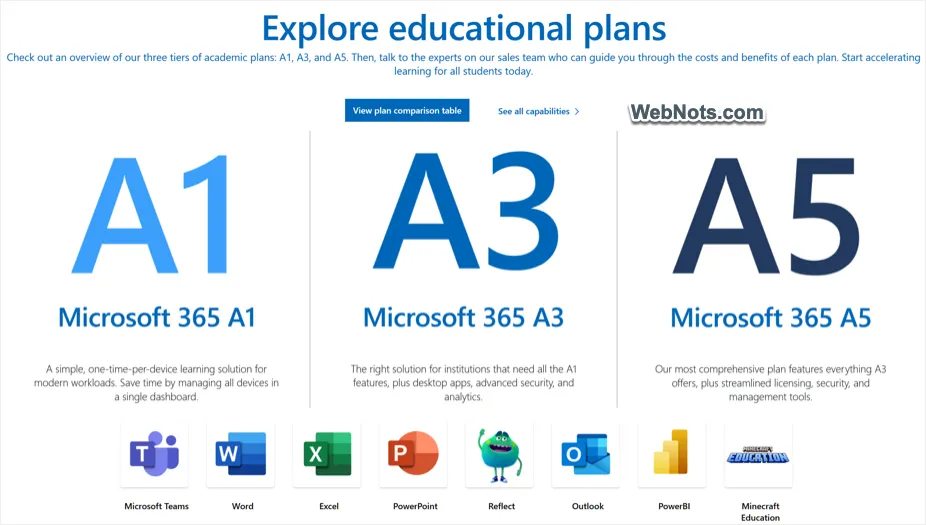
There are three academic plans (A1, A3 and A5) to use Microsoft 365 based on the need. There is no definite pricing and you need to contact their sales for getting the quote. You can learn more about these plans here.
Office Standalone Purchase Vs Microsoft 365 Personal Subscription
Now that you know all the available options for purchasing your Office apps from Microsoft. For an individual person, the confusion comes whether to purchase a standalone app or subscription-based Microsoft 365. Here is a summary of features compared for one-time purchase and Microsoft 365 Personal subscription to give you an overview.
| Feature | Office Standalone App | Microsoft 365 Personal Subscription |
|---|---|---|
| App(s) included | Single Office app | Word, PowerPoint, Excel, Outlook, Teams and OneNote |
| Additional perks | No | Microsoft Editor, Microsoft Defender, 1 TB OneDrive storage and limited Clipchamp features |
| Price | $159.99 one-time | $69.99 per year |
| Version | Office 2021 | Microsoft 365 |
| Number of people | 1 | 1 |
| Number of devices | 1 | 5 simultaneous |
| Mac & Windows | Yes (use on one device) | Yes |
| Mac App Store version | No | Yes |
| Online editor access | No | Yes |
| Free updates | No, only security updates | Yes |
| Support | No | Yes, including personal chat |
| Mobile apps | No | Yes |
Which One to Buy?
From the cost perspective, yearly Microsoft 365 subscription is more than 2 years cost of using standalone apps. In addition, subscribed apps will stop working or lose its features if you do not renew the payment. Obviously, the price will tend to increase in coming years and you will be bonded to Microsoft lifetime for using Office apps. Best example is the 1 TB free OneDrive feature. If you do not renew the subscription, you need to backup and migrate all OneDrive data to another cloud storage which is a complete hassle (OneDrive is also integrated in Windows making things more complicated to get rid of it).
On other hand, without feature updates and support, you may expect Microsoft to stop standalone 2021 app sales anytime. With AI revolution, you will get lot of eye-catching features with Microsoft 365 updates which will not be available to standalone apps. Soon, you will end up in using outdated features with standalone apps.
Since the future of Office apps is based on subscription plans, you do not have many options other than going for a subscription. Note that you can also upgrade Office 2021 to Microsoft 365 by purchasing a subscription and updating your apps with new license.