
Pay to click programs have been present since the early days of the internet. However, Microsoft Rewards is somewhat different in that category. It’s an innovative loyalty program that rewards users for simple, everyday interactions within the Microsoft ecosystem. Whether you are browsing the web or shopping online, Microsoft Rewards allows you to turn your digital activities into tangible benefits. In this article, we will explain the overview of Microsoft Rewards program, including its origins, how it works, the types of rewards available, and tips for maximizing your earning potential.
What is Microsoft Rewards?
Microsoft Rewards is a free program to incentivize Microsoft account holders, designed to engage them with the company’s products and services. Originally launched as Bing Rewards in 2010, the program was later rebranded and expanded to include a wider array of activities and benefits. Here are some of the reasons why you should consider joining the program:
- It’s free program with no cost associated with signing up or participating, making it accessible to all Microsoft account holders.
- It works seamlessly with devices and services you likely already use, such as Windows PCs, Xbox consoles, Edge browser, and Bing app.
- A wide range of activities ensures that both casual and active users can steadily accrue points.
- Points can be redeemed for items of real value, whether for personal use or as gifts for others. The ability to donate points to charity adds a philanthropic dimension to your daily digital routines.
How Microsoft Rewards Works?
At its core, Microsoft Rewards operates on a points system. You can earn points by completing a variety of activities, ranging from searching the web with Bing to completing quizzes or making purchases. There are numerous options to redeem the collected points for rewards like gift cards, sweepstakes entries, or even donate for charity.
Signing Up
Anyone with a Microsoft account can enroll in the program for free by visiting the official Microsoft Rewards website. Once registered, users can immediately begin earning points by completing the recommended tasks.

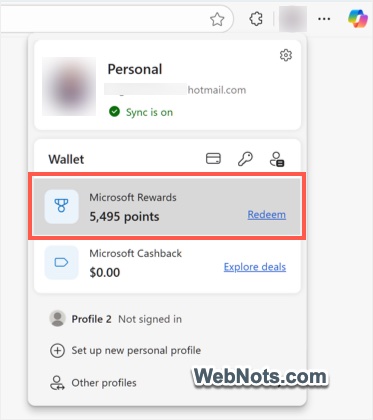
You can also keep track of the points and quickly access the rewards site from your Edge profile (by clicking on the profile icon on Edge). Similarly, Bing website will also show a rewards and earning options when logged in with your Microsoft account.

Earning Points
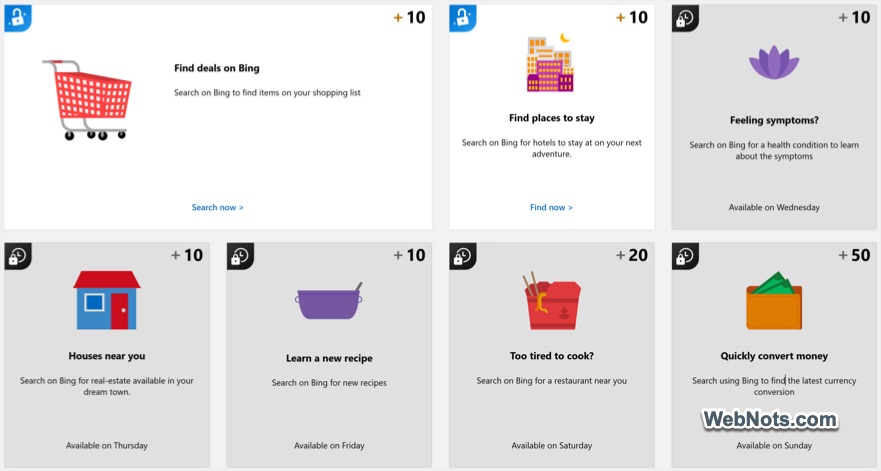
The program offers multiple avenues for earning points, catering to different user habits and interests. Some of the most common methods include:
- Web Searches with Bing: One of the simplest ways to accumulate points is by using Bing, Microsoft’s search engine, instead of competitors like Google. Users earn points for every search conducted, up to a daily limit. Premium points are often available for searches completed via Microsoft Edge or on mobile devices.
- Daily Sets and Quizzes: Microsoft frequently provides daily tasks, quizzes, and polls through its Rewards dashboard. Completing these not only increases your knowledge but also boosts your point total.
- Shopping in the Microsoft Store: Purchases made through the Microsoft Store, whether on Windows, Xbox, or online, earn reward points proportional to the amount spent. Occasionally, promotional offers provide bonus points for specific products.
- Xbox Activities: Xbox users can earn rewards by playing featured games, completing specific achievements, or taking part in special events or Game Pass quests.
- Promotional Offers: From time to time, Microsoft Rewards launches limited-time campaigns where users can earn extra points by participating in new services, trying apps, or referring friends to the program. There is also a referral program to earn from your friends joining the rewards program through your referral link (from Bing searches).
Levels and Status Tiers
To further engage users, Microsoft Rewards features tiered membership levels. Level 1 is the entry-level status, while Level 2 offers enhanced benefits such as increased earning caps and exclusive offers. Advancing to higher levels generally requires consistent activity, such as daily searches or regular purchases.

Redeeming Points: What Can You Get?
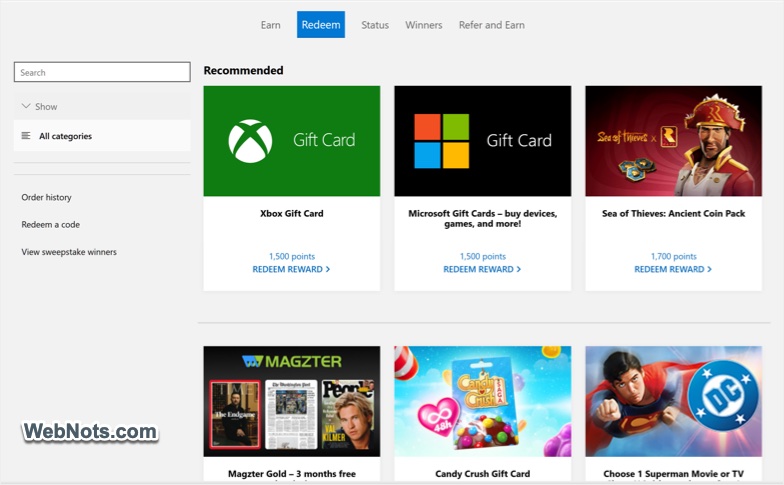
Accumulated points can be exchanged for a diverse selection of rewards. Microsoft continues to update and expand its catalog, but common options include:
- Gift Cards: These include Microsoft Store gift cards, Xbox gift cards, and cards for popular retailers like Amazon, Starbucks, and Target (availability may vary by region).
- Sweepstakes Entries: Users can enter draws for chances to win high-value items such as Surface devices, Xbox consoles, or large gift card denominations.
- Charity Donations: Microsoft Rewards also enables users to donate their points to a wide range of charitable organizations, converting digital engagement into real-world impact.
- Digital Content: Redeem points for movies, apps, games, or subscriptions within the Microsoft ecosystem.
- Special Offers: From time to time, Microsoft presents limited-time deals such as discounts, bundles, or early access to services for Rewards members.
Tips for Maximizing Your Microsoft Rewards
Although earning points is easy, some strategic actions can help you get more out of the program:
- Make it a habit to complete daily sets and quizzes for steady point accumulation. Consider using Bing as your default search engine or use Bing app to earn more points.
- Regularly check the Rewards dashboard (available on the Microsoft Rewards website) for new tasks, quizzes, and promotional offers.
- If you are an Xbox user, link your accounts and participate in featured quests for extra points.
- Watch for time-limited campaigns that offer boosted point earning rates or special rewards.
- Sometimes, saving up your points for higher-value rewards or limited-offer items yields greater value than frequent, smaller redemptions.
Frequently Asked Questions
Yes, joining and participating in Microsoft Rewards does not cost anything. Users simply need a Microsoft account.
No, points are non-transferable and are tied to the account holder.
Yes, points may expire if there is no account activity for a specified period (typically 18 months). Engaging in any rewards-earning activity will refresh your expiration timeline.
Users generally must be at least 13 years old, though age requirements may differ between countries.
While the program tracks user activity to award points, the data collected is managed in accordance with Microsoft’s privacy policy. You can review and manage the data preferences at any time through their account settings.
Microsoft Rewards is available in many, but not all, countries. The selection of rewards, point values, and promotional offers may vary based on region. It is advisable to review the specific terms and options available in your locale, accessible via the Microsoft Rewards website.


