Emojis are essential for modern web communication. While most operating systems have their own emoji sets, they can look inconsistent across Windows, macOS, Android, and Linux. Google’s Noto Color Emoji provides a unified, colorful, and well-designed emoji set that works across all platforms. However, using it on the web requires some considerations, especially for Mac Safari browser.
1. Understanding Noto Color Emoji
Noto Color Emoji is part of Google’s “No Tofu” project and includes color emojis (glyphs with built-in color) and modern Unicode coverage (emojis, smileys, flags, symbols). It has special color formats:
- CBDT/CBLC – bitmap‑based (used in ChromeOS, Android, and most Chromium browsers).
- COLR/CPAL – vector-based newer format.
- SVG‑in‑OpenType – vector‑based (used by Firefox, Safari, and some other renderers)
Since the SVG version may cause rendering issues in browsers like Safari (both desktop and iOS), never set Noto Color Emoji as your primary/interactive font without fallbacks.
2. Using Noto Color Emoji Font File
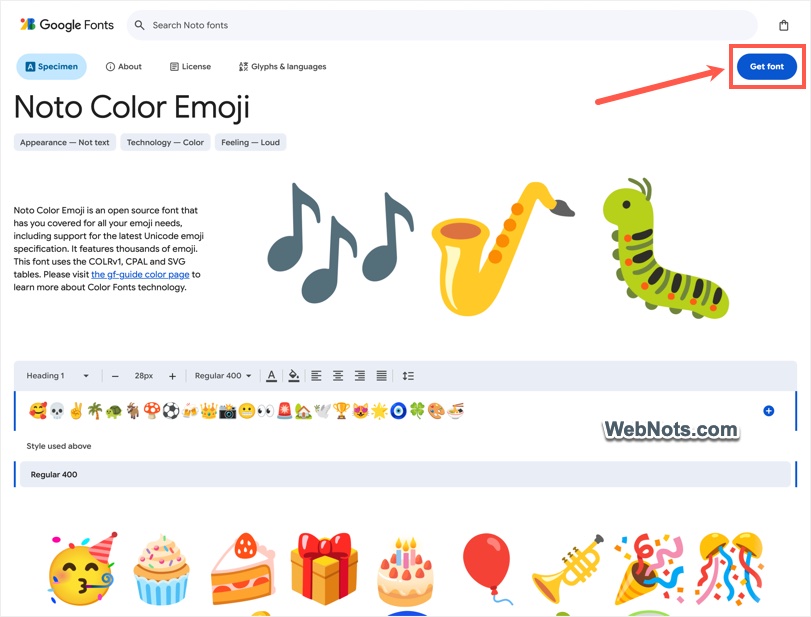
You can preview the emoji font in official Google Fonts website. Make sure to check the correct font as there are many Noto fonts including Noto Emoji (which is in grayscale). There are three ways to include the CSS font file in your site either using Google CDN URL or hosting the file on your server.
First, click the “Get font” button on Google Fonts site.
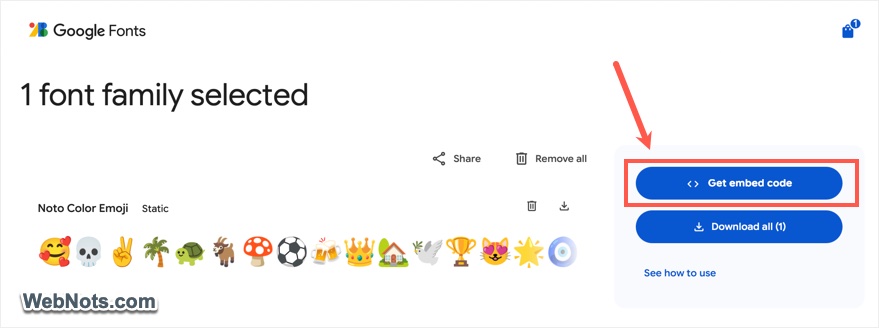
On the next page, click the “Get embed code” button.
Under the “Web” tab, you can find the CDN URLs for Link and Import method.
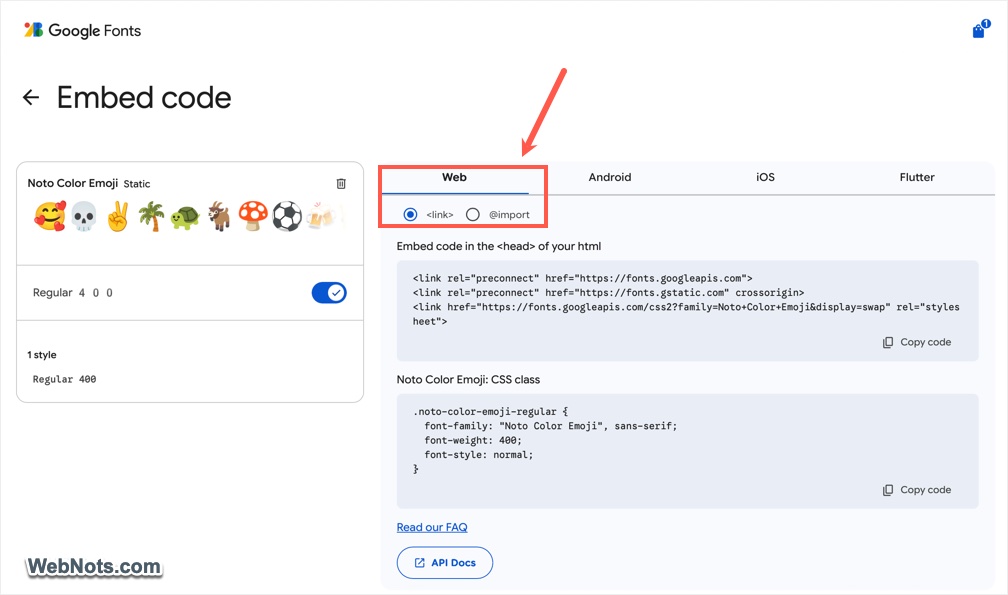
- For linking, use the following code between the
<head>and</head>sections on your website.
<link rel="preconnect" href="https://fonts.googleapis.com">
<link rel="preconnect" href="https://fonts.gstatic.com" crossorigin>
<link href="https://fonts.googleapis.com/css2?family=Noto+Color+Emoji&display=swap" rel="stylesheet">- For importing the font file, use the following code in the
<head>section of your page.
<style>
@import url('https://fonts.googleapis.com/css2?family=Noto+Color+Emoji&display=swap');
</style>
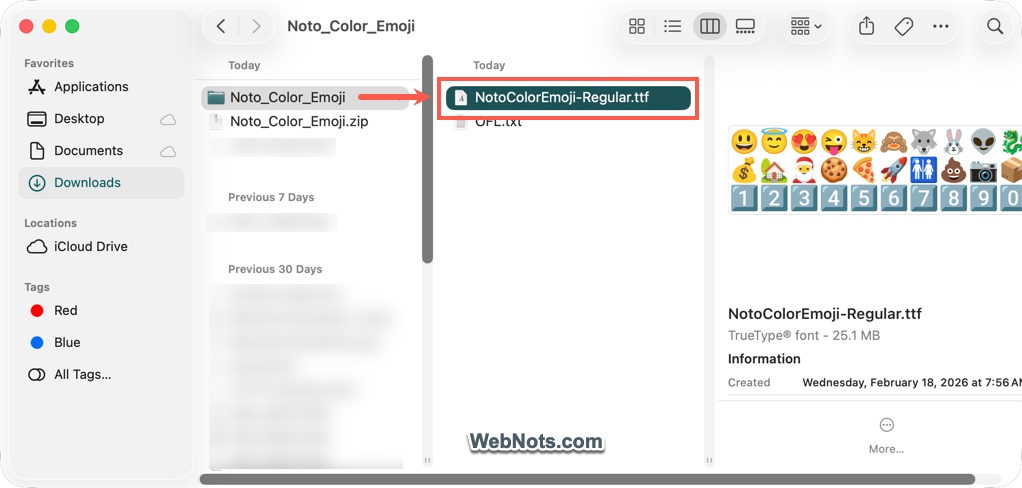
If you don’t want to link or import the file from Google’s server, it’s possible to host the file on your own server. After clicking the “Get font” button, click the “Download all” button. Extract the downloaded “Noto_Color_Emoji.zip” file and upload the “NotoColorEmoji-Regular.ttf” file under the /fonts/ folder on your server.
If required, you can convert (using an online tool) the .ttf file to other formats like .woff and .woff2. When hosting the fonts on your server, you don’t need to link or import the file in the header section. You can directly add @font-face CSS rules to your site’s main stylesheet. In most cases, the file will be named style.css, mainstyle.css, or something similar. Make sure you add the CSS to the correct stylesheet and confirm that the file is properly loading on the page.
@font-face {
  font-family: "Noto Color Emoji Self";
  src: url("/fonts/NotoColorEmoji-Regular.ttf") format("truetype");
  font-weight: normal;
  font-style: normal;
  font-display: swap;
}
3. Using Noto Color Emoji Fonts
Now that you have connected the source font files, the next step is to use the font on your site.
3.1. Using Font-Face with Fallback
The safest and most performant way is to declare Noto Color Emoji as a fallback after your system’s native emoji font using the following CSS.
body {
  font-family: "Apple Color Emoji", "Segoe UI Emoji", "Segoe UI Symbol", "Noto Color Emoji", "Android Emoji", "EmojiOne Color", "Twemoji Mozilla", sans-serif;
}
Although the above code loads Noto Color Emoji, the browser will first try Apple Color Emoji or Segoe UI Emoji (native OS emoji) and use Noto only when those fonts are unavailable. As a result, Noto emojis are typically visible only on systems without native emoji support, like some Linux distributions and older Android devices.
Note: You can also combine the generic “emoji” font family (which automatically picks the system’s preferred color emoji font) with Noto like below:
body {
  font-family: "Noto Color Emoji", emoji, sans-serif;
}
Here, emoji resolves to Apple/Segoe/Noto depending on the OS. Noto acts as a fallback if the system lacks a color emoji font (rare). Though this format is supported on Chromium based browsers and Firefox, Safari does not support this.
3.2. Forcing Noto Color Emoji
If you insist on showing Google’s emoji design on every platform (for branding or design consistency), you must force the font and apply it to the whole body. However, we don’t recommend this as browsers like Safari has issue with the font. So, you can restrict it to a particular block or element.
Add this code in your main stylesheet file:
.google-noto-emojis {
 font-family: "Noto Color Emoji", "Apple Color Emoji", "Segoe UI Emoji", sans-serif;
}
Then wrap the element like below:
<span class="google-emojis">🎉 🚀 ❤️</span>4. Typing the Emoji Symbols
You don’t need any special tool for typing emoji symbols as most operating systems have an in-built option for that:
- Windows: Press the ⊞ Windows + . (period) or ⊞ Windows + ; (semicolon) keys.
- macOS: Press Command + Control + Space to open the Character Viewer.
- Mobile (iOS/Android): Simply tap the emoji icon on your device’s on-screen keyboard. It’s often located near the space bar.
This inserts the actual Unicode character, which Noto Color Emoji font will then automatically render.
5. Demo HTML Page with Noto Color Emoji
Though it is easy to implement Noto Color Emoji font on your site, not all browsers support proper rendering. Therefore, make sure to test thoroughly across different browsers and devices before deploying the changes to your live site.
Below is a complete HTML page example that uses the @import CSS URL from the Google CDN. The page contains two boxes: one displaying Noto emojis and another displaying standard Unicode emojis so you can compare the visual differences. Blocks 1, 2, and 3 (marked in the comments) are related to the Noto emoji implementation.
<!DOCTYPE html>
<html lang="en">
<head>
<meta charset="UTF-8">
<meta name="viewport" content="width=device-width, initial-scale=1.0">
<title>Noto Color Emoji – Forced Example</title>
<style>
/* 1. Load Noto Color Emoji from Google's CDN */
@import url('https://fonts.googleapis.com/css2?family=Noto+Color+Emoji&display=swap');
/* 2. Force the font on a specific block (and its children) */
.noto-emoji-block {
font-family: 'Noto Color Emoji', 'Apple Color Emoji', 'Segoe UI Emoji', sans-serif;
/* No fallback to system emoji – Noto is first in stack */
font-size: 1.3rem;
line-height: 1.25;
background: #f9f9fc;
padding: 1.5rem;
border-radius: 24px;
border: 1px solid #e0e0e0;
max-width: 700px;
margin: 2rem auto;
box-shadow: 0 4px 12px rgba(0,0,0,0.05);
}
.unicode-emoji {
font-size: 1.3rem;
line-height: 1.25;
background: #f9f9fc;
padding: 1.5rem;
border-radius: 24px;
border: 1px solid #e0e0e0;
max-width: 700px;
margin: 2rem auto;
box-shadow: 0 4px 12px rgba(0,0,0,0.05);
}
body {
font-family: system-ui, -apple-system, 'Segoe UI', Roboto, Helvetica, Arial, sans-serif;
background: #ffffff;
margin: 0;
padding: 2rem;
text-align: center;
}
</style>
</head>
<body>
<h3>🎨 Demo of Google Noto Color Emoji</h3>
<p>The first box below uses <code>font-family: 'Noto Color Emoji'</code> and the second box uses system-ui body font.</p>
<!-- 3. Forced Noto Color Emoji Block -->
<div class="noto-emoji-block">
🚀 Here are your Noto Color Emojis:<br><br>
General: 🥸 😀 🎉 🐶 🍕 ☀️ 🏆 🎸 🔥<br><br>
Flags: 🇺🇸 🇬🇧 🇫🇷 🇯🇵 🇧🇷<br><br>
People: 🧑💻 👨👩👧👦 🧑🚀 👩🍳<br><br>
<strong>Mixed text:</strong> I love coding 💻 and emojis ✨️!
</div>
<div class="unicode-emoji">
🚀 Here are the Unicode emojis based on OS:<br><br>
General: 🥸 😀 🎉 🐶 🍕 ☀️ 🏆 🎸 🔥<br><br>
Flags: 🇺🇸 🇬🇧 🇫🇷 🇯🇵 🇧🇷<br><br>
People: 🧑💻 👨👩👧👦 🧑🚀 👩🍳<br><br>
<strong>Mixed text:</strong> I love coding 💻 and emojis ✨️!
</div>
</body>
</html>The result is shown below, where you can see the differences in the emoji display.
🎨 Demo of Google Noto Color Emoji
The first box below uses font-family: 'Noto Color Emoji' and the second box uses system-ui body font.
General: 🥸 😀 🎉 🐶 🍕 ☀️ 🏆 🎸 🔥
Flags: 🇺🇸 🇬🇧 🇫🇷 🇯🇵 🇧🇷
People: 🧑💻 👨👩👧👦 🧑🚀 👩🍳
Mixed text: I love coding 💻 and emojis ✨️!
General: 🥸 😀 🎉 🐶 🍕 ☀️ 🏆 🎸 🔥
Flags: 🇺🇸 🇬🇧 🇫🇷 🇯🇵 🇧🇷
People: 🧑💻 👨👩👧👦 🧑🚀 👩🍳
Mixed text: I love coding 💻 and emojis ✨️!