There is no free lunch – this popular quote is more suitable for the internet companies offering free services. With every free service, the owner company will collect personalized data and use it for different purposes. Especially when using Google, you need to understand how the data is being tracked and how it is being used. Though there are many case filings in different countries against Google for breach of privacy of users, it is unfortunate truth that most of the individual users never read and understand the privacy policy documents. In this article, let us explore how Google collects personal information through free services it offers and the possibility of reducing the tracking.
Why Google Tracks User Data?
Basically, Google is an online advertisement company generates most the revenue by displaying advertisements through its services like Google Search, YouTube, Gmail, etc. In order to generate more revenue, Google follows the interest based advertising technique to show relevant ads by using personal information of the users. As you need to have a Google account (Gmail id) to use any of the services, it is easy for Google to track all your account activities and understand your interests.
Let us take an example – assume you are using a web hosting service and receive promotional emails from the hosting company on your Gmail account. On Gmail interface, these promotional emails can be seen under “Promotions” tab. Now, Google will display similar web hosting advertisements when you view the promotional emails. This will drastically increase the click through rate of the advertisements since it is relevant to the mail content and to the interest of you thus increasing the ad revenue for Google.

More Examples of Tracking
Google offers plenty of free services to ensure all users start using their products. Here are some of Google products you may be using on daily basis:
- Gmail for sending and receiving emails.
- YouTube – the largest video hosting platform in the world.
- Google Fonts – used on most of the websites.
- Google Search – have more than 60% of global search volume.
- Google Chrome – the most popular browser.
- Android operating system on most of the popular mobile devices.
- Google Play Store for digital marketplace.
Almost every single search on Google Search, YouTube and Google Maps are stored and tracked by Google for different purposes. Google keeps the history of each individual user under their user accounts which can be easily used for understanding the interest and serve personalized advertisements.
Tracking – View from Web Development
For website owners and developers, Google offers many free tools like Google Fonts, Analytics, Ajax libraries, etc. to build, monitor and improve the performance of websites on Google search engine. Since the resources like fonts and JavaScript libraries are served through Google’s content delivery network, they are popular among developers to use it on their plugins and themes. It also eliminates the worry of compatibility and updates from developer’s perspective – since Google takes care of maintaining the latest versions.
Let us take an example – assume you have purchased a theme from a developer’s site which uses Google fonts. Unknowingly you will start using Google fonts on your site – and Google tracks your usage data to understand the statistics of their font usage.
More About Google Privacy Policies
You can checkout the privacy policy page of Google to see what information Google collects from the users and how it is being used. Here are some of the points from that policy page that may surprise you:
- Collected information includes apps, browser, device type, IP address, browser settings, operating system, mobile network, carrier name, phone number, etc.
- Tracking includes search terms, watched videos, interaction with content and ads.
- Methods used to collect information include cookies, pixel tags, browser’s storage, app cache, database and server logs.
In simple words, every single activity you do when accessing a Google service is being tracked.
How to Stop Google from Tracking You?
Though there are few tips to reduce the tracking from Google, it is evident that you can’t eliminate it completely. Also, you can try with alternate available products that offer tracking prevention.
Control the Settings
The first step is to control the types of data you want to share with Google. Go to Google account history page and clear all your browsing history. You can also make necessary settings not to record your activities. View the personal info & privacy section to control the data like ad settings.

Try Alternate Browsers
Next step is to switch you browser and search engine. You can try privacy focused browser apps like DuckDuckGo. Since DuckDuckGo also offers search in-built search engine, you do not need to rely on Google Search.

Google Analytics Opt Out Browser Add on
Google also tracks user data through the popular Google Analytics code installed on most of the sites by the site owner. If you want to opt-out from tracking by Google Analytics, then install the Google Analytics opt-out browser add on. This add-on is available for Chrome, Safari, Firefox, Opera and Microsoft Edge.
Use Ad Blockers
Advertisements are the primary way for Google to collect your information. Some browsers like Firefox Focus automatically help to block content trackers, social trackers and advertisements when you open websites. Otherwise, you can use ad blockers to prevent the advertisements from loading thus avoiding tracking cookies are set in the browser.
Stop Tracking on Mobiles
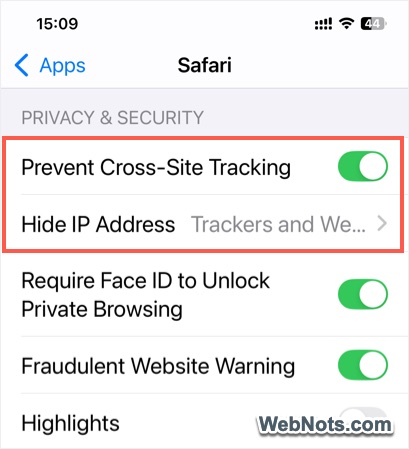
Since Android and Play Stores are owned by Google, you can only adjust your Google account’s settings to prevent syncing and storing your data. However, Apple offers various tracking prevention on iOS Safari browser for hiding your IP and preventing cross-site tracking by websites.
Conclusion
At this internet age, it is really difficult to expect everything for free without any tracking. It is also a difficult situation to imagine a world without Google products like Android or Google Search. What you can do is try to use alternative products wherever possible and make appropriate settings to reduce the tracking. It is sure that if not Google, some other company will spy on your activities starting from your favorite apps, news websites, online shopping and even through a query on search engine.