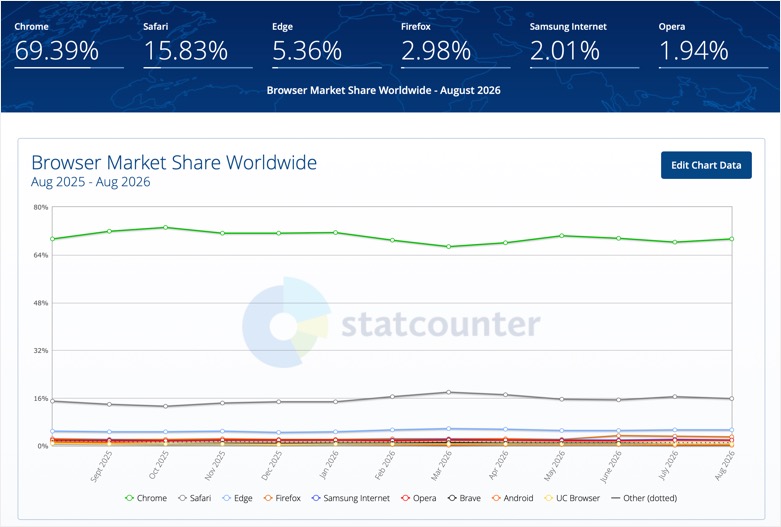
Artificial Intelligence (AI) affected almost everything in past few years and browsers not an exception to that. For a while, it seemed AI would completely transform the web browser. Yet the predicted Google Chrome collapse never happened. As of August 2026, Chrome still held 69.39% of worldwide browser usage, per StatCounter, far ahead of Safari (15.83%) and Edge (5.36%). The funny truth is that AI browsers were not even in that usage list. So why didn’t AI browsers replace Chrome?
What are AI Browsers?
Rather than opening a browser, searching Google, clicking through sites, copying information, and asking a chatbot to summarize it, why not embed AI directly in the browser? That idea produced a new generation of AI browsers promised to do more than displaying websites like understanding pages, summarizing information, answering questions, and even performing tasks on users’ behalf. Here are some of the popular AI browsers launched in past few years with the AI boom:
| AI Browser | Company | What made it notable |
|---|---|---|
| Arc Search | The Browser Company | AI first mobile browsing with “Browse for Me”, which researches a question and creates an answer page. |
| Dia | The Browser Company | AI focused successor to Arc, designed to understand browsing context and help with research, writing and web tasks. |
| Perplexity Comet | Perplexity | Native AI browser with an assistant capable of understanding webpages, managing tabs, summarizing information and performing tasks. |
| Opera Neon | Opera | Agentic browser designed to perform actions such as research, shopping, form filling and creating content. |
| ChatGPT Atlas | OpenAI | ChatGPT integrated directly into a browser, with an agent mode capable of performing tasks on websites. |
| Genspark AI Browser | Genspark | AI centric browser with agentic automation and an emphasis on running AI tools and tasks through the browser. |
| Fellou | Fellou | Agentic browser focused on multi step web research and task automation. |
These AI browsers like Atlas, Comet, and Dia did not make any impact on the Chrome userbase. In fact, the most expected ChatGPT Atlas (launched in October 2025) was discontinued as a standalone browser in 2026 and OpenAI moved its browser agent capabilities into ChatGPT and Codex. This is the best example of why the AI browser story turned out differently from the initial predictions.
1. Chrome Was Already Deeply Embedded in People’s Lives
The biggest obstacle for an AI browser isn’t technology; it’s getting people to switch. This is the same reason why Microsoft failed with Edge browser as users are not ready to switch from Chrome. Chrome isn’t just an app for visiting websites. For many users, it holds years of bookmarks, passwords, browsing history, extensions, settings, open tabs, and personalized preferences. Switching means moving an entire digital environment to another world.
AI browsers offer impressive features, but those must justify abandoning something that already works. That’s especially hard because Chrome runs across Windows, macOS, Android, and Linux, while some AI browsers launched on only one platform. ChatGPT Atlas, for example, initially launched on macOS only. That creates friction before a user even experiences the AI features.
2. Chrome Benefits From Google’s Enormous Ecosystem
Chrome is connected to a much larger ecosystem like Google Search, Gmail, YouTube, Google Drive, Google Maps, Android, and more. The app also comes preinstalled on Android and most retailers preinstall it on Windows OS also. This creates convenience, and Chrome doesn’t have to win every feature comparison.
An AI startup might build an excellent AI assistant, but reproducing the infrastructure surrounding Chrome is a completely different challenge. This is why competing with Chrome is fundamentally different from competing with an individual AI chatbot.
3. Most People Don’t Need an AI Agent For Ordinary Browsing
AI browser demos show impressive scenarios: finding the cheapest flight, researching companies, comparing products, summarizing 20 pages, or adding items to a shopping cart. These are interesting capabilities, but they represent only part of what people do in a browser. Much of everyday browsing is simpler like opening Gmail, watching YouTube, checking social media, reading news, visiting known sites, or searching and clicking a result.
For those activities, an AI agent can introduce unnecessary complexity. If you already know the site you want, asking an AI to navigate there isn’t faster than typing the address. That’s one reason impressive demos haven’t translated into mass switching.
4. AI Agents Still aren’t Perfectly Reliable
A conventional browser is predictable by loading a webpage and lets you interact with it. An AI agent must interpret what you want, understand a page, decide what to click, fill out forms correctly, and recover from mistakes. That’s much harder for most users.
When Comet launched, testing found its AI assistant useful for simple tasks but struggling with more complicated requests. Similar limitations have affected other browser based AI agents. For an experimental tool, occasional mistakes are tolerable. For a browser handling email, shopping accounts, financial sites, work applications, and personal information, reliability matters far more. Users don’t want an AI that’s “usually right” but they want a browser that behaves predictably.

5. Chrome Has Started Becoming an AI Browser Itself
Perhaps the biggest strategic mistake in the “AI will kill Chrome” narrative was treating Google as a passive observer. Google has been adding AI directly into Chrome. Instead of requiring users to abandon Chrome for an AI browser, Google brings AI features to the browser people already use. Recent Chrome updates have expanded capabilities powered by Gemini including analyzing webpages and media, creating quizzes, and helping users continue browsing across devices.
The choice is no longer “traditional Chrome versus futuristic AI browser”. It’s increasingly “Chrome with AI versus another browser with AI”, which is a much harder battle for new entrants. It’s not just Chrome, traditional browsers like Edge and Brave also added AI features to make the competition tough for new products in the market.
| Browser | Company | What made it notable |
|---|---|---|
| Gemini in Chrome | Google’s move to put Gemini directly inside Chrome, providing AI assistance without requiring users to switch browsers. | |
| Copilot Mode in Edge | Microsoft | Microsoft expanded Edge with AI powered browsing, including multi tab reasoning and agentic capabilities. |
| Brave Leo | Brave | AI assistant built directly into Brave, with webpage summarization, document analysis, translation and content creation. |
6. Browser Extensions are a Huge Switching Barrier
Extensions may not sound exciting when compared with AI agents, but they’re one of Chrome’s strongest advantages. Users have accumulated extensions for password management, ad blocking, writing assistance, developer tools, productivity, shopping, security, accessibility, and research. Moving to a new browser means finding replacements and checking whether they work correctly.
For most technical users and professionals, extensions are part of their workflow. An AI browser isn’t competing against Chrome’s interface alone; it’s competing against an entire collection of tools built around Chrome.

7. AI Browsers Initially Attracted Enthusiasts, Not Everyone
The people most excited about AI browsers are often the same people who enjoy experimenting with new AI products. They’ll download a new browser, test an agent, report bugs, and tolerate unfinished features. However, the average internet users are different. Their mind set is simple: if Chrome works, why change?
This creates a classic technology adoption problem. Early adopters may be fascinated without the product becoming a mainstream replacement. For example, Perplexity’s Comet was initially launched to a limited audience before becoming free to everyone in October 2025. While the company worked to expand its user base, it didn’t happen as of now.
So, getting attention is relatively easy but getting hundreds of millions of people to change their default browser is much harder.
8. Privacy Becomes Much More Complicated
AI browsers potentially know far more about a user than traditional search engines. The browser can see all the sites you visit, pages you read, searches you perform, products you consider, work applications, logged in accounts, and browsing history. Adding an AI system to the browser can interpret this information and act on your behalf, and you get a powerful product, but also a much bigger privacy and security question.
For mainstream users, the question isn’t just “Can this browser do more?” It’s also “How much of my online life am I comfortable giving to this AI?” That makes adoption slower.

Final Words
The failure of AI browsers to immediately crush Chrome doesn’t mean the concept failed. It may mean the original prediction was too simplistic. AI is changing the browser, but changing the browser doesn’t necessarily mean replacing it. AI can sit on top of existing browsers. Instead of replacing Chrome, an AI assistant can operate alongside it through a sidebar, extension, desktop app, or integrated feature. This removes the biggest barrier of switching. You keep your bookmarks, extensions, and passwords while adding AI capabilities.
The next battle may be less about which browser people install and more about which AI becomes the layer through which people interact with the web.