Airplane Mode is one of the simplest settings on a smartphone. You can simply tap that airplane icon to silence your digital world. But have you ever wondered what actually happens to your smartphone when you enable airplane mode? Beyond the obvious “no more notifications,” there’s a fascinating cascade of technical changes occurring inside your device. Let’s explore exactly what happens when you activate that iconic setting.
What is Airplane Mode?
Airplane Mode is a system setting designed to quickly disable certain wireless communications on your phone. It was created primarily for use during air travel, where cellular connectivity may need to be disabled according to airline and aviation requirements. When you enable it, your phone changes the state of its wireless radios rather than shutting down the phone itself.
- On Android: Go to “Settings > Network & internet” and turn off “Airplane mode” option. Alternatively, swipe down from top of the screen and tap the airplane icon.
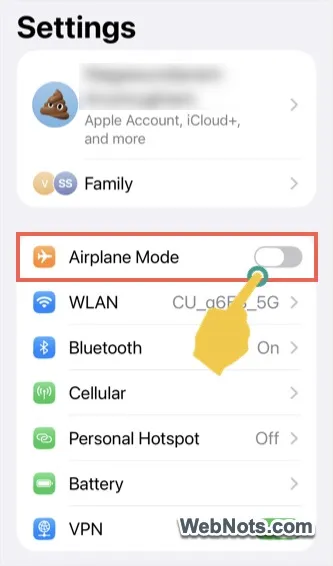
- On iPhone: Go to “Settings” and turn on “Airplane Mode” option. Alternatively, swipe down from top right corner of the screen to open Control Center and tap on the airplane icon.
The Immediate Radio Shutdown
The most significant change is that your phone immediately stops transmitting all radio signals. This includes:
- Cellular connectivity: Your phone ceases communication with nearby cell towers. No more calls, text messages, or mobile data. Your carrier’s network essentially “loses” your phone until you disable airplane mode.
- Wi-Fi: The Wi-Fi radio shuts down, disconnecting you from any nearby networks. Your phone stops scanning for available connections.
- Bluetooth: This short-range radio also powers down, disconnecting any paired devices like headphones, speakers, or smartwatches.
- GPS: While GPS is technically a receiver rather than a transmitter, it’s also typically disabled to save power. Though some newer phones keep it active, the precise location may not work if cellular data and Wi-Fi is turned off.
Why This Matters for Air Travel?
The primary reason for airplane mode isn’t a myth, despite what some skeptics claim. While a single phone might not bring down an aircraft, the collective radio signals from hundreds of devices could potentially interfere with sensitive cockpit instrumentation. Additionally, cell towers attempting to connect to phones moving at 500+ mph creates network congestion and can even cause dropped calls on the ground. Airlines also appreciate passengers being more present and less distracted during safety briefings and taxiing.
The Battery Life Bonus
Here’s a pleasant surprise: airplane mode significantly extends your battery life. Your phone typically consumes substantial power just searching for signals, especially in areas with poor reception. When radios are off, your processor has less work to do, allowing your battery to last considerably longer, sometimes twice as long as normal usage.
The Modern Exception: Wi-Fi and Bluetooth Re-enablement
Since 2013, Federal Aviation Administration (FAA), the agency that regulates civil aviation in the United States, has permitted passengers to use Wi-Fi and Bluetooth during flights when aircraft have the appropriate technology. Modern phones allow you to manually re-enable these connections while staying in airplane mode. This means you can:
- Connect to onboard Wi-Fi for streaming or messaging.
- Use Bluetooth headphones.
- Access the internet through in-flight entertainment systems.
What Still Works?
Airplane mode isn’t a digital lobotomy. Your phone remains a capable device:
- Alarms and timers function normally.
- Offline apps like notes, calendars, and downloaded content remain accessible.
- Music and video previously downloaded continue playing.
- Photos and camera work as usual.
- Games without internet requirements remain playable.
The Secondary Benefits
Beyond its primary purpose, airplane mode serves as a digital detox tool. It creates instant boundaries, allowing focused work without notifications. It’s also useful for:
- Toggling airplane mode on and off is one of the troubleshooting steps for resolving network issues and connectivity problems.
- Reducing radiation exposure during sleep (if that concerns you).
- Extending battery life during emergencies.
- Preventing accidental roaming charges when traveling internationally.
Airplane Mode vs Turning Off Wi-Fi and Mobile Data
These settings aren’t identical.
- If you turn off mobile data, your phone can still remain connected to the cellular network for calls and other carrier services.
- If you turn off Wi-Fi, your phone can still use cellular data.
- Airplane Mode is designed as a broader wireless-disconnection setting (although modern phones allow Wi-Fi and Bluetooth connections).
Conclusion
Airplane mode is far more than a travel requirement; it’s a sophisticated feature that transforms your phone from a connected communications hub to a versatile offline device. Whether you’re soaring at 35,000 feet, trying to conserve battery, or seeking digital peace, this simple toggle remains one of your phone’s most useful tools.
Next time you tap that airplane icon, appreciate the complex symphony of shutdowns happening behind your screen. Your phone isn’t just being quiet; it’s being efficient.