The iPhone is an incredibly powerful device, packed with features that can transform the way you communicate, work, and enjoy life. However, most iPhone user do not even know some features are existing as they are buried under deep settings. For example, you can enable functions (like taking a screenshot or home button) by double or triple tapping the backside of your iPhone. The best way to learn, especially new features released with new iOS version, is to make use of the official iPhone user guide from Apple. It is an invaluable resource for understanding every aspect of your device and make use of the hidden features.
What You Can Get with the iPhone User Guide?
Here are some of reasons how the free user guide from Apple can help you:
- The guide covers everything from basic setup to advanced features, ensuring you’re never left confused.
- Having the guide downloaded means you can access it even without an internet connection.
- The guide is regularly updated by Apple and tailored for your specific iOS version.
- Clear instructions, illustrations, and tips help you solve problems and learn new tricks.
Follow one of the below options depending upon whether you want to download the guide or read it online.
1. Downloading from Books App
This is the most convenient ways to get the iPhone user guide. Apple Books app comes pre-installed on most iPhones, but if you’ve removed it, you can re-download it from the App Store.
- Locate and tap the Books app on your iPhone’s home screen.
- Tap on the Search button at the bottom right corner, type “iPhone User Guide” in the search box and tap on the search key on the keyboard. You can also include your iOS version for the best match like “iPhone User Guide for iOS 26”.
- Find the official guide published by Apple Inc. It should appear among the top results and have the Apple Inc. as the publisher.
- Tap the guide to check preview and read reviews, then tap “Get” button.
- The guide will be downloaded and added to your library. Open the Books app at any time, go to “Library” section to find and read your iPhone user guide. You can read the downloaded books even without internet access.

The advantage with this method is that you can get the official guide for older iOS versions like iOS 7. However, you may need to wait longer time for getting the latest iOS version guide after the software is released for public.
2. Download PDF from Safari Browser
Apple also provides the iPhone user guide online in a digital format that’s always up to date. This is great for users who prefer browsing online or want to download the guide as a PDF file from any device like iPhone, Android, Mac, iPad or Windows PC. Here, we explain how to download the PDF in iPhone using Safari app.
- Open Safari and go to official Apple iPhone user guide page to find the user guide for the latest iOS version.
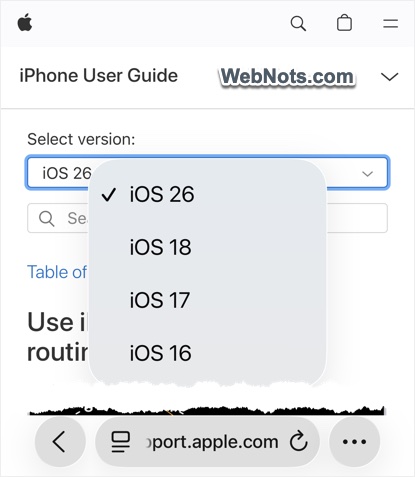
- Use the table of content and search box to navigate through the guide online. When reading a specific page, you can switch the applicable iOS version for you (for example, switch from iOS 26 to iOS 16).
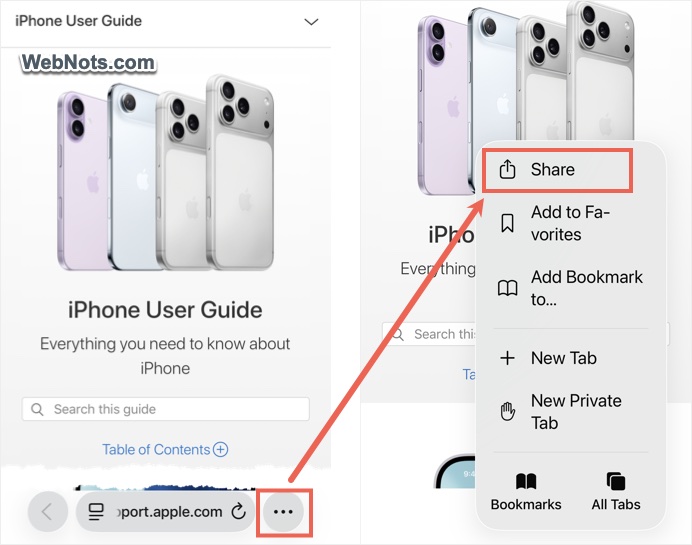
- If you prefer to have a PDF version of the entire guide for offline reference, tap the icon (three-dots inside a circle) and select “Share” option (or simply tap on the “Share” icon on older iOS versions) when you are in the iPhone user guide home page.
- Tap on the “Options” button showing below the “iPhone User Guide” file name.
- Select “PDF” option and tap on the tick mark icon to go back.

- Now, you should see “PDF Document” is showing below the file name. select a device or people to share the PDF or tap “Save to Files” to download the PDF to your iPhone or iCloud Drive.

- Open Files app and navigate to “Recents” section to find your PDF iPhone user guide file.
- Tap on the file to open it with the Preview app (available from iOS 26). You can edit and annotate the PDF’s content using the Preview app to make notes on the guide.

This is the best option for sharing the PDF guide to others or read anytime without an internet connection.
3. Reading Online with Tips App
iPhone also comes with another app called Tips for suggesting new features especially after installing a new iOS version. This Tips app offers the full iPhone user guide which you can read anytime. The guide is the same as you can find online in Apple support website.
- Open Tips app and scroll down to “User Guides” section.
- Tap on “iPhone” option.
- Use table of content and search feature to quickly find the content you want to read from the guide.

Good thing is that Tips app will offer the applicable iOS guide for your iPhone. However, the problem is that you need an internet connection to use the app.
Frequently Asked Questions (FAQ)
Yes, Apple provides the official iPhone User Guide at no cost in both Apple Books and online.
Books app offers the user guide for older iOS versions and you can also switch the iOS version when reading the guide online through Apple support website. However, Tips app offers only the version applicable for iOS version installed on your iPhone model.
Apple offers the iPhone User Guide in several languages. Check the Books or the online guide’s language options.
With each major iOS update, a new version of the user guide is released. Download the latest version when you update your device.