Google AdSense is one of the first options for content publishers to start making money. The payment is reliable, and Google will automatically schedule the payment when the threshold amount is reached. However, if you want to hold the payment and delay the schedule, here is how you can do that.
Default AdSense Payment Schedule
By default, Google will process your payment:
- When minimum threshold of $100 is reached.
- 21st to 26th of each month or the next working day.
Unfortunately, you can’t change the regular schedule to pay on another day. What you can do is to change the threshold amount so that the payment is delayed. In addition, you can also select a specific date to get the delayed payment.
Changing Threshold and Delay Payment
- Login to your AdSense account and go to “Payments > Payments info” section.
- Here you can find your current earnings and threshold amount.
- Scroll down to bottom of the page to find “Settings” section. click on “Manage settings” link showing below the “Settings” section.

- This will take you to your payment profile page and find “Payment schedule” under “Payments account” heading.
- Click the pencil edit icon to change the details.

- Type the new threshold amount in “Increase payment threshold – min $100 (optional)” box.
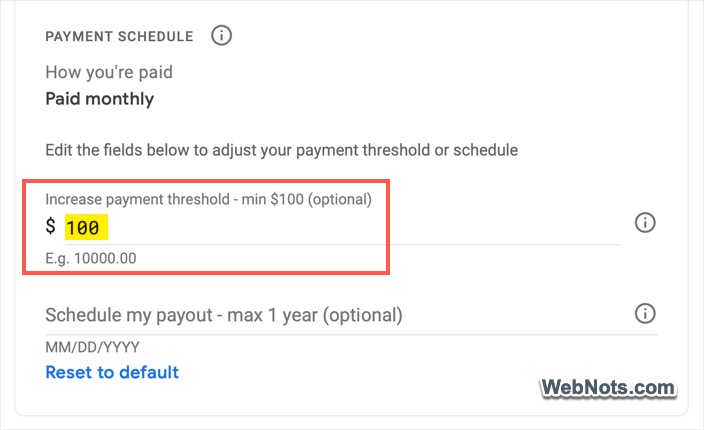
- Click the “Schedule my payout – max 1 year (optional) and select a date for your delayed payout.
- Click anywhere outside to save your changes.

You can anytime click on the “Reset to default” link to change the threshold to $100 and remove the scheduled date.
What Will Happen?
Let’s take an example:
- Current date – 05th of September.
- Earnings till August – $175.
- Default threshold amount – $100.
In this case, your payment of $175 will be automatically processed on 21st of November without any action. However, you change the settings on 10th of November as below:
- New threshold amount – $250.
- Delayed schedule date – 05th December.
- Total earnings by end of October – $400
- Total earnings by end of November – $540.
Now, Google will process $400 which is your eligible accrued payment on the scheduled date 05th December as the amount exceeded the set threshold amount. If you have only set the threshold without any scheduled date, then Google will process $540 on 21st of December as per the default monthly payment cycle.
Points to Note
- Payment information changes should be done before 20th of the month. Otherwise, it will be effective only for the next cycle which is next month’s 21st.
- You can only increase the threshold amount above $100 and can’t reduce it below that amount.
- Accrued payment will be processed till month end before two months (October month end earnings will be processed on 05th December instead of November month earnings as explained in the above example).
- You can delay the payment for the maximum of one year and not more than that.