Whenever registering a new domain name, you need to provide details like your name, phone number, email address, and other required information to the domain registrar. Depending on the registrar and domain extension, you may also need to verify (through a call or SMS) some of these details. Information about the domain registration is maintained by the registrar and the relevant domain registry. Anyone can access most of this information using a domain lookup service, generally called WHOIS or RDAP.
WHOIS and RDAP
While the registration data is maintained by registrars and registries, ICANN (Internet Corporation for Assigned Names and Numbers), a nonprofit organization coordinates the domain name system and develops policies and requirements for domain registration services..
- WHOIS is an Internet protocol traditionally used to query domain registration databases and obtain information about registered domain names.
- For generic top-level domains (like .com, .org, and .net), ICANN transitioned from the traditional WHOIS protocol toward RDAP (Registration Data Access Protocol) since January 28, 2025.
For everyday users, however, the term “WHOIS lookup” is still commonly used when referring to checking domain registration information even though the underlying technology for gTLD lookups is now generally RDAP.
How to Check Your Domain Details?
You can check publicly available registration information using the official ICANN Lookup service. The service is operated by the Internet Corporation for Assigned Names and Numbers (ICANN) and uses RDAP for domain registration lookups.
- Open the ICANN Lookup website.
- Enter your domain name (like webnots.com) in the search box and click the “Lookup” button.
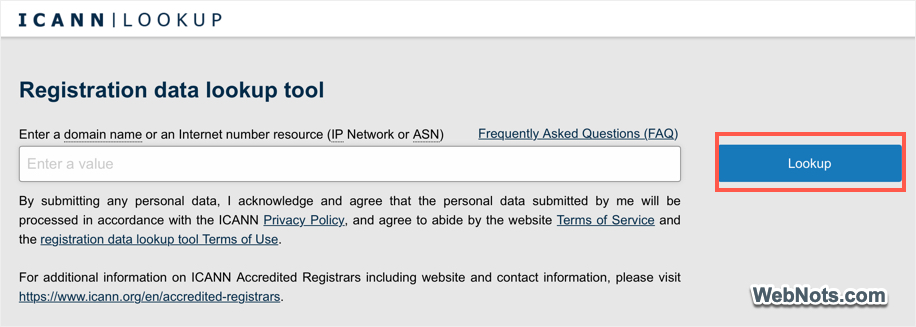
- Look for details like the registrar, domain status, creation date, expiration date, and nameservers.

You do not normally need to log in simply to look up publicly available registration information.
What Information Can You Find With a WHOIS Lookup
Generally, a WHOIS or domain registration lookup can provide the following information:
- Domain name and status.
- Registrar name and details.
- Registration, expiration, and updated dates.
- DNS and nameservers related information.
- Personal registration data associated with the domain.
- Available contact or registrant information.
For example, a lookup may show something similar to:
| Information | Example |
|---|---|
| Domain Name | example.com |
| Registrar | Example Registrar |
| Domain Status | clientTransferProhibited |
| Creation Date | January 10, 2020 |
| Expiration Date | January 10, 2027 |
| Nameservers | ns1.example.com |
| Registrant | Privacy Protected |
| Registrar Country | United States |
The exact information displayed depends on the domain extension, registrar, registry, privacy protections, and applicable data protection rules.
Can WHOIS Show the Domain Owner’s Name?
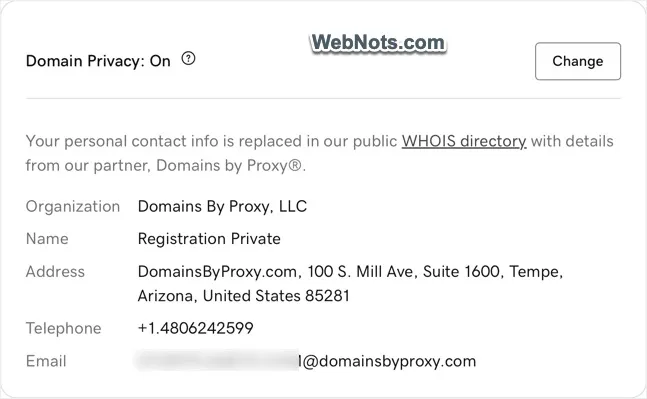
Historically, WHOIS records could contain the name, address, telephone number, and email address of a registered domain owner. However, privacy laws, registrar policies, and privacy or proxy services have significantly changed how much personal information is publicly displayed. You may therefore see something like “Registrant: Privacy Protected” or “Registrant: Redacted for privacy” instead of an individual’s name and contact information.
This does not necessarily mean that the domain has no identifiable owner. It generally means that the owner’s personal information is not being displayed publicly through the lookup service. For example, Domain Privacy service offered by the registrar may replace the personal details of the owner with the registrar’s contact details. Below is how it shows when you register a domain with GoDaddy. The organization shows as “Domains By Proxy” instead of the actual domain owner’s name or company.
What Does Domain Status Mean?
A lookup can also display one or more EPP (Extensible Provisioning Protocol) domain status codes like below.
- clientDeleteProhibited
- clientRenewProhibited
- clientTransferProhibited
- clientUpdateProhibited
These statuses are related to restrictions placed on operations like deleting, renewing, transferring, or updating a domain. Seeing a status code does not automatically mean that there is a problem with the domain. Many are normal security settings applied by registrars.
Why Would You Use a WHOIS Lookup?
There are many legitimate reasons to look up domain registration information. For example, you might want to:
- Check when a domain was registered to find the age of a domain.
- Find the registrar managing a domain. This can be useful if you have forgotten which company you used to register a domain. For example, if you own several domains registered with different companies, a lookup can help identify the registrar associated with each domain.
- Check a domain’s expiration information to find when the registration is scheduled to expire.
- Examine nameservers to find the DNS information associated with the domain. Keep in mind that the nameserver provider and web hosting company are not necessarily the same company.
- Check publicly available registration information.
- Investigate a domain involved in a technical or security issue.
- Research an existing domain before contacting its owner or administrator.
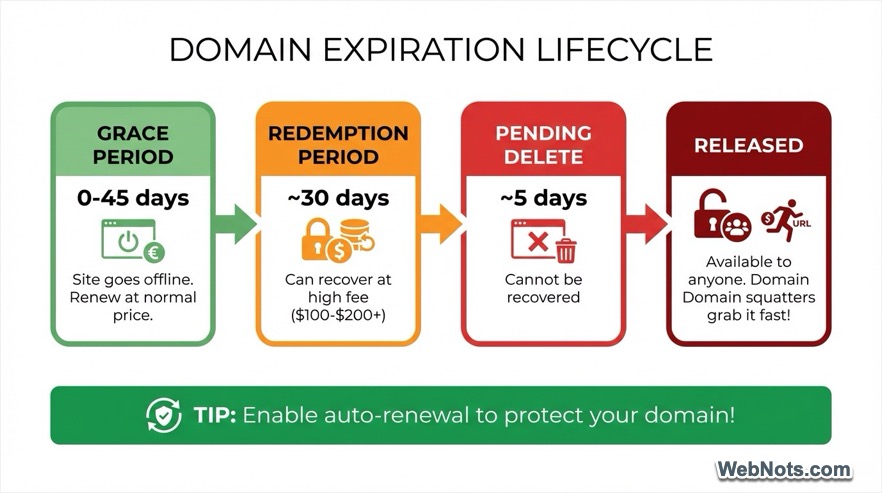
Note: Domain expiration date should not be confused with the date on which a website will immediately stop working. Registrars and registries can have renewal, grace-period, redemption, and deletion processes, so the expiration date is not necessarily the same as the final date on which a domain can be recovered. If it is your domain, your registrar account remains the best place to manage and verify your renewal status. Below is the common domain expiration cycle followed by popular registrars.
Frequently Asked Questions
The term WHOIS is still widely used, but for ICANN regulated gTLD registration data, RDAP has replaced traditional WHOIS as the definitive system.
WHOIS is generally not considered an acronym. ICANN describes WHOIS as a system and protocol used to access information associated with registered Internet resources.
Use the official ICANN lookup service to access publicly available registration information without registering for an account.
Yes. Publicly available registration data for a domain can generally be queried through an appropriate lookup service. However, personal information may be hidden or redacted.
Not always. Privacy protections and data redaction policies can prevent the public from seeing the registrant’s personal information.
You can usually find the domain’s creation or registration date through the lookup results. You can then calculate how long ago the domain was registered.