Weebly is one of the free site building tools offering many features including site builder, email, hosting and domain registration. What you need is a computer and an internet connection without out the need of downloading and installing any software. The sign up process is also very easy and you will be ready to start building your dream site in minutes. We started this site with Weebly more than a decade back before moved to WordPress.org. So, you can rely on this review as it is based on our usage and experience.
Brief History of Weebly
Weebly is a private web company founded in 2007 offering various tools for building a web site. Three college friends David Rusenko, Dan Veltri and Chris Fanini built Weebly site builder to provide an easy platform for the people to publish their work online. It became quickly famous among webmaster’s community due to the easy to use WYSIWYG drag and drop site editor. Weebly claims that they power over 50 million websites.

During 2018, the payment processing company Square purchased Weebly. Currently, Weebly is the backend for Square Online platform which primarily focuses on ecommerce users. At this moment, you need a Square account to login to Weebly and it is not clear how long Square Online and Weebly will continue to work independently. This is a major concern if you are planning to purchase a plan for Weebly for long term usage. You can find some Weebly official articles say the support will exist till Jul 2025 and they can’t guarantee after that. However, we have updated this review based on the assumption that Weebly will continue to exist as an independent platform.
Basic Weebly Setup
Here is how the Weebly setup works:
- You need a Square account to login to Weebly or use Facebook or Google account.
- After logging in, you will be landing on the Dashboard section where you can manage ecommerce stuffs (like creating products), domains and switch site for editing.
- Editing site will take you to Weebly Editor where you can drag and drop elements to build your content.
- You can connect to custom domain, customize site’s settings and publish it online.

Note: Some hosting companies like SiteGround offer Weebly on cloud. In this case, you should login to Weebly through the hosting account.
Before diving into features, let’s us first explain the pricing plans.
Weebly Pricing Plans
When you look at Weebly’s pricing page, you will see that Weebly offers four plans to cover different needs of users. However, if you are logged in and check the upgrade page, you will see an additional plan called Premium. Earlier, there was also a Business and Business Plus plans which were subsequently renamed or removed. Here os a summary of the current plans available in Weebly:
| Plan | Number of Sites | Price Per Month (Monthly Plan) | Price Per Month (1 Year Plan) | Price Per Month (2 Years Plan) |
|---|---|---|---|---|
| Free | 10 | Free | Free | Free |
| Personal | 10 | $13 | $10 | $9 |
| Professional | 10 | $16 | $12 | $10 |
| Performance | 10 | $29 | $26 | $22 |
| Premium | 10 | $79 | $72 | $68 |
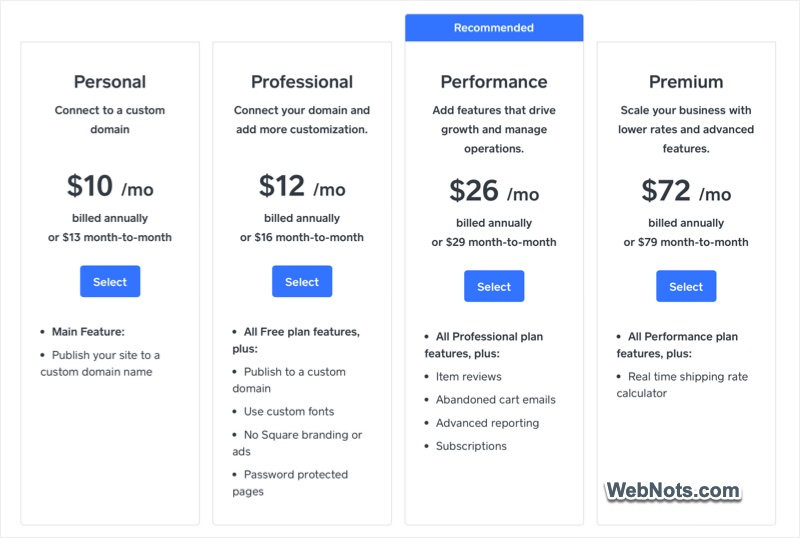
The pricing plans are similar to other platforms like Wix or Squarespace.
Weebly Dashboard and Editor
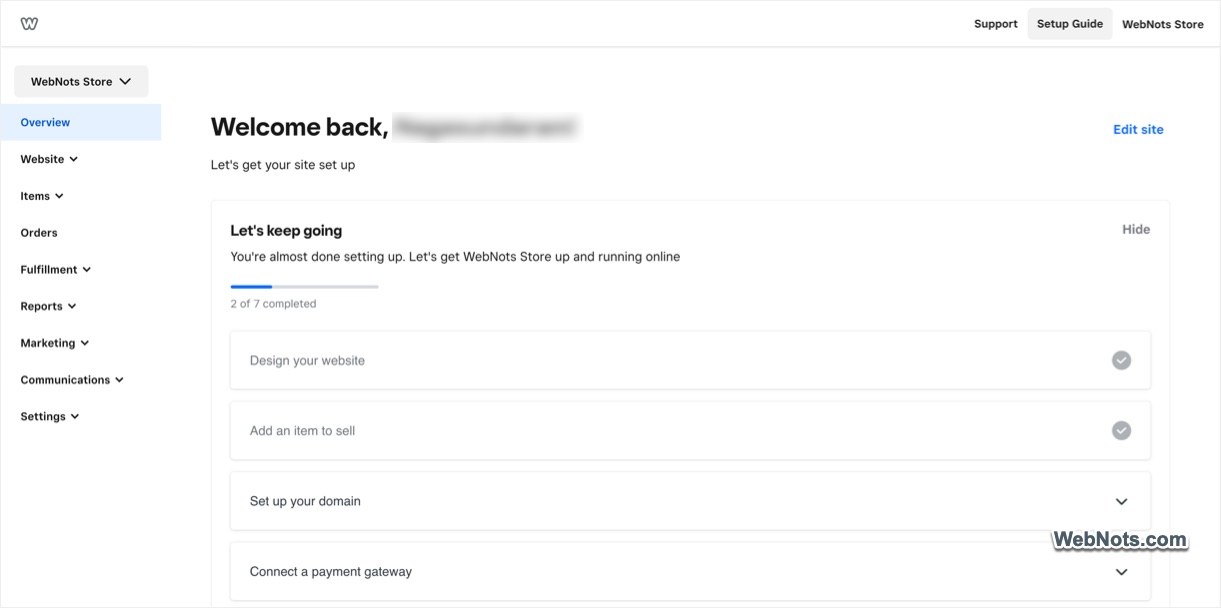
Dashboard will show a checklist of items to guide you in creating your first Weebly site. As you can see, it primarily focuses on ecommerce store as Weebly is owned by Square. You can create products, coupons, gifts and manage your store orders from Dashboard. Other than that, you can manage domains purchased from Weebly and switch site (if you have multiple websites).
Select the site from dropdown and click on the “Edit site” link to go to Weebly Editor.
The major advantage of Weebly is that it does not need any prior technical skills to start building a site. The elements are arranged in left sidebar which you can just drag and drop on a page to build your content. Top menu helps to manage pages, apps, themes and customize site’s settings. You can create a content site, blog or an online store using various features with the same drag and drop builder interface.
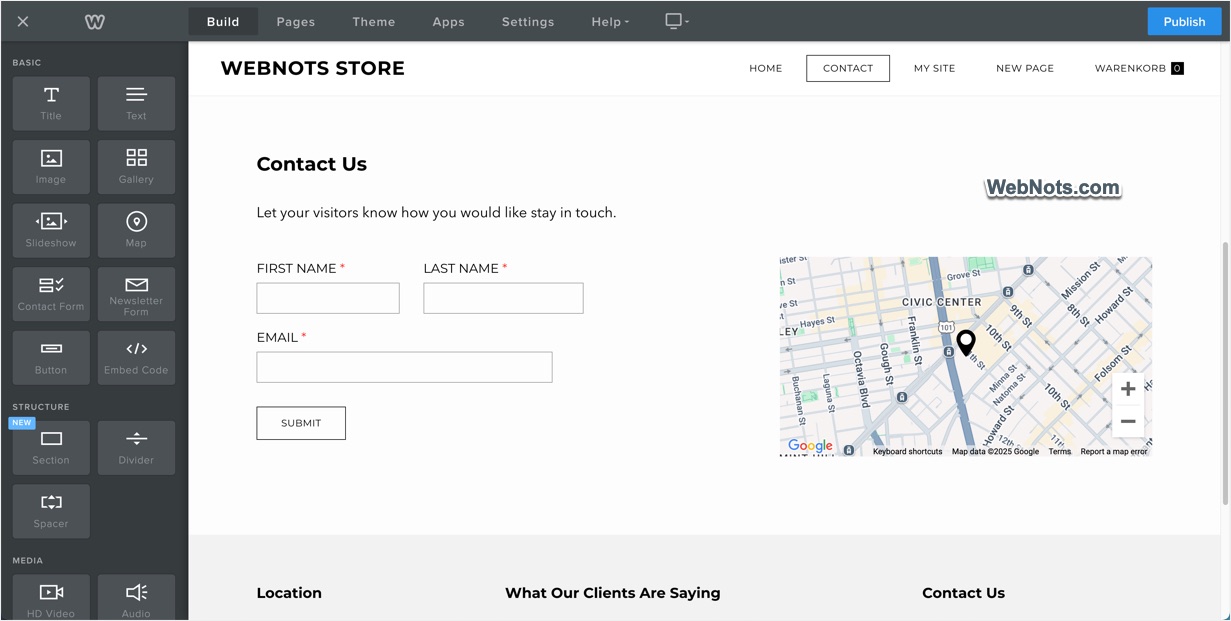
Weebly’s success forced other popular platforms like Wix (moved from Flash) and WordPress (moved from Classic to Gutenberg editor) to offer simplified drag and drop editor.
Note: There is also Code Editor in Weebly to modify the source HTML and CSS of templates. In addition, you can insert third-party codes on your site using Embed Code element or from the site settings page.
Weebly Themes
Weebly offers less than 20 responsive themes – yes, you read it right – less than 20 and not 200. While platforms like Wix offer thousands of templates, this is kind of absurd for a platform asking to pay $72 per month for their Premium plan. Though there are plenty of non-responsive themes, they are outdated and you need to manually adjust the mobile site in the editor (you will see a separate mobile editor when using non-responsive themes).

Good thing is that you can switch the theme without losing your content (this is not possible in Wix) and edit the source HTML / CSS to modify the base templates.
Blogging and SEO Features
Weebly is definitely not meant for full-fledged blogging. However, you can get a basic features to keep as an add-on for your ecommerce store. You can simply add blog page and create posts with categories. It is also possible to enable comments and showcase various widgets in blog sidebar.

Note that you can’t backup blog and store pages. Though it is possible to download the archive of other content, it will also not work properly when you import the content.
Ecommerce Features
If you notice the name, it is Weebly – eCommerce by Square. So, it is obvious that Weebly is meant for small business owners who want to establish their presence through an online store. You will not be disappointed with the Weebly’s ecommerce capabilities combined with Square’s payment gateway. Performance or Premium plan is needed for adding PayPal, sending abandoned cart emails to users, customer registration and real-time shipping rate calculation.
$26 per month for Performance plan is actually cheaper than Squarespace or Wix to get similar features.
App Center
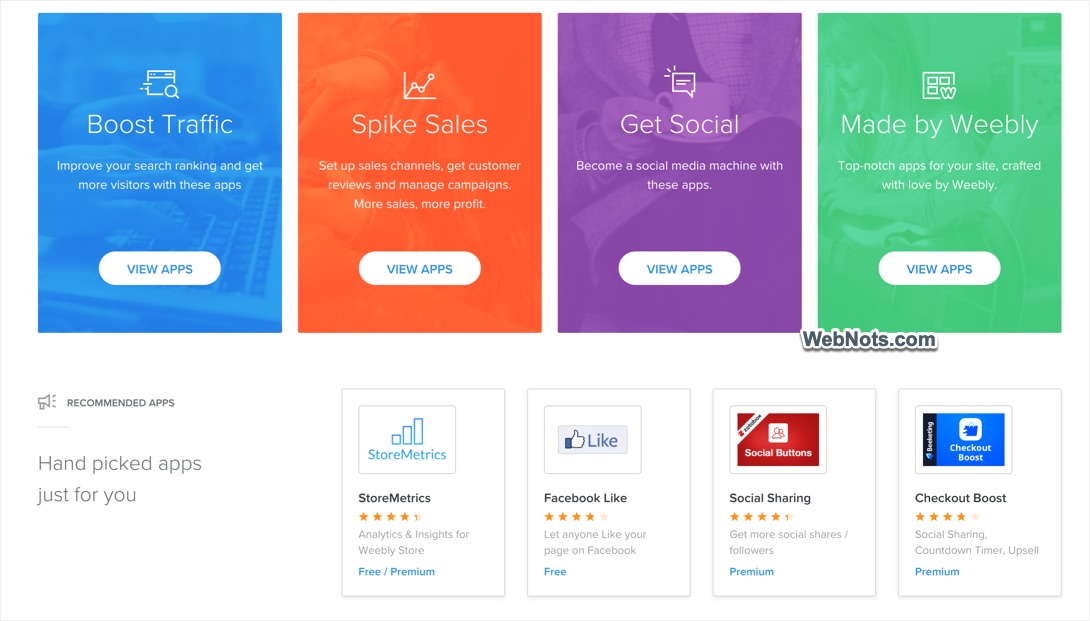
There is a separate App Center offering Weebly-owned as well as third-party apps. You can add any app to enhance the functionalities of your site right from the Editor. However, most of the apps will not work seamlessly with the Editor and you will lot of problems like crashing. So, avoid using apps for primary functions for your business.
AI Features
This will surprise you – Weebly does not have a single AI related feature. When Wix and Squarespace are offering AI editor for building website, you will not get any AI assistance with Weebly.
Complete List of Weebly Features
Below is the complete list of features for various pricing plans offered by Weebly:
| Feature | Premium | Performance | Professional | Personal | Free |
|---|---|---|---|---|---|
| Free Site Builder | Yes | Yes | Yes | Yes | Yes |
| Free Hosting | Yes | Yes | Yes | Yes | Yes |
| Free Domain | 1 Year | 1 Year | 1 Year | No | No |
| Number of Pages | Unlimited | Unlimited | Unlimited | Unlimited | Unlimited |
| Storage Limit | Unlimited | Unlimited | Unlimited | Limited | Limited |
| Search Engine Indexing | Yes | Yes | Yes | Yes | Yes |
| Expanded Site Statistics | Yes | Yes | Yes | No | No |
| Connect with Custom Domain | Yes | Yes | Yes | Yes | No |
| Remove Square Ad | Yes | Yes | Yes | No | No |
| Drag & Drop Customizable Footer | Yes | Yes | Yes | Yes | No |
| Password Protection | Page Level | Page Level | Page Level | Site Level | Site Level |
| Own Favicon | Yes | Yes | Yes | Yes | No |
| Site Search Box | Yes | Yes | Yes | Yes | No |
| Video Backgrounds | Yes | Yes | Yes | No | No |
| HD Video and Audio Players | Yes | Yes | Yes | No | No |
| Editor Permissions | Yes | Yes | Yes | No | No |
| File Upload | 250MB | 250MB | 250MB | 100MB | 100MB |
| SSL Certificate | Yes | Yes | Yes | Yes | Yes |
| Membership | Yes | Yes | Yes | No | No |
| User Registration | Yes | Yes | Yes | No | No |
| Support Model | Forum + Email + Chat + 24/7 Phone | Forum + Email + Chat + Phone | Forum + Email + Chat + Phone | Forum + Email + Chat + Phone | Forum + Email + Chat |
| Ecommerce Features | |||||
| Selling Digital Goods | Yes | Yes | Yes | No | No |
| Inventory Tracking | Yes | Yes | Yes | Yes | No |
| Shipping Details | Yes | Yes | No | No | No |
| Tax Calculator | Yes | Yes | Yes | Yes | No |
| Offering Coupon Codes | Yes | Yes | Yes | Yes | No |
| Realtime Shipping Rates | Yes | Yes | Yes | Yes | No |
| Abandoned Cart Emails | Yes | Yes | No | No | No |
| Gift Cards | Yes | Yes | Yes | Yes | No |
All the plans have the following common features for free:
- 10 sites per account.
- Access and edit source CSS / HTML.
- Free hosting and SSL.
- WYSIWYG drag & drop site builder and free image editor.
- Mobile app for iPhone, Android and iPad.
- Mobile site and editor.
Weebly Website Builder

Weebly is an easy to use site builder platform that allows you to create a wonderful site in minutes. With Square integration, you can easily create an online store, sell digital or physical goods, manage inventory, and accept payments
Pros:
Best option to create quick and small sites.
Build online store to sell your digital and physical products.
No hassle of hosting and security.
One stop solution for hosting, domain and marketing campaigns.
Cons:
Not an option for creating larger sites that provide more value to the customers.
There are no new themes, apps or features introduced after Square acquired Weebly.
Confusion of future as the merging plan with Square is going on for years without clarity.
No backup option and migrating to other platform is difficult.
Customer support is always poor that they will not exactly solve your problem.
Frequently Asked Questions
The answer is – No. Weebly offers free subdomains with hosting without a need of providing any credit card or billing information. In return for a free hosting and site builder Weebly displays a footer ad from Square on your site and offers premium upgrade packages.
Not recommended as no one will trust your store with Weebly subdomain showing Square ads.
Yes, you can build a decent online store with Performance or Premium plan.
Square acquired Weebly and is the current owner of the platform. So, you need a Square account to make use of their features.
Currently, they are two different platforms though Weebly is the backend for Square Online. In future, these platforms may merge together as it was the purpose of Square acquiring Weebly.
Conclusion
Though Weebly is competitive in pricing for creating a decent online store, it still lags many features needed by individual users and businesses. So, unless you love Weebly’s beautiful drag and drop editor, look somewhere else like Squarespace, Wix or WordPress.com.