Integrating an online store into a content-driven website like blogs, news platforms or educational hubs can seem appealing. There are also many eye-catching WordPress themes bundled with customized WooCommerce plugin dominating the ecommerce space. However, while WooCommerce excels for dedicated online stores, it will create significant challenges when bolted onto content-centric sites. Below are detailed reasons why content creators should reconsider using WooCommerce for store creation.
Example Scenario
Let’s say, you have a blog with 500+ posts and few pages. You wanted to sell around 50+ eBooks and digital items to diversify your income and looking for an ecommerce plugin for this purpose. In such a case, the easiest option available for WordPress site owners is to purchase a cool theme that nicely integrates with WooCommerce offering beautiful product page layouts. As WooCommerce is a free plugin, you can simply install the plugin and start creating product pages on the existing blog.
Unfortunately, this kind of setup will create bigger problems compared to the revenue you plan to earn from the store.
1. Performance Problems with Database Overload
Content sites prioritize fast loading time to retain readers and improve SEO rankings. WooCommerce, however, adds substantial load in database increasing the query time (which means slow down the entire site). The latest version of the plugin will create more than 30 tables in your database which is insane. Even if you don’t use functionalities like shipping, the tables will be still created without any use.

There will be also huge number of items and transients added in wp_options table with most of them set as “yes” for autoloading. This means the item will be loaded on each page load on your site regardless of whether it is blog posts, pages or product pages.
2. Scripts and CSS Bloat
WooCommerce loads multiple CSS and JavaScript files for carts, checkout, shop, mobile responsiveness, etc. These files will load on each page competing with content-focused scripts / styles. For example, you may not need the shopping cart on your contact page, news articles or blog posts. However, there are no default options in the plugin settings to disable JS / CSS files on pages that do not need ecommerce functions.
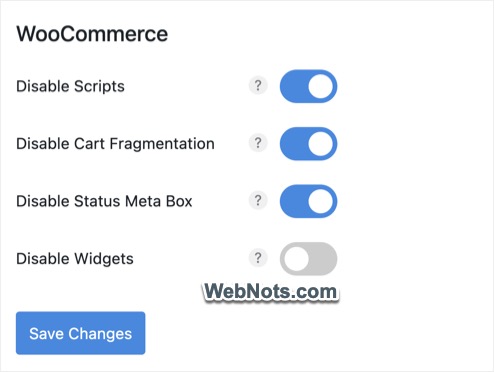
Though you can use plugins like Perfmatters to disable WooCommerce scripts and cart fragmentation on unnecessary pages, it is an additional work not relevant to store management.
3. Hosting Strain
Shared hosting plans common among content sites often lack resources to handle simultaneous content delivery and ecommerce transactions. Some companies also do not allow installing WooCommerce on shared servers, as it can affect the entire server’s resources.
You may need to go for a WooCommerce optimized hosting setup which generally will cost hefty compared to shared hosting plans offered by the same hosting company.
4. Increased Security Vulnerabilities
Ecommerce platforms are prime targets for cyberattacks. Content sites using WooCommerce may lack robust security measures:
- Payment Data Risks – Storing payment information requires PCI-DSS compliance, which many content sites overlook.
- Plugin Conflicts – Third-party WooCommerce extensions can introduce vulnerabilities, especially if not regularly updated.
- Brute Force Attacks – Poorly secured login pages (common on WordPress) become gateways for attacks, risking customer data and site integrity.
5. Update Fatigue
You will go mad with the frequently released plugin updates. You can check the plugin’s changelog to understand how big updates are released with bugs and then immediately patched with a minor updates. This is only for the parent plugin and the same situation will be there for each extension you use.

Another problem is the bundled themes that need immediate update to make sure the plugin is compatible. Otherwise, WooCommerce will show a warning that plugin files are outdated due to the reason they are overwritten by the theme. Now, you need to wait for the theme developer to release an update after each major WooCommerce update.
This cycle of updates will go endlessness which you can’t avoid as missed updates risk compatibility issues or security breaches. You may need an additional person to manage WooCommerce updates, overlook technical aspects and reporting.
6. Caching will Break Layouts
Content sites thrive on clean, distraction-free layouts. Adding a store can disrupt the layout when you cache the pages. None of the caching plugins will work out of box with WooCommerce, especially with the frequent plugin updates. The page layout will break even with simple themes like Astra or GeneratePress when cached with popular caching plugins like WP Rocket. You need to test the mobile responsiveness and exclude WooCommerce scripts / styles for the layout to work properly.

7. Problems with User Registration / Login
Registration and login functions are offered by core WordPress as well by WooCommerce plugin. Some themes may merge these functions while some other may offer them separately. This will be confusing especially when changing your theme and you may need additional customizations for the setup to work properly.
Anyone registering and purchasing an item through WooCommerce store will be added with a “Customer” role. You will see all the registered users including administrators, subscribers, authors, editors and customer under “Users” section. This will be confusing for you if you don’t want to see the customer’s name / email in WordPress admin panel.
8. SEO Conflicts
Content sites rely heavily on SEO, but WooCommerce can introduce hurdles:
- Duplicate Content – Product descriptions and category pages may duplicate existing content, triggering SEO problems.
- Keyword Cannibalization – Product pages might compete with blog posts for similar keywords, splitting organic traffic.
- Structured Data Issues – Improperly configured product schema can confuse search engines, harming rankings.
9. Scalability Challenges
As content sites grow, integrating WooCommerce complicates scalability:
- Traffic Spikes – Viral content can strain server resources, crashing both the blog and store during peak periods.
- Storage Limits – Media-rich content sites may exhaust storage with product images and transaction logs. Both WordPress and WooCommerce will independently generate thumbnails for each image you upload (even on blog posts). This will create large number of unused thumbnails simply occupying storage on your server with no use.
- Costly Upgrades – Scaling WooCommerce often requires premium hosting like VPS with CDN which you might not have planned for normal content creation purposes.
10. Hidden Costs and Budget Strains
While WooCommerce is free, hidden costs can easily accumulate:
- Premium Extensions – Features like subscriptions, memberships, or advanced analytics require paid extensions. Even when using free SEO plugins like Yoast, you need a separate premium add-on plugin for WooCommerce for optimizing product pages.
- Design Tweaks – Aligning store pages with content aesthetics often demands developer fees (or a premium theme).
- Transaction Fees – Payment gateways like PayPal and Stripe charge per transaction, reducing your margin.
11. Dilution of Core Mission
Content sites risk alienating audiences by prioritizing commerce. There are possibilities of brand trust issues as readers may perceive product promotions as biased or spammy.
Time spent managing orders detracts from content creation, undermining the site’s primary value. In addition, visitors seeking content may find themselves funneled into product pages, diluting engagement metrics.
12. Legal and Compliance Risks
Ecommerce introduces regulatory demands unfamiliar to content teams. For example, storing customer data requires explicit consent mechanisms and data protection measures like GDPR/CCPA compliance. Though standard WooCommerce does not store payment information in your database, you still need to manage customer’s personal information like emails and phone numbers.
You may also need to manage tax obligations as sales tax calculations vary by region, requiring automated tools or legal consultation.
Conclusion – Better Alternatives Exist
While WooCommerce is a powerful tool for standalone stores, its integration into content-centric websites introduces performance, security, and UX challenges that often outweigh benefits. Content creators should evaluate their monetization goals – if the primary aim isn’t ecommerce, leveraging specialized tools or external platforms may prove more efficient and sustainable. By maintaining a clear separation between content and commerce, sites can preserve their core mission while exploring revenue streams strategically.
Here are some of the dedicated solutions that suit content sites better:
- Third-Party Marketplaces – Link to established platforms like Etsy or Amazon for sales, without hosting products on your site.
- Simplified Plugins – Use lightweight donation or membership plugins (like MemberPress) if monetization – not full-scale retail – is the goal.
- Subdomain Setup – If you really want to use WooCommerce, consider setting it up separately on a subdomain without mixing with the content on primary domain (like shop.yoursite.com). In this case, you can also use simplified and dedicated platforms like Shopify to setup a store on your subdomain to keep all commerce transactions separate from the content CMS.