Pages, Keynote, and Numbers are free apps that come with Apple devices such as the iPhone, iPad, and Mac. These apps were completely free before January 28, 2026. However, Apple released a new bundle called Apple Creator Studio on that date and included these productivity apps as part of it. They now follow a freemium model, offering basic features for free and additional features through the Creator Studio subscription. As a result, new versions of Pages, Keynote, and Numbers are available on the Mac App Store, while the older versions may still remain on your device. If you install the new version from App Store, you’ll have both old and new apps on your device.
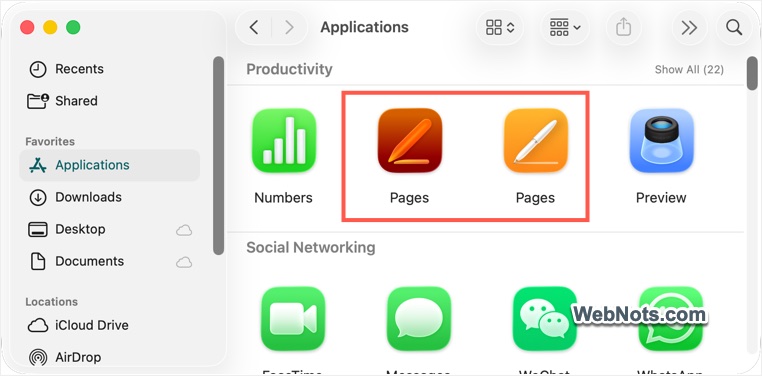
Two Pages, Keynote, and Numbers
We did not face any confusion on the iPhone and iPad, as the old apps were updated seamlessly to the newer versions. You will simply see a notification about the new features when launching the old app, and it will update automatically without any issues. However, that is not the case on macOS. The older versions will continue to exist on your device, and new versions are available on the App Store with updated icons and features.
Installing New Pages, Numbers, and Keynote App
When you open the old Pages (or Keynote or Numbers) app on your device, it will display a warning message that “New version of Pages available”, indicating that the old app will no longer receive updates. You can ignore this warning and continue using the old Pages app if you prefer.
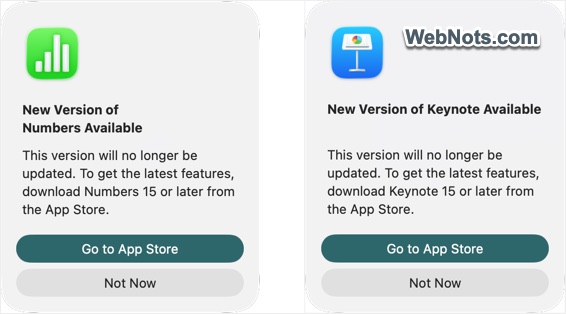
When the warning appears, click the “Go to App Store” button, or open the App Store and search for the Pages app. You will find the new Pages app as part of the Creator Studio bundle. Download and install it to start using the updated version on your Mac.
Deleting Old Apps
Although you can continue using both the old and new sets of apps on the same Mac, the old Pages, Keynote, and Numbers apps will display a warning suggesting that you switch to the new version. The message will also indicate that the old version 14.5 is out of date and can be safely deleted.

To remove the old apps, open the “Applications” folder in Finder, then drag the old Pages, Keynote, or Numbers app to the Trash. Alternatively, right-click on the old app icon and select the “Move to Trash” option.
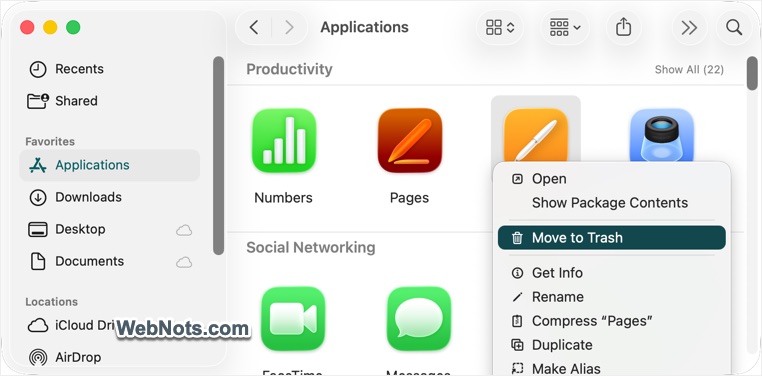
All old documents will be available on your Mac and you can then safely use the new set of apps.
Apple Creators Studio Features
Here are the features you will get in the new app as part of Apple Creator Studio subscription:
- A large library of professionally designed premium templates.
- A Content Hub with stock photos, illustrations, graphics, and backgrounds.
- AI-powered tools like Magic Fill, image enhancement, Auto Crop, and style adjustments.
- Support for larger shared iCloud files (up to 4GB).
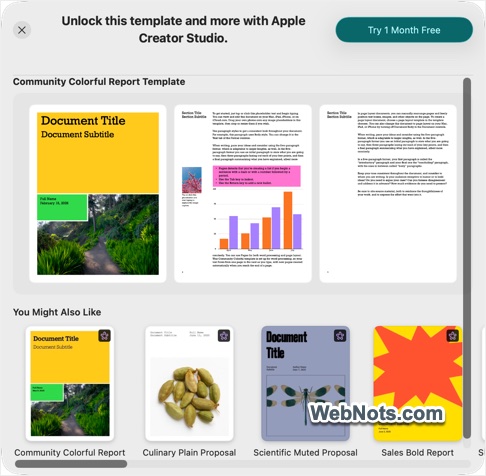
The issue with the new apps is that the premium Apple Creator Studio features will pop-up everywhere distracting your work. Clicking on any premium templates, photos, graphics, or backgrounds will prompt you to upgrade to a monthly subscription.
Should You Keep the Old Apps?
If you don’t want to get annoyed with the premium integrations, you can continue using the old apps as long as they function properly. However, keep in mind:
- They will not receive future updates.
- Security patches may eventually stop.
- Compatibility issues could arise over time.
Alternatively, you can switch to Microsoft 365 or another office suite like WPS Office and ditch these Apple apps.
Final Words
The reason you’re seeing two versions of Pages, Keynote, and Numbers is simple: macOS installs the new Creator Studio apps separately instead of replacing the old ones. Each of these apps takes up more than 600 MB of storage, making it impractical to keep both the older and newer versions on the same device. The era of completely free iWork apps is over, and you will need to either work with the premium upsell prompts or pay for a monthly Apple Creator Studio subscription. Otherwise, as mentioned earlier, a practical alternative is to switch to Microsoft 365, which offers an optional Copilot integration with a yearly subscription.