
Yandex is a leading search engine in Russia having more than 65% of market share. Yandex also offers searches in English, which means you have a potential to drive traffic from Russia. Previously you had an option to submit the sites anonymously without registering for Yandex webmaster Tool but at this moment you need to create an account to use the site submission feature. Yandex Webmaster Tools is a free and powerful service that helps webmasters monitor their site’s performance, track indexing, analyze traffic, and resolve SEO-related issues. In this article, we will cover the step-by-step process of adding your website to Yandex Webmaster Tools, verifying site ownership, and making the most of its features.
Key Features of Yandex Webmaster Tools
Here are some of the key features that will help you manage and improve your website’s SEO performance on Yandex:
- Search Query Data: Yandex Webmaster Tools provides detailed information on the search queries that drive traffic to your website. This helps you understand what keywords your audience is using and how well your site is performing in Yandex search results.
- Crawling and Indexing Monitoring: You can track how often Yandex crawls your site and identify any issues that prevent certain pages from being indexed. This helps you fix technical SEO problems, like blocked resources or broken links, to improve your site’s visibility.
- Backlink Analysis: The platform provides insights into your site’s backlinks (external links pointing to your site), which are a crucial factor for SEO. You can analyze the quality of your backlinks and monitor their growth over time.
- Site Performance and Load Speed: Yandex Webmaster Tools offers tools to monitor your website’s load speed and performance, which directly affect SEO rankings. Slow-loading pages may rank lower, so these insights can help you optimize your site for better speed.
- Malware and Security Reports: Yandex keeps an eye on security issues like malware or phishing attempts on your site. If any issues are detected, you’ll receive alerts so you can resolve them before they impact your rankings or user experience.
- Index Management: With Yandex, you can manage how frequently certain sections of your website are crawled, block specific pages from being indexed, and track the indexing status of individual URLs.
- Geo-Targeting: Yandex allows you to set a specific geographic region or country for your website’s target audience. This is particularly useful if your site caters to a specific region or country (such as Russia or other Eastern European countries).
Once your website is verified and your Sitemap is submitted, you can explore the above features in Yandex Webmaster Tools.
Registering and Login to Yandex Webmaster Tools
Unlike Baidu, the popular search engine in China, Yandex offers webmaster tools in both Russian and English versions. Though the English version has limited features, it will definitely help webmasters around the world to easily submit their sites to Yandex search engine.
- Visit the Yandex Webmaster Tools homepage and click on the “Add site” button.

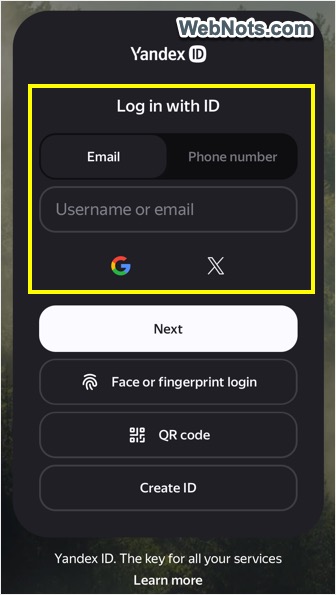
- You need a Yandex ID to use the service. Type your email address or phone number, click the “Create ID” button and fill up your details to create an account with Yandex. Alternatively, you can use your Google or X account for login.
- Once you have signed in, you will be taken to the Yandex Webmaster Tools dashboard where you can start adding websites.
Adding Site in Yandex
- Once logged into Webmaster Tools account, click on the “+” button available next to the site selection dropdown box.
- Enter the URL of your site and click on “Add” button. Remember to enter the correct URL with www and https like https://www.webnots.com.
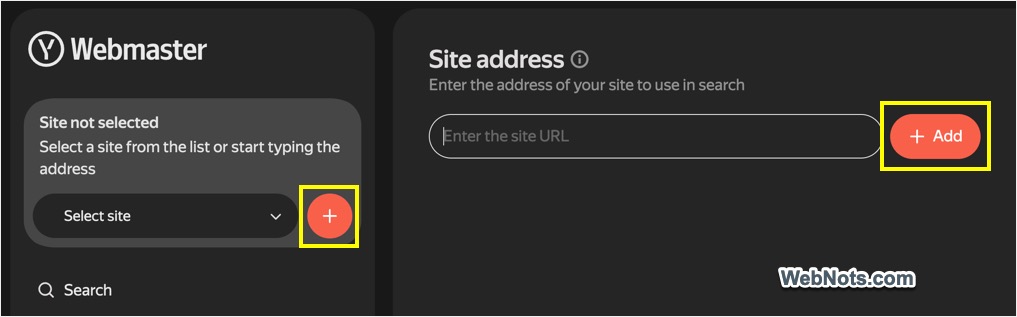
- Once the site is submitted successfully you will be taken to the “Summary” page. You can view all submitted sites from the site selection dropdown.
Verifying Site Ownership
Before Yandex can start tracking your website’s data, you must verify the ownership rights of your site. Click the gear settings icon on the bottom of the left sidebar and go to “Access Rights” section. There are three main methods to verify ownership.
Method 1: HTML File
- Go to “HTML file” tab and download the file.
- Upload this file to your website’s root directory and you should be able to access the file using the URL like below:
https://www.yoursite.com/yandex_verification.html- Once uploaded, return to Yandex Webmaster Tools and click “Verify” button.
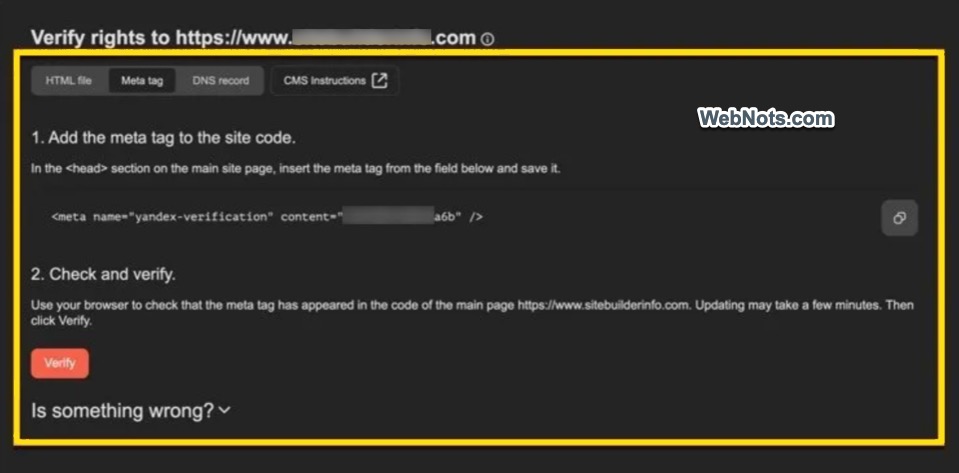
Method 2: Meta Tag (Most Common & Easy)
- Go to “Meta tag” tab and copy the code provided by Yandex.
- Paste it into the HTML code of your website, before the closing </head> tag.
- Go back to Yandex Webmaster Tools and click “Verify” to confirm your ownership.
Method 3: DNS Record
- Under “DNS record” section you can get a DNS TXT record.
- Log in to your domain registrar (like GoDaddy or Namecheap) and add this DNS record to your domain’s DNS settings.
- Once the DNS record is propagated (this may take a few minutes to 48 hours), click “Verify” in Yandex Webmaster Tools.
Note: Ensure the HTML file, meta tag, or DNS record is correctly added before verifying. Verification might take a few minutes to a few hours, so be patient.
Submitting Your Sitemap to Yandex
After the verification of ownership, submit your Sitemap to Yandex so that all pages on your site can be crawled and indexed easily.
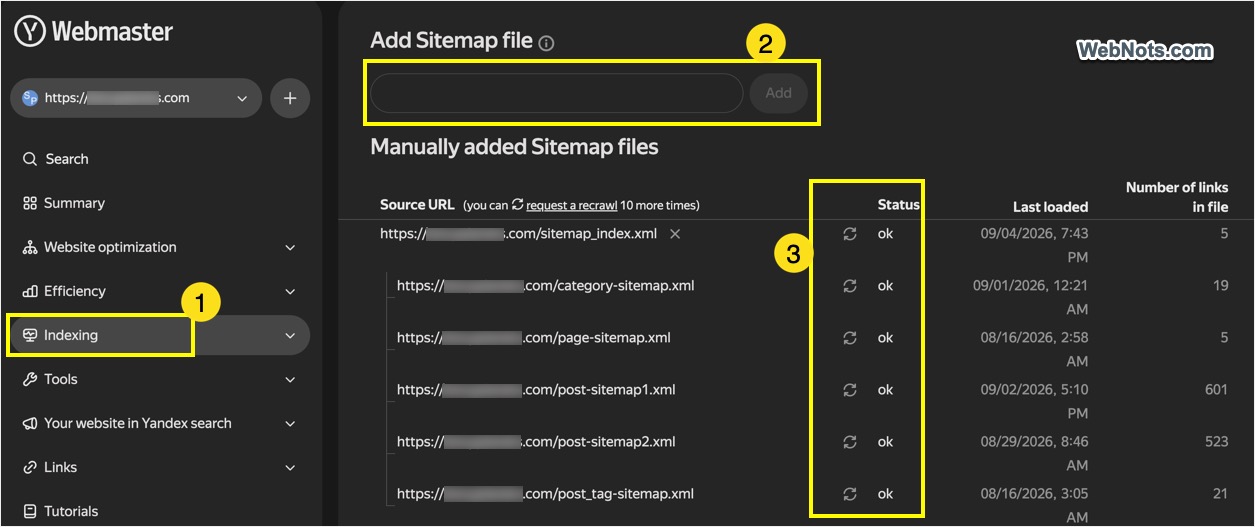
- In the Yandex Webmaster Tools dashboard, go to the “Indexing” section on the left sidebar menu and select “Sitemap files” option.
- Enter the URL of your XML Sitemap like https://www.yoursite.com/sitemap.xml.
- Click “Add” button and submit your sitemap to Yandex.
- Yandex will begin crawling the URLs in your Sitemap and confirm the status is showing as “ok”. Note that unlike other search engines like Bing and Google, Yandex will take longer time of 1 to 2 weeks for processing your Sitemap.
Note: If you are using WordPress, your Sitemap might be automatically generated by the content management system or by the SEO plugins like Yoast SEO or Rank Math. You can find it at https://www.yourwebsite.com/sitemap.xml or https://www.yourwebsite.com/sitemap_index.xml.
Submitting Important Pages
Similar to fetch as Google option in Google Search Console account, you have an option to request Yandex to crawl your important pages on priority. This is called “Reindex pages” and the option is available under “Indexing” section.
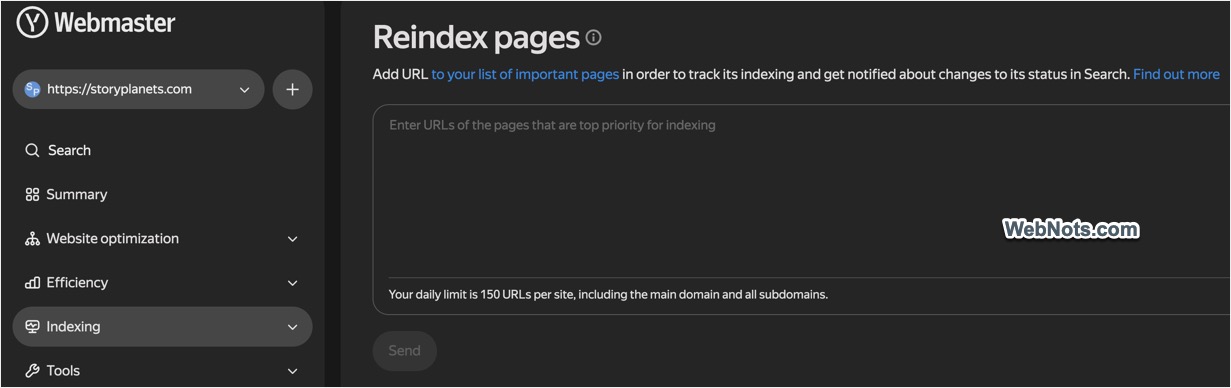
After submission of the site, if you change the content or the URL of an important page, then use this reindexing option to resubmit the pages to Yandex. You have a daily limit of 150 URL submissions per site including all subdomains.
Guidelines for Site Submission to Yandex
Yandex prefers the site with Russian content and hosted in Russia. Hence, if you are planning to submit your site to Yandex, make sure at least a single page on your site is in Russian. You can include the following meta tag in your Russian page so that Yandex crawler will understand that the page is in Russian.
<META http-equiv="Content-Language" content="RU">Remember Yandexbot is Aggressive
The problem in submitting your site to Yandex is that the Yandexbot will aggressively crawl your site. If you are using a shared hosting server, then the server resources will become a real problem with Yandexbot. Fortunately, you have an option to set crawl delay in robots.txt file to restrict the crawl rate of Yandexbot. Below are some examples of setting crawl delay:
User-agent: Yandex
Crawl-delay: 10 # sets a 10 seconds time between crawling pages

User-agent: Yandex
Disallow: /search
Crawl-delay: 6.5 # Disallow search directory and sets a 6.5 second time delay



Very comprehensive and helpful guide. Now I can easily submit my site to Yadex.
I added the tag to the website header, but it seems not getting verified and it’s not showing on the page source too. What to do?
If all pages appear to be indexed in Yandex site:mysite.com is still needed to do that?
Very useful information. I now know how to submit my sites to Yandex…
Good post. I am worried that submitting a sitemap to Yandex would bring me more spammers and security issue.
I manage a number of sites. I don’t want to add Russian content to my site. HOWEVER…Yandex seems INTENT on crawling my site…except despite the fact that I have a sitemap and a robots.txt file, they keep trying to crawl pages that haven’t existed for 8 years or so. I don’t “really” want to submit to them, but if they insist on crawling, I don’t want to block them, I’d just like for them to get it right.