Weebly offers a WYSIWYG site builder that shows the preview exactly as live site. This eliminates the need of separately previewing pages before publishing. However, there are certain situations you need to show the draft or preview to someone before publishing the content. For this purpose, there is a “Secret Draft Link” feature in Weebly to share draft blog post URL.
Weebly Secret Draft Link for Blog Posts
Anyone can view the blog post using the secret URL link without logging into your Weebly account. However, they should be logged into their Weebly account to view the draft URL. It helps in the following situations:
- Share draft blog post URL to your client and get approval before publishing the post.
- Ask suggestions from other authors and contributors.
- Share with large number of recipients for getting opinion before publishing.
The feature is only available for blog posts and not with standard or product pages.
Share Weebly Blog Post with Secret Draft Link
- Login to your Weebly account and edit the site you want to publish a blog post.
- Go to “Pages” section and select your “Blog” page. If you have not added a blog page, click on the + icon and add a new “Blog Page” to your site.
- Click on the “New Post” button showing at the bottom right corner.

- Add your post content and then click the “Post Options” button showing at the bottom left corner.

- Click in the “Secret Draft Link” box and press “Control + C” or “Command + C” to copy the URL to clipboard.
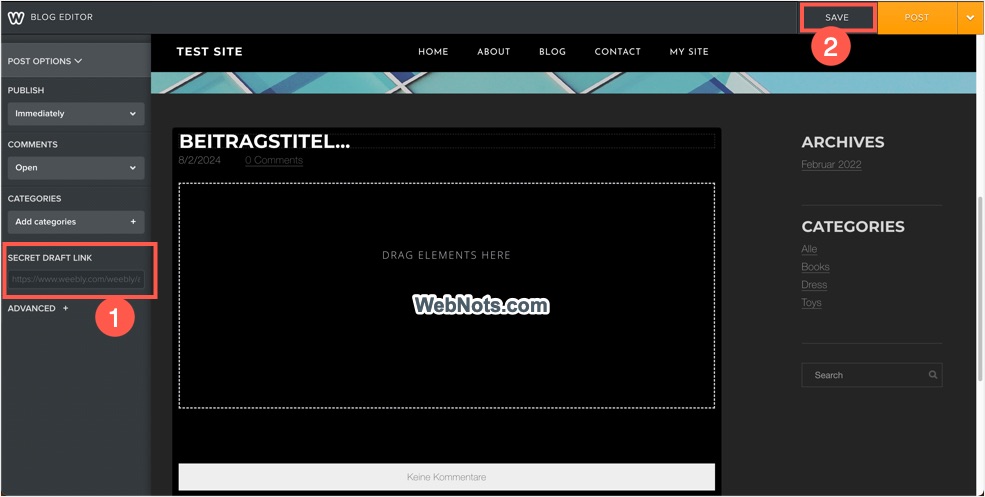
- Click the “Save” button to save your post in draft status. You can anytime click on the “Drafts” button to select and edit the saved posts.

- Now, you can share the secret draft link with anyone over email or message.
Viewing Secret Draft Link
Recipient should be logged into their Weebly account to view the secret draft link. All it need is to just paste the secret draft link in browser’s address bar in a new tab and press enter. This will show the draft post like any other live content.

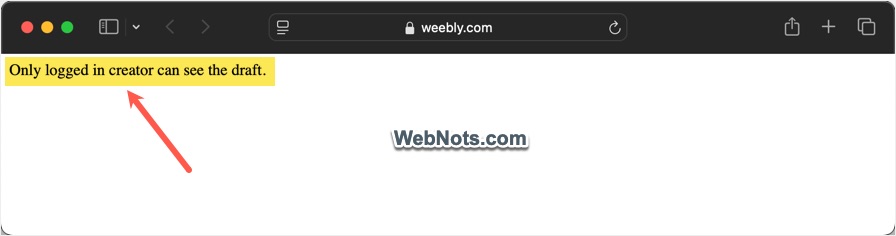
If not logged in, you will see an error showing “Only logged in creator can see the draft”. This helps someone without Weebly account from accidently clicking and viewing the post content.
What About Pages?
Earlier, Weebly used to offer secret link feature for pages and anyone can view the draft without logging in. However, these features were removed and currently it works only for blog posts. If you want to use it for pages, simply create the page content as a blog post and get approval from your client. After that, you can delete the draft blog and publish it as a new page.
Alternate Options
There are two alternate options you can consider instead of using secret link:
- Schedule a blog post and get the content reviewed before the deadline.
- Collaborate with multiple authors using Editors function available for Weebly premium users.
However, using secret link is the best option for getting approval or opinion over email or message.