Besides using recommended ad sizes by Google, it is also important to place ads in appropriate places on each page of your site to increase the revenue from AdSense. In general, placement of AdSense ads depends on your site like a content site, blog or forum. Also, the site layout like left sidebar, right sidebar or full width page decides the suitable ad sizes to be displayed in those pages. In this article, we will explain some of the best placement locations for Google AdSense ads to earn more as well as offer better user experience.
Type and Layout of Site
Whether it is a forum, blog or content site, each type of site has its own layout. So, theoretically deciding ad placement may not exactly suit all cases in practical. Nevertheless, most of the sites fall into a standard layout having header, sidebar, main content area and footer with minor modifications like right sidebar, left sidebar or full width page.
Ad Placement Example Case 1
- Place one unit 728 x 90 leaderboard ad either in the header area or just above the content.
- Insert the second unit 300 x 600 large skyscraper in suitable place of your sidebar based on your average post length.
- Place the third unit 728 x 90 in between the content or below the content depending on the post length.

Ad Placement Example Case 2
- Insert a 336 x 280 large rectangle ad beside the content at the start of your article.
- Place a 300 x 250 medium rectangle on the sidebar.
- Place 336 x 280 large rectangle or 728 x 90 leaderboard below the content.

Other Factors for Ad Placement
- Ensure to select responsive ads so that it will automatically occupy the available space on your layout thus improving the possibility of higher revenue.
- Check out the revenue optimization recommendations in your AdSense account and implement them.
- Try out the experimental features in your AdSense account by modifying the parameters of an ad unit (for example changing fixed ad unit to responsive size) and choose the winner after certain period of time.
- If you have WordPress site then it is easy to optimize ad placements using official Google Site Kit plugin. This plugin helps to integrate your AdSense account with WordPress site, automatically determine placements on your page layouts and monitor earning from WordPress dashboard.
- There are also plugins available for WordPress sites to dynamically insert ads based on conditions like after every 5 paragraphs in the content or after every 3 posts in the loop.
AdSense Auto Ads
When you have multiple page layouts on your site, it will be difficult find optimized ad placement. The best option in such case is to use Auto Ads instead of manually inserting ad codes.
- You need to enable Auto ads in your AdSense account and insert a single script in header section of your pages.
- Turn on the options you need like whether you want to show anchor ads, vignette ads, side rail ads and dynamically insert in-content ads.
- For in-content ads, Google will analyze your page and show the preview of ad placements. You can remove the unnecessary placement areas and add desired locations from the layout. It is also possible to exclude pages like login and contact pages to prevent them showing ads.
- After saving your changes, ads will automatically appear based on your setup.
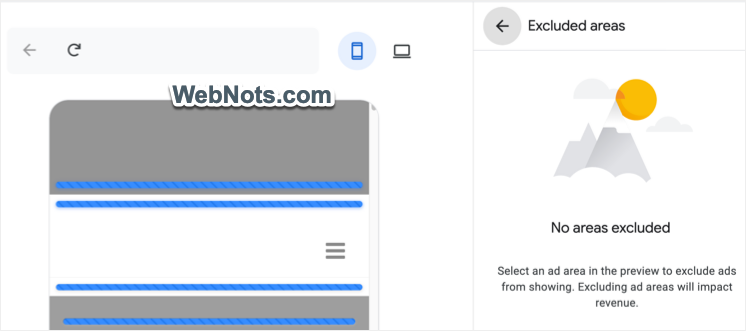
You can anytime customize the entire auto ads setup from your AdSense account without modifying or inserting any ad code.