
Nowadays, performance optimization is one of the most needed activities by any WordPress blogger. With Google pushing towards better user experience, you have to optimize every aspect of the site. Perfmatters is not a typical caching plugin and in fact, it does not offer any caching features at all. However, it aims to remove the bloat comes with default WordPress installation and through other plugins.
Perfmatters Features
Here is a summary of features that you will get with this plugin. As mentioned, you need a caching plugin like WP Rocket to work together with Perfmatters plugin.
- Disable unnecessary codes inserted in the header section like feeds, RSD, navigations, etc.
- Disable WooCommerce styles and scripts with single click.
- Use Script Manager to selectively disable CSS/JS files on each page.
- Disable XML-RPC, REST API, comment author link and heartbeat API.
- Limit post revisions and change autosave interval.
- Schedule database optimization to cleanup trash, expired transients, spam comments, revisions and auto-saves.
- Protect your site by changing login URL.
- Enable lazy loading of images, iframes, videos and YouTube thumbnail previews.
- Host Google Analytics and Google Fonts locally and use CDN rewrite URL.
- Insert style and scripts in header, body and footer area.
- Add Code Snippets using a dedicated snippet manager.
- Preload, prefetch, DNS-prefetch and preconnect resources to speed up your site.
- Defer and delay JavaScript to reduce total blocking time and render blocking resources.
Perfmatters Pricing Plans
The single site license will cost you $29.95 per year. You can get 30 days moneyback guarantee, 1 year free updates and support. If you have multiple sites, then go for 3 sites license ($59.95 per year) or purchase unlimited sites license for $124.95 per year.
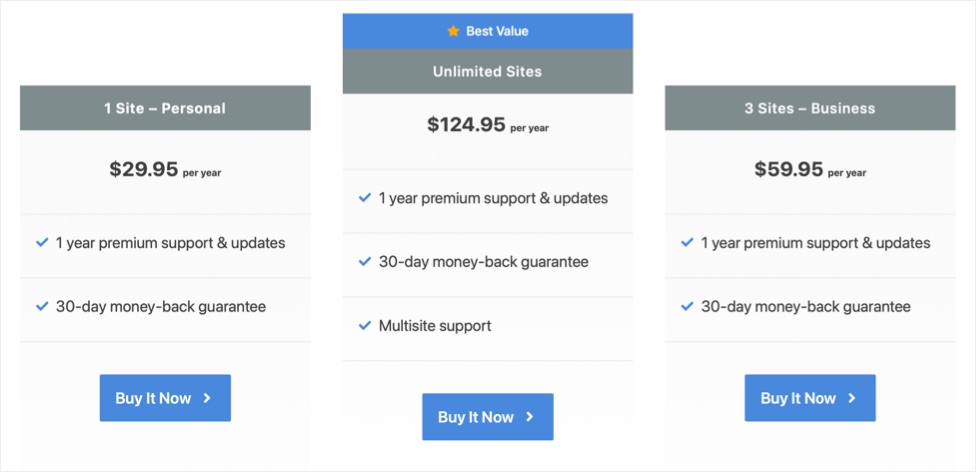
Remember, only unlimited license supports WordPress multisite setup. Other two licenses need to be used on single site installation.
Get Perfmatters 30% Coupon Code
You can purchase Perfmatters plugins for 10% discount and this discount is available almost all the time. With this discount, the net price for single license will be as low as $22.45. You can also get the unlimited sites license with 16% discount during most of the time. Use the following coupons for getting additional discounts.
- Use coupon code PERFMATTERS to get 10% discount
- Use WOORKUP coupon for getting 15% discount.
- Try WPSMACKDOWN coupon for getting 20 % discount.
- Use NOVAPERF coupon to get 25% discount.
- Use BLACKFRIDAY coupon code to get 30% discount (this is a seasonal coupon)
Though NOVAPERF is a special coupon for Novashare plugin users, it works for all.
Applying Coupon Code When Purchasing
First, click on the “Buy It Now” button under the pricing plan you want to purchase and go to the checkout page. Let us go through the process with single site license purchase here. Check the total price and click the link that says, “Have a discount code? Click to enter it”.
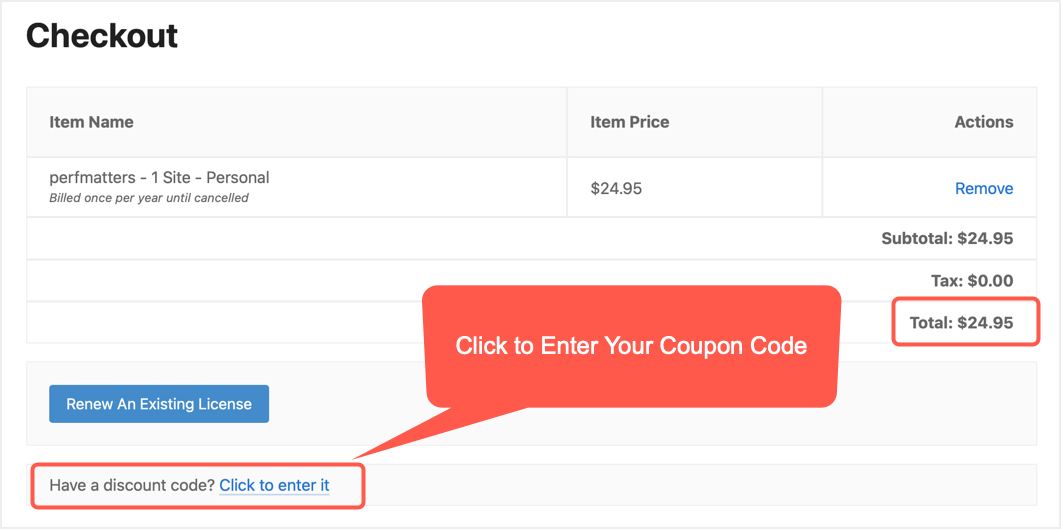
Enter your code coupon code like PERFMATTERS and click the “Apply” button.

You should see the coupon code is applied and the price is discounted as shown below:

Next, select the payment method and we will use PayPal. If you use credit card, enter the card details.

Fill out your personal information and billing details. Make sure to provide correct email address as you need this for logging into your account.


Finally, agree the terms, check the price once again and click “Purchase” button.

For PayPal payment, you need to login to PayPal account and confirm the recurring subscription.

Confirm the payment and go back to the Perfmatters website.

Note: The purchase will setup an annually auto renewing subscription with PayPal. However, you can cancel the subscription anytime from your account panel.

Perfmatters Plugin
Speed up and remove unnecessary CSS and JS bloat to skyrocket page loading speed of your WordPress sites.
Downloading Plugin
You will receive the login password in the email provided during checkout. Use the email as your username and enter the password to login to your account. Copy the license key and download the plugin ZIP file.

Setup Perfmatters Plugin
You can upload the plugin like any other plugins and activate using the license key. You can disconnect the license from your Perfmatters account and link to a new site anytime when needed. The plugin offers cool and easy user interface. All what you need is to simply toggle the options to remove unnecessary scripts and codes. Checkout our article on how to setup the plugin and improve the page speed score of your WordPress site.
After activation, you can get the auto updates and keep it up to date for a year for free. You need to renew the license in order to get continuous updates after a year. You will also get a 15% discount on renewal of all the pricing plans.
Frequently Asked Questions
No. Perfmatters is a premium only plugin which you need to purchase from the developer’s website. It is not available in free WordPress plugin directory and there are no demo versions offered.
First, the single license plan is one of the cheapest costing around $24.95 per year. You can get up to 25% discount using various coupon codes as given in the article.
Copy the coupon code and paste it when you checkout for getting the discounted price. The coupons will NOT be applied automatically.
You will get the license key and plugin’s ZIP file. License will be valid for 1 year from the date of purchase and you will get free support / updates for 1 year.
Perfmatters will setup yearly auto renewal subscription after purchase. You will get 15% discount on renewal of all the plans.


