Script or cursive fonts are helpful to type stylish text in your documents. However, using these fonts has limitations, as they typically work only within a specific text processing app and may require installing custom fonts. Additionally, the formatting will be lost if you open the document in another app that doesn’t support the font. For typing a heading or few words, a better alternative is to use Unicode script-style fonts which are universally supported across platforms and applications. For example, you can create a heading with script-style cursive letters in Word Windows version and the formatting will remain intact when you open the document with Pages app on Mac.
Alt Code Shortcuts for Script Style Letters
Unicode offers four types of script letters as part of Mathematical Alphanumerical and Letterlike symbols group.
- Uppercase or capital script letters (𝒜, ℬ, 𝒞).
- Lowercase or small script letters (𝒻, ℊ, 𝒽).
- Uppercase bold script letters (𝓠, 𝓡, 𝓢).
- Lowercase bold script letters (𝔁, 𝔂, 𝔃).
Below is the complete list of shortcuts which you can use to insert script or cursive style letters in English.
| Letter | Name | Alt + Key (Decimal) | Alt + X (Hex Code) |
|---|---|---|---|
| 𝒜 | Capital script A | Alt + 119964 | 1D49C |
| ℬ | Capital script B | Alt + 8492 | 212C |
| 𝒞 | Capital script C | Alt + 119966 | 1D49E |
| 𝒟 | Capital script D | Alt + 119967 | 1D49F |
| ℰ | Capital script E | Alt + 8496 | 2130 |
| ℱ | Capital script F | Alt + 8497 | 2131 |
| 𝒢 | Capital script G | Alt + 119970 | 1D4A2 |
| ℋ | Capital script H | Alt + 8459 | 210B |
| ℐ | Capital script I | Alt + 8464 | 2110 |
| 𝒥 | Capital script J | Alt + 119973 | 1D4A5 |
| 𝒦 | Capital script K | Alt + 119974 | 1D4A6 |
| ℒ | Capital script L | Alt + 8466 | 2112 |
| ℳ | Capital script M | Alt + 8499 | 2133 |
| 𝒩 | Capital script N | Alt + 119977 | 1D4A9 |
| 𝒪 | Capital script O | Alt + 119978 | 1D4AA |
| 𝒫 | Capital script P | Alt + 119979 | 1D4AB |
| 𝒬 | Capital script Q | Alt + 119980 | 1D4AC |
| ℛ | Capital script R | Alt + 8475 | 211B |
| 𝒮 | Capital script S | Alt + 119982 | 1D4AE |
| 𝒯 | Capital script T | Alt + 119983 | 1D4AF |
| 𝒰 | Capital script U | Alt + 119984 | 1D4B0 |
| 𝒱 | Capital script V | Alt + 119985 | 1D4B1 |
| 𝒲 | Capital script W | Alt + 119986 | 1D4B2 |
| 𝒳 | Capital script X | Alt + 119987 | 1D4B3 |
| 𝒴 | Capital script Y | Alt + 119988 | 1D4B4 |
| 𝒵 | Capital script Z | Alt + 119989 | 1D4B5 |
| 𝒶 | Small script a | Alt + 119990 | 1D4B6 |
| 𝒷 | Small script b | Alt + 119991 | 1D4B7 |
| 𝒸 | Small script c | Alt + 119992 | 1D4B8 |
| 𝒹 | Small script d | Alt + 119993 | 1D4B9 |
| ℯ | Small script e | Alt + 8495 | 212F |
| 𝒻 | Small script f | Alt + 119995 | 1D4BB |
| ℊ | Small script g | Alt + 8458 | 210A |
| 𝒽 | Small script h | Alt + 119997 | 1D4BD |
| 𝒾 | Small script i | Alt + 119998 | 1D4BE |
| 𝒿 | Small script j | Alt + 119999 | 1D4BF |
| 𝓀 | Small script k | Alt + 120000 | 1D4C0 |
| 𝓁 | Small script l | Alt + 120001 | 1D4C1 |
| 𝓂 | Small script m | Alt + 120002 | 1D4C2 |
| 𝓃 | Small script n | Alt + 120003 | 1D4C3 |
| ℴ | Small script o | Alt + 8500 | 2134 |
| 𝓅 | Small script p | Alt + 120005 | 1D4C5 |
| 𝓆 | Small script q | Alt + 120006 | 1D4C6 |
| 𝓇 | Small script r | Alt + 120007 | 1D4C7 |
| 𝓈 | Small script s | Alt + 120008 | 1D4C8 |
| 𝓉 | Small script t | Alt + 120009 | 1D4C9 |
| 𝓊 | Small script u | Alt + 120010 | 1D4CA |
| 𝓋 | Small script v | Alt + 120011 | 1D4CB |
| 𝓌 | Small script w | Alt + 120012 | 1D4CC |
| 𝓍 | Small script x | Alt + 120013 | 1D4CD |
| 𝓎 | Small script y | Alt + 120014 | 1D4CE |
| 𝓏 | Small script z | Alt + 120015 | 1D4CF |
| 𝓐 | Capital bold script A | Alt + 120016 | 1D4D0 |
| 𝓑 | Capital bold script B | Alt + 120017 | 1D4D1 |
| 𝓒 | Capital bold script C | Alt + 120018 | 1D4D2 |
| 𝓓 | Capital bold script D | Alt + 120019 | 1D4D3 |
| 𝓔 | Capital bold script E | Alt + 120020 | 1D4D4 |
| 𝓕 | Capital bold script F | Alt + 120021 | 1D4D5 |
| 𝓖 | Capital bold script G | Alt + 120022 | 1D4D6 |
| 𝓗 | Capital bold script H | Alt + 120023 | 1D4D7 |
| 𝓘 | Capital bold script I | Alt + 120024 | 1D4D8 |
| 𝓙 | Capital bold script J | Alt + 120025 | 1D4D9 |
| 𝓚 | Capital bold script K | Alt + 120026 | 1D4DA |
| 𝓛 | Capital bold script L | Alt + 120027 | 1D4DB |
| 𝓜 | Capital bold script M | Alt + 120028 | 1D4DC |
| 𝓝 | Capital bold script N | Alt + 120029 | 1D4DD |
| 𝓞 | Capital bold script O | Alt + 120030 | 1D4DE |
| 𝓟 | Capital bold script P | Alt + 120031 | 1D4DF |
| 𝓠 | Capital bold script Q | Alt + 120032 | 1D4E0 |
| 𝓡 | Capital bold script R | Alt + 120033 | 1D4E1 |
| 𝓢 | Capital bold script S | Alt + 120034 | 1D4E2 |
| 𝓣 | Capital bold script T | Alt + 120035 | 1D4E3 |
| 𝓤 | Capital bold script U | Alt + 120036 | 1D4E4 |
| 𝓥 | Capital bold script V | Alt + 120037 | 1D4E5 |
| 𝓦 | Capital bold script W | Alt + 120038 | 1D4E6 |
| 𝓧 | Capital bold script X | Alt + 120039 | 1D4E7 |
| 𝓨 | Capital bold script Y | Alt + 120040 | 1D4E8 |
| 𝓩 | Capital bold script Z | Alt + 120041 | 1D4E9 |
| 𝓪 | Small bold script a | Alt + 120042 | 1D4EA |
| 𝓫 | Small bold script b | Alt + 120043 | 1D4EB |
| 𝓬 | Small bold script c | Alt + 120044 | 1D4EC |
| 𝓭 | Small bold script d | Alt + 120045 | 1D4ED |
| 𝓮 | Small bold script e | Alt + 120046 | 1D4EE |
| 𝓯 | Small bold script f | Alt + 120047 | 1D4EF |
| 𝓰 | Small bold script g | Alt + 120048 | 1D4F0 |
| 𝓱 | Small bold script h | Alt + 120049 | 1D4F1 |
| 𝓲 | Small bold script i | Alt + 120050 | 1D4F2 |
| 𝓳 | Small bold script j | Alt + 120051 | 1D4F3 |
| 𝓴 | Small bold script k | Alt + 120052 | 1D4F4 |
| 𝓵 | Small bold script l | Alt + 120053 | 1D4F5 |
| 𝓶 | Small bold script m | Alt + 120054 | 1D4F6 |
| 𝓷 | Small bold script n | Alt + 120055 | 1D4F7 |
| 𝓸 | Small bold script o | Alt + 120056 | 1D4F8 |
| 𝓹 | Small bold script p | Alt + 120057 | 1D4F9 |
| 𝓺 | Small bold script q | Alt + 120058 | 1D4FA |
| 𝓻 | Small bold script r | Alt + 120059 | 1D4FB |
| 𝓼 | Small bold script s | Alt + 120060 | 1D4FC |
| 𝓽 | Small bold script t | Alt + 120061 | 1D4FD |
| 𝓾 | Small bold script u | Alt + 120062 | 1D4FE |
| 𝓿 | Small bold script v | Alt + 120063 | 1D4FF |
| 𝔀 | Small bold script w | Alt + 120064 | 1D500 |
| 𝔁 | Small bold script x | Alt + 120065 | 1D501 |
| 𝔂 | Small bold script y | Alt + 120066 | 1D502 |
| 𝔃 | Small bold script z | Alt + 120067 | 1D503 |
Note that the + sign indicates holding the keys together and not pressing + or = key on your keyboard. Download the entire list as an image to use as an offline reference.
Using Script Letters in Windows
You have multiple options in Windows based computers.
- Alt Code – hold one of the alt keys on your keyboard and type the decimal numbers using number pad. For example, Alt + 8459 will make letter ℋ.
- Alt + X on Word – you can use this option in Microsoft Word app if you do not have a separate number pad with your keyboard. Type the hex code, then simply press Alt and X keys. For example, 1D4F6 Alt + X will make 𝓶.
You can use these shortcuts to quickly add a few words or headings in your document. For longer paragraphs, you have the option to use custom Microsoft fonts included with Windows. Keep in mind that Unicode characters will work across all apps and platforms, as they’re not dependent on specific fonts. However, custom fonts may not display properly if the app or operating system doesn’t support them.
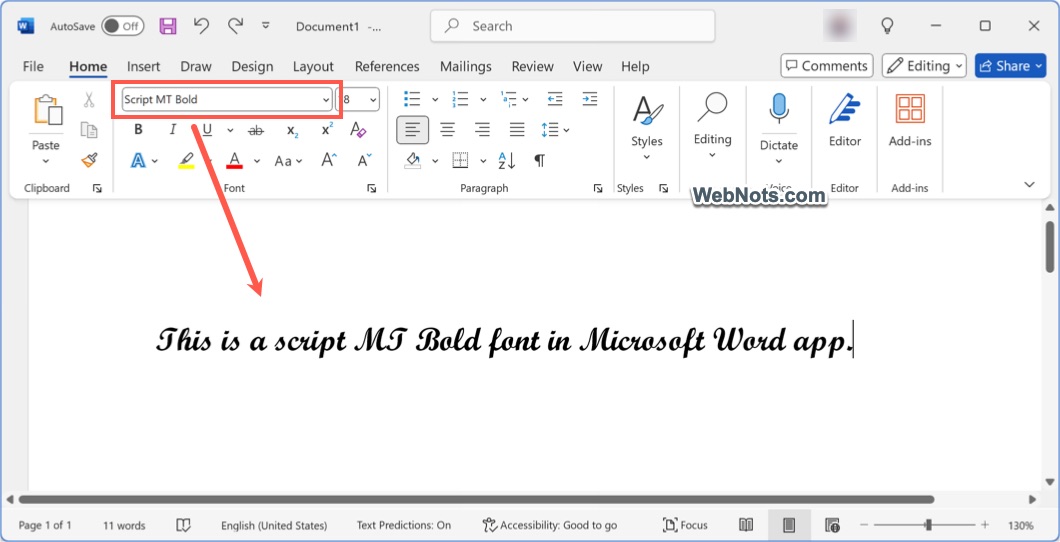
- Using Script MT Bold font – all Office apps like Word, Excel, PowerPoint and Outlook comes with a default script font called “Script MT Bold”. Select your paragraph and apply this font in your app.
Script fonts are also available in Character Map app as well as “Symbol” utility within Microsoft Office apps. However, you need to insert the letters one by one or copy/paste with these options.

Using Script Letters in Mac
You have two options in Mac:
- Using Hex Code – hold one of the option keys and type the hex code to make script letter. This works only with the 4 characters hex code and you should change the input method to Unicode Hex Input.
- Using Character Viewer – press “Control + Command + Shift” keys or go to “Edit > Emoji & Symbols” menu in any app. This will open Character Viewer app and type “script” in the search box. Double-click on any script letter to insert it in your document.

Using Online Third-Party Sites
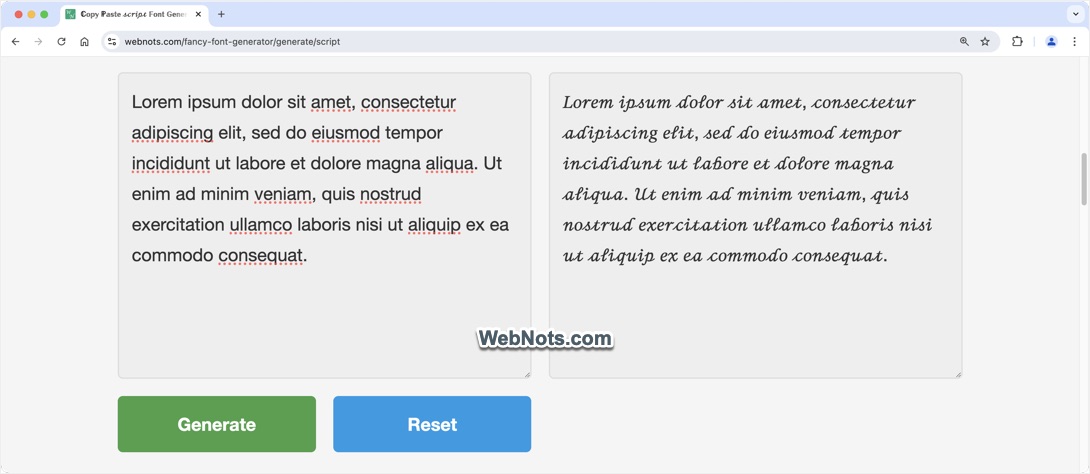
Each Unicode script letter is assigned with a unique codepoint. These codepoints are converted to decimal and hexadecimal formats and used along with Alt key as explained above. There are online font generators with built-in mapping of these script letters. This means you can use these tools to generate long sentences or even a full-length document using Unicode script letters in cursive style.
- Go to the free script font generator or bold script font generator tools.
- Paste your text in the box and click “Generate” button.
- Select and copy the generated script text in cursive style.
- Simply paste the text anywhere in your documents or online social apps without hassle.