Typography symbols are special characters or glyphs used in written text to serve specific functions. These symbols often don’t belong to the alphabet or numerals but are important in providing structure, style, and meaning to the content. They help break up text, direct the reader’s attention, and clarify meaning. Some of these symbols may be common punctuation marks, while others are more specialized symbols used in typesetting, publishing, and graphic design.
Common Typography Symbols
There are no standard classifications available for typography symbols. Here are some categories that you can roughly use:
- Punctuation symbols like exclamation, colon, dashes, quotation marks, etc.
- Formatting marks like paragraph, section, tab, white spaces, etc.
- Other symbols like copyright, eclipse, etc.
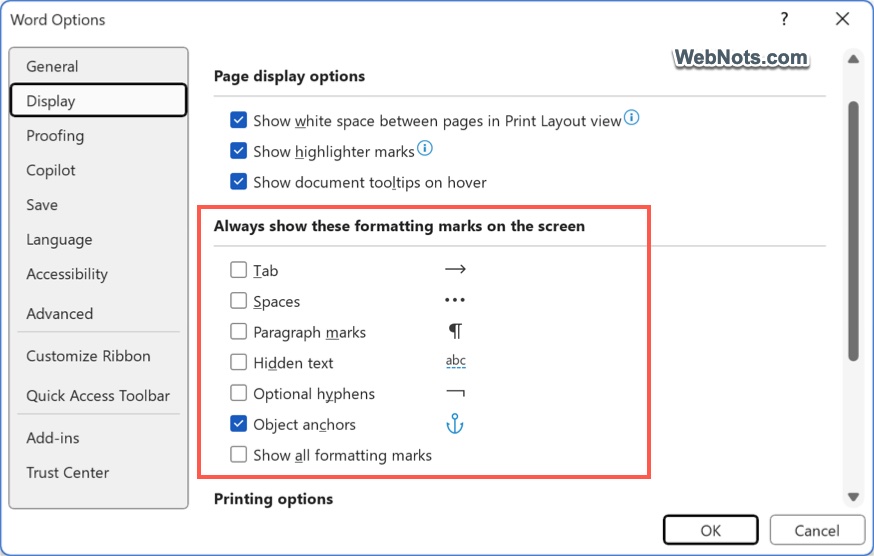
Though you can visually see punctuation and other symbols, formatting marks are not visible on document text. However, they will have impact when printing the document. For example, Microsoft Word does not show formatting signs by default. But go to “File > Options > Display” section and turn on “Show all formatting marks” to view them. You can also click on the paragraph symbol icon in the ribbon (under Home menu) to show or hide them when typing.
In this article, we will explain 15 popular typography symbols.
1. The Section (§)
The section symbol is a typographical character used primarily in legal and academic writing to reference a specific section of a document or law.
- Use Case: Common in legal documents (e.g., “Section §5”), or when citing specific paragraphs in long documents.
2. The Pilcrow (¶)
The pilcrow symbol is used to represent a paragraph break or the beginning of a new section in a document. It’s often referred to as the “paragraph mark.”
- Use Case: Seen in documents to visually indicate the end or start of a paragraph or to provide structure to the text.
3. The Ellipsis (…)
The ellipsis is a symbol consisting of three consecutive dots used to indicate the omission of words, a pause in speech, or an unfinished thought.
- Use Case: Commonly used in writing to suggest something is left unsaid or to indicate an unfinished thought (e.g., “I was thinking…”).
4. The Hyphen (-) and En Dash (–)
The hyphen is used to connect words or parts of words, while the en dash is typically used to represent a range of values, such as in dates or numbers.
- Use Case:
- Hyphen (-): “Well-known,” “mother-in-law.”
- En Dash (–): “The meeting is from 2:00–4:00 PM.”
5. The Em Dash (—)
The em dash is a versatile symbol that can be used in place of commas, parentheses, or colons to create emphasis or an abrupt change in thought.
- Use Case: “She was going to say something—but then decided against it.”
6. The Asterisk (*)
The asterisk is a symbol used to indicate a footnote or reference mark. It’s also used to highlight important content or to represent a wildcard in computing.
- Use Case: In writing, it’s often used for footnotes or references. In computing, it serves as a wildcard character in searches.
Note: Some languages use reference mark symbol (※) Instead of asterisk or numerals.
7. Interrobang
The interrobang (‽) is a unique punctuation mark that combines a question mark (?) and an exclamation point (!). It is used as a way to convey excitement or disbelief in a single symbol.
- Use Case:
- Expressing surprise or disbelief in a question: You did what‽ or How could you forget your passport‽
- Rhetorical or exclamatory questions: Why on earth would you do that‽ or Are you serious‽
- Expressing astonishment while questioning: You actually solved it‽ or That really happened‽
8. The Ampersand (&)
The ampersand is one of the most commonly used symbols in typography. It represents the word “and” and is often used in design contexts where space is limited, or to give a stylistic flourish to the typography.
- Use Case: Frequently used in logos, company names, and formal writing such as “Johnson & Johnson” or “Rock & Roll.”
9. The Copyright Symbol (©)
This symbol signifies that the content is copyrighted and legally protected. It is widely used in publishing, digital media, and art.
- Use Case: Often found in the footer of websites, books, and creative works to indicate intellectual property rights.
10. The Registered Trademark Symbol (®)
Similar to the copyright symbol, the registered trademark symbol is used to show that a brand or logo is officially registered with a government office and legally protected.
- Use Case: Used next to company names, product names, or logos to denote that the trademark has been officially registered (e.g., “Coca-Cola®”).
11. The Degree Symbol (°)
The degree symbol is used to represent temperatures, angles, or geographic coordinates.
- Use Case: Common in scientific and everyday writing, such as “90°F” or “45° N.”
12. The Tilde (~)
The tilde is often used to denote approximation, such as in mathematics or general writing. It is also a special character in certain programming languages.
- Use Case: Used in math to indicate “approximately equal” (e.g., “~100” means approximately 100), or in URLs and computing for specific commands.
13. The Quotation Marks (“ ”)
Quotation marks are used to denote direct speech, a quotation, or specific terms within a text. They come in both single (‘ ’) and double (“ ”) variations.
- Use Case: “She said, ‘This is the best day ever!’”
14. The Backslash (\)
The backslash is used in computing and programming, often as an escape character to provide special instructions in code or a file path.
- Use Case: In programming languages like Python, backslashes are used to escape special characters, or as part of file paths (e.g., “C:\Users\Documents”).
15. The Forward Slash (/)
The forward slash is used to indicate a separation between elements or options, such as in fractions, URLs, or dates.
- Use Case: “The ratio is 3/4” or “https://www.example.com.”
Conclusion
While typography symbols may seem like small, insignificant characters, they offer powerful functions in terms of readability, clarity, and communication. Whether you’re working on a corporate logo, a website, or a printed book, understanding and using the right typography symbols can elevate your design, enhance user experience, and help convey your message more effectively.